Loading...
System Architecture

Inside DataOS

62 subsystems. One platform. Nav, APIs, trust boundaries, data paths, hidden engines, and the operator levers behind every page — extract to UI surface, with nothing left implicit.

62Subsystems
100+Modules
45+Indexes
~70AI Tools
270MRows Processed
I
The Big Picture
How everything connects — from raw sources to delivered insight
25

End-to-End Data Flow

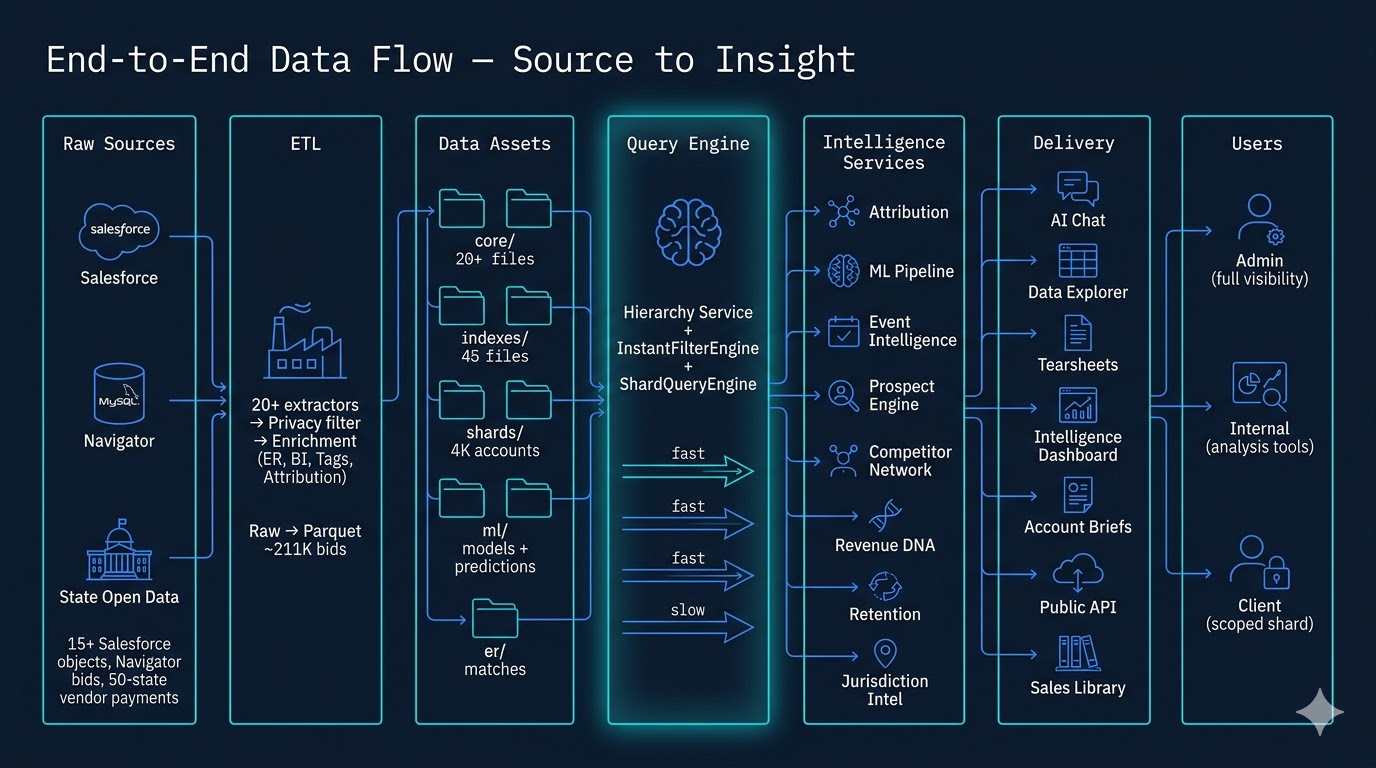
This is the capstone view — the complete journey from raw data to actionable intelligence. Three external sources feed the platform: Salesforce provides CRM data across 15+ objects (accounts, opportunities, venues, leads, products), Navigator MySQL supplies 211K government contract bids, and State Open Data contributes 270M vendor payment records from 50 states.

Raw data flows through 33 ETL pipeline steps, survives privacy filtering, gets enriched with entity resolution and attribution linkages, then crystallizes into 45+ inverted indexes for sub-5ms queries and syncs to PostgreSQL tables for server-side filtering. The Hierarchy Service sits at the center — a multi-path query engine selecting from file-based or SQL-based execution paths to serve every downstream consumer: the AI chat agent (44 tools), the data explorer, 10 ML models, event intelligence, pipeline analytics, prospect targeting, sales agents, and client-facing dashboards. Three user tiers — admin, internal, and client — see the same interface backed by different data scopes, with client isolation enforced by either filesystem shards or PostgreSQL Row-Level Security.

End-to-End Data Flow
01

Platform Architecture

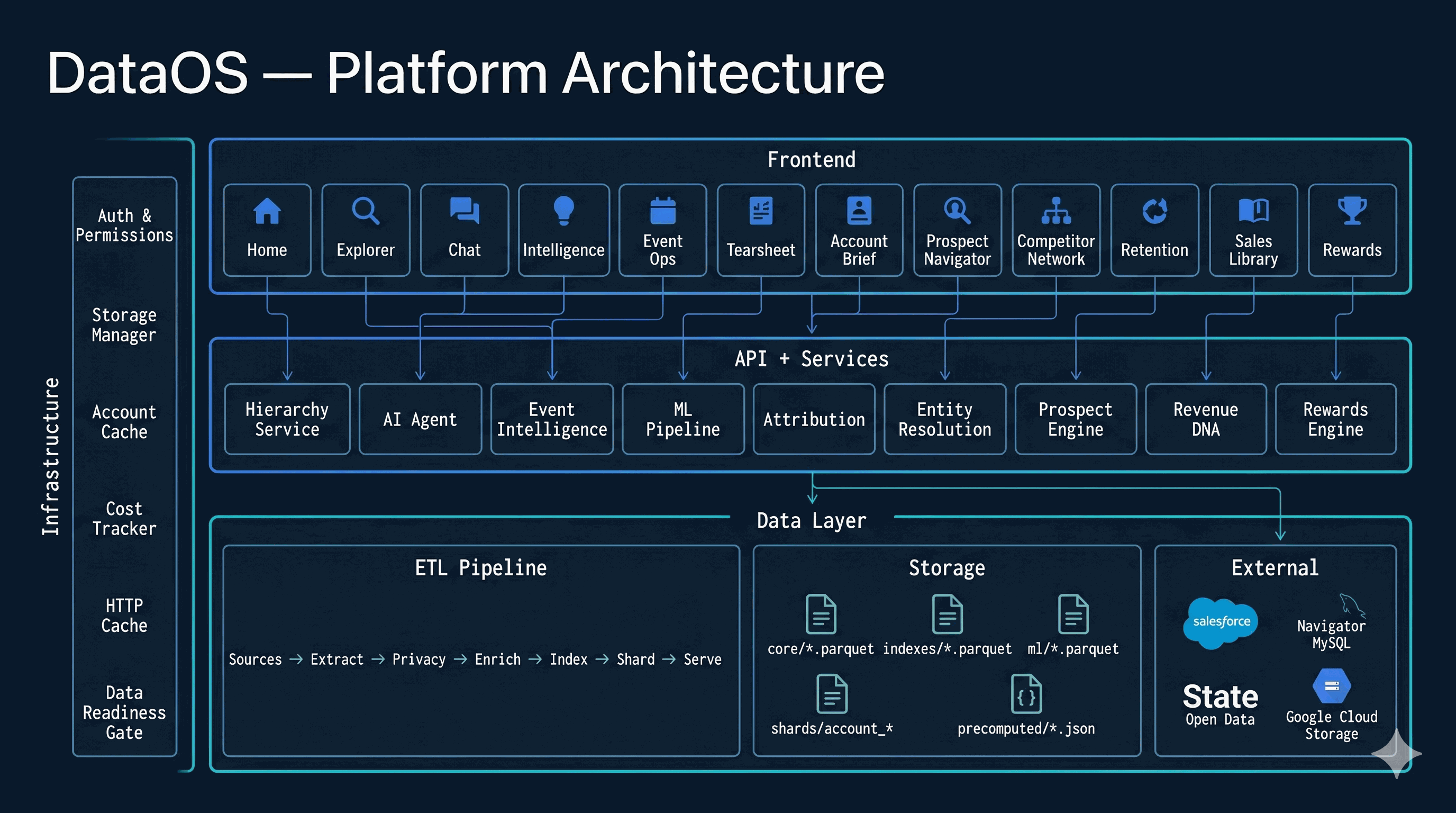
DataOS is a three-layer architecture. The frontend comprises 30+ specialized modules — from the AI chat interface and data explorer to event tearsheet builders, sales agents, pipeline managers, and competitor network visualizations — each built as lightweight Alpine.js components talking to a Flask API layer.

The service layer hosts the core engines: a hierarchy service for hierarchical data queries, an ML pipeline producing 10 predictive models, an AI agent with 44 callable tools, an attribution engine linking marketing to government contracts, entity resolution for fuzzy vendor matching, and a prospect engine for config-driven target discovery. Below everything sits a hybrid data layer — Parquet files on disk plus PostgreSQL with Row-Level Security, synced to Google Cloud Storage, with inverted indexes enabling O(1) lookups across 45+ filter dimensions. The pg_io.py abstraction transparently routes reads to file or database based on environment configuration.

Platform Architecture
II
Data Layer
ETL, storage, indexes, and the query engine that makes it all fast
02

Master ETL Pipeline

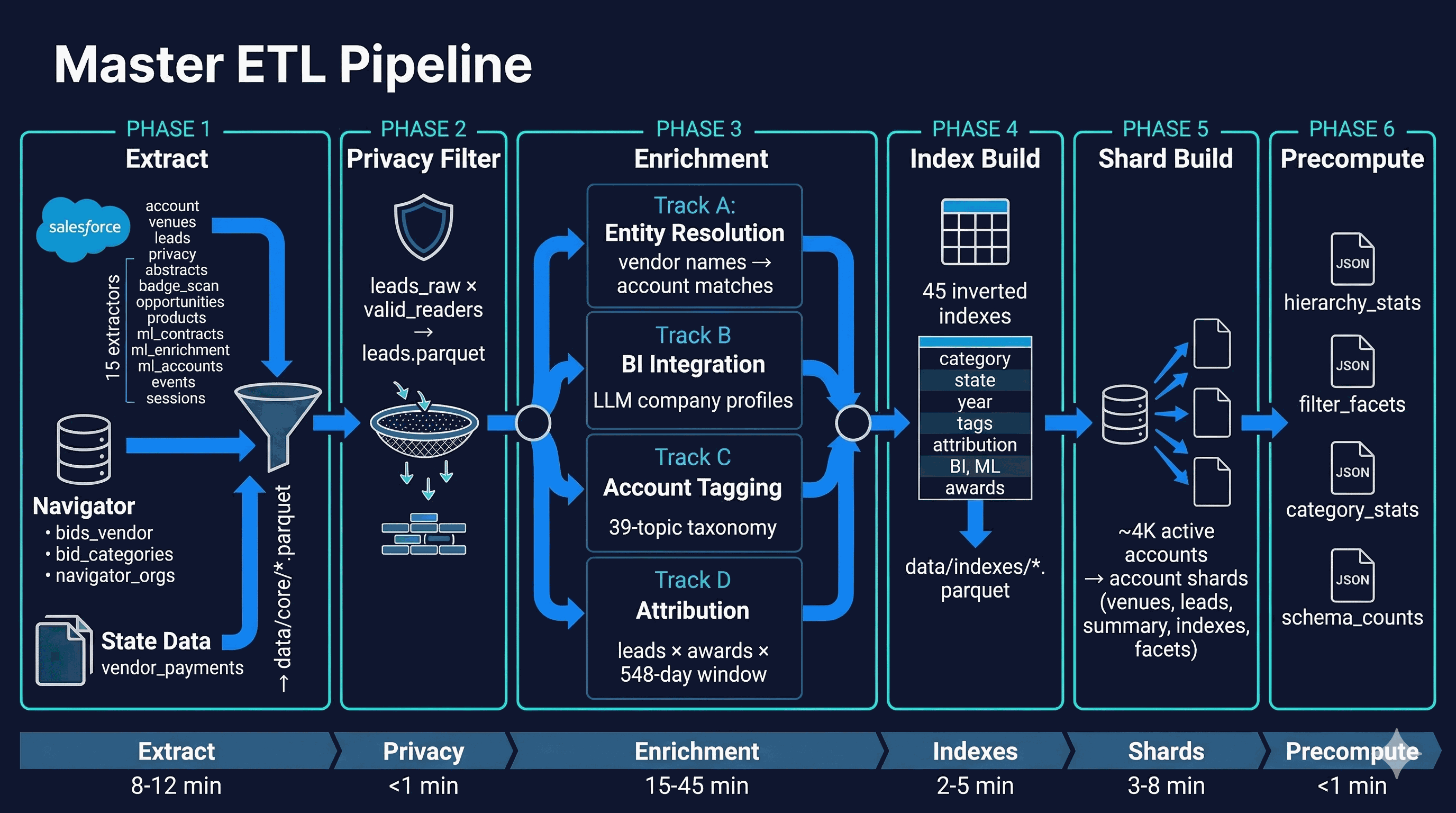
The ETL orchestrator runs in six phases. Extract pulls from Salesforce (15 SOQL extractors), Navigator MySQL (bids, categories, orgs), and state open data portals. Privacy filtering removes opted-out contacts. Enrichment runs four parallel tracks: entity resolution matches vendor names to accounts, BI integration generates LLM company profiles, account tagging assigns 39 topic labels, and the attribution engine links leads to government contracts through a 548-day influence window.

After enrichment, the index builder produces 45 inverted indexes for instant filter queries. The shard builder partitions everything into ~4K per-account packages for client isolation. Finally, precompute generates JSON stat files for sub-millisecond first-paint. Total pipeline time: 30-70 minutes depending on whether enrichment LLM calls are included.

Master ETL Pipeline
03

Data Layer & Storage

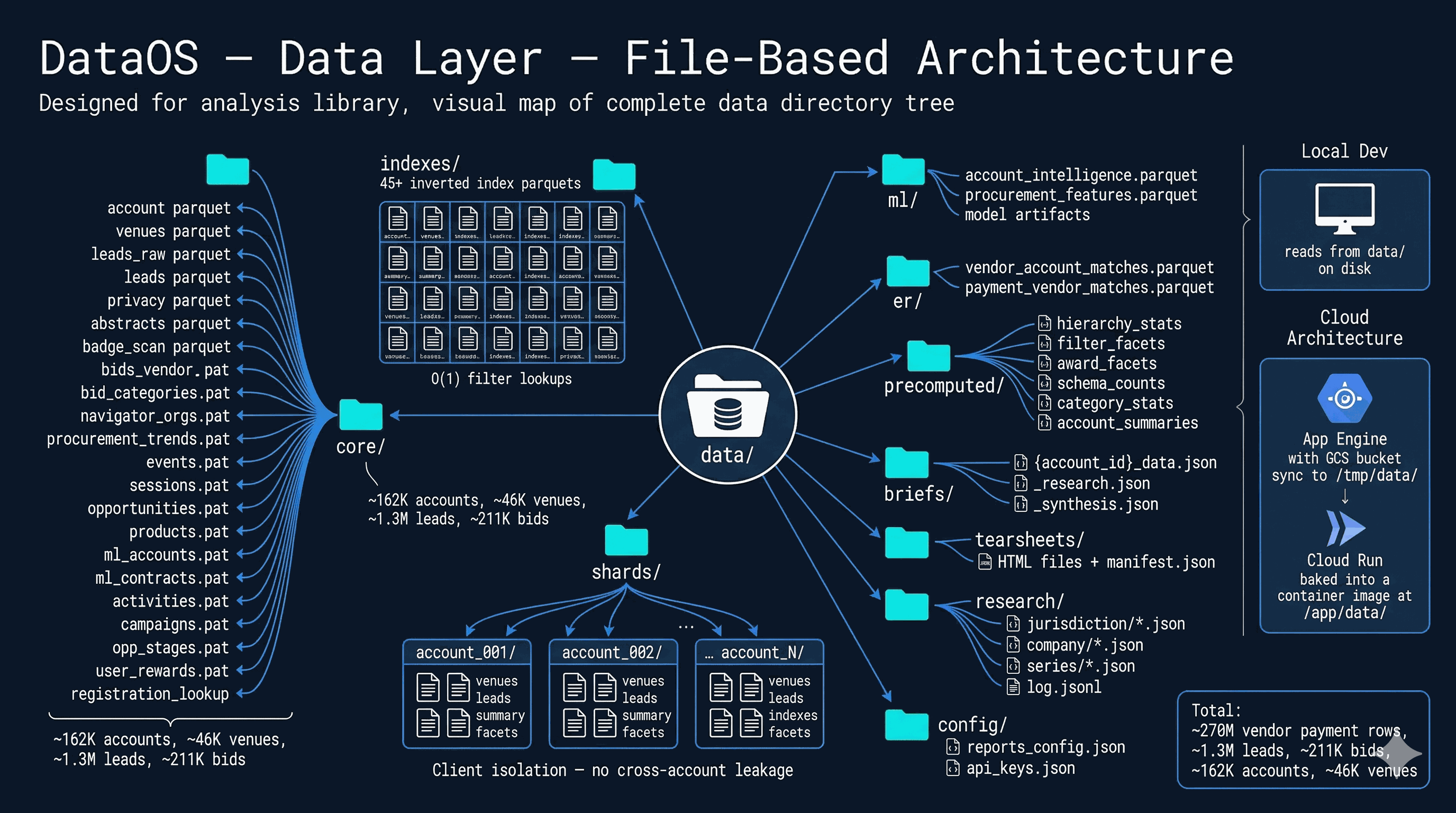
DataOS uses a hybrid file + PostgreSQL architecture. The data/ directory contains ten subdirectories with Parquet files: core/ holds 20+ files with 162K accounts, 46K venues, 1.3M leads, 211K bids. indexes/ stores 45+ inverted index files for O(1) filter lookups. shards/ contains per-account data packages. In parallel, PostgreSQL stores the same data in relational tables with JSONB for mutable state and a normalized filter_index_v2 table for server-side filtering.

The pg_io.py universal access layer transparently routes all data reads: when DATABASE_URL is set, reads go to PostgreSQL; otherwise, they hit the filesystem. Three environment flags control the hybrid behavior: DATABASE_URL (PG backend), PG_ANALYTICS (SQL filtering), and USE_PG_SHARDS (RLS client isolation). The StorageManager and pg_io abstractions make backend selection transparent to application code across local dev and Cloud Run deployments.

Data Layer & Storage
04

Inverted Index Engine

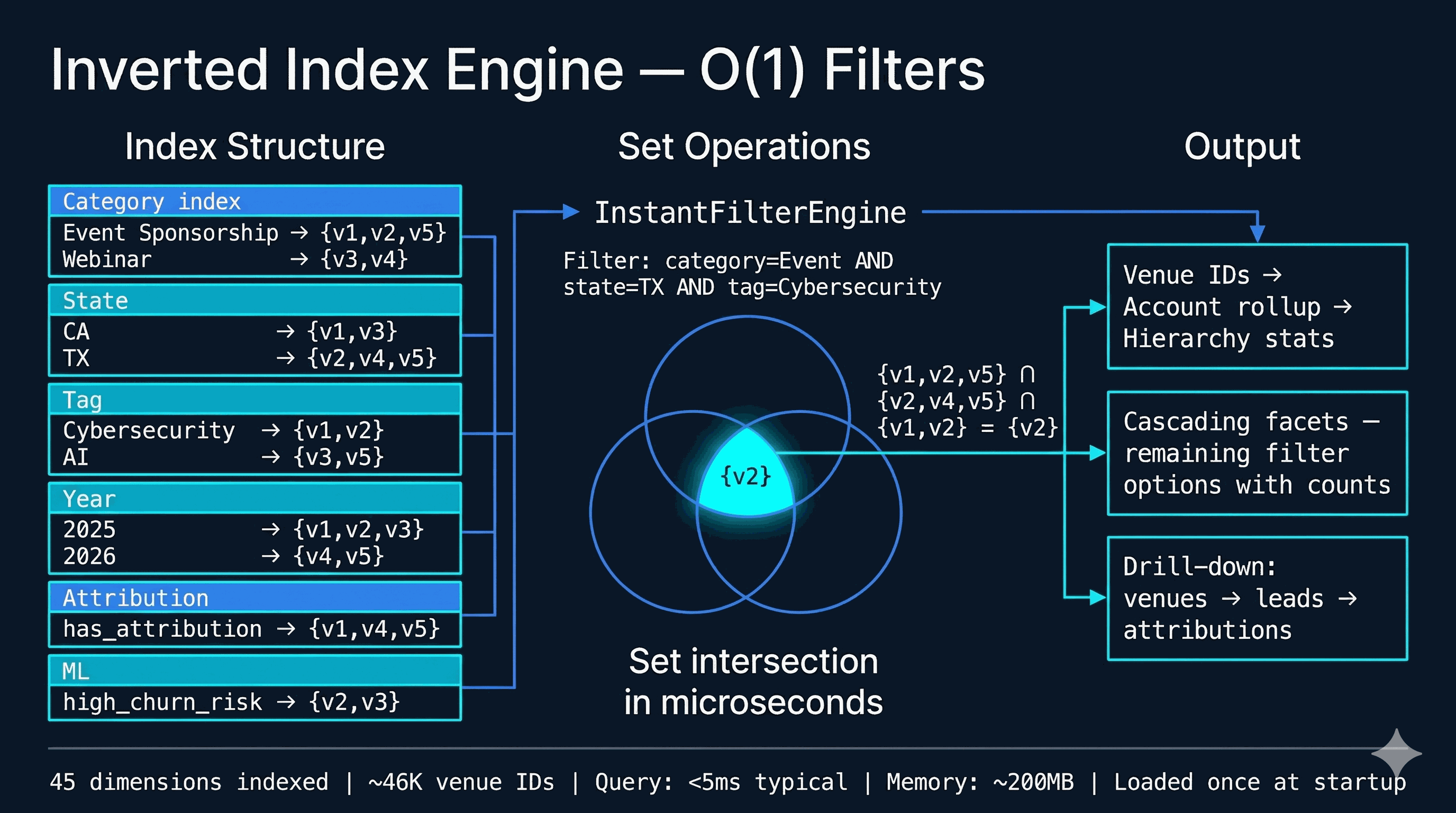
The InstantFilterEngine is the reason DataOS can answer complex multi-dimensional queries in under 5 milliseconds. Each of the 45 indexes maps a filter value to a set of venue IDs — for example, "Cybersecurity" → {v1, v2, v847, ...}. When a user applies filters for category, state, tag, and attribution simultaneously, the engine simply intersects the pre-built sets: pure set math, no scanning, no joins.

The result — a set of matching venue IDs — cascades upward to accounts and downward to leads. Cascading facets recalculate remaining filter options after each selection, showing only what's available given current filters, with accurate counts. All 45 indexes load into memory once at startup (~200MB) and serve every request from RAM.

Inverted Index Engine
05

Hierarchy Service

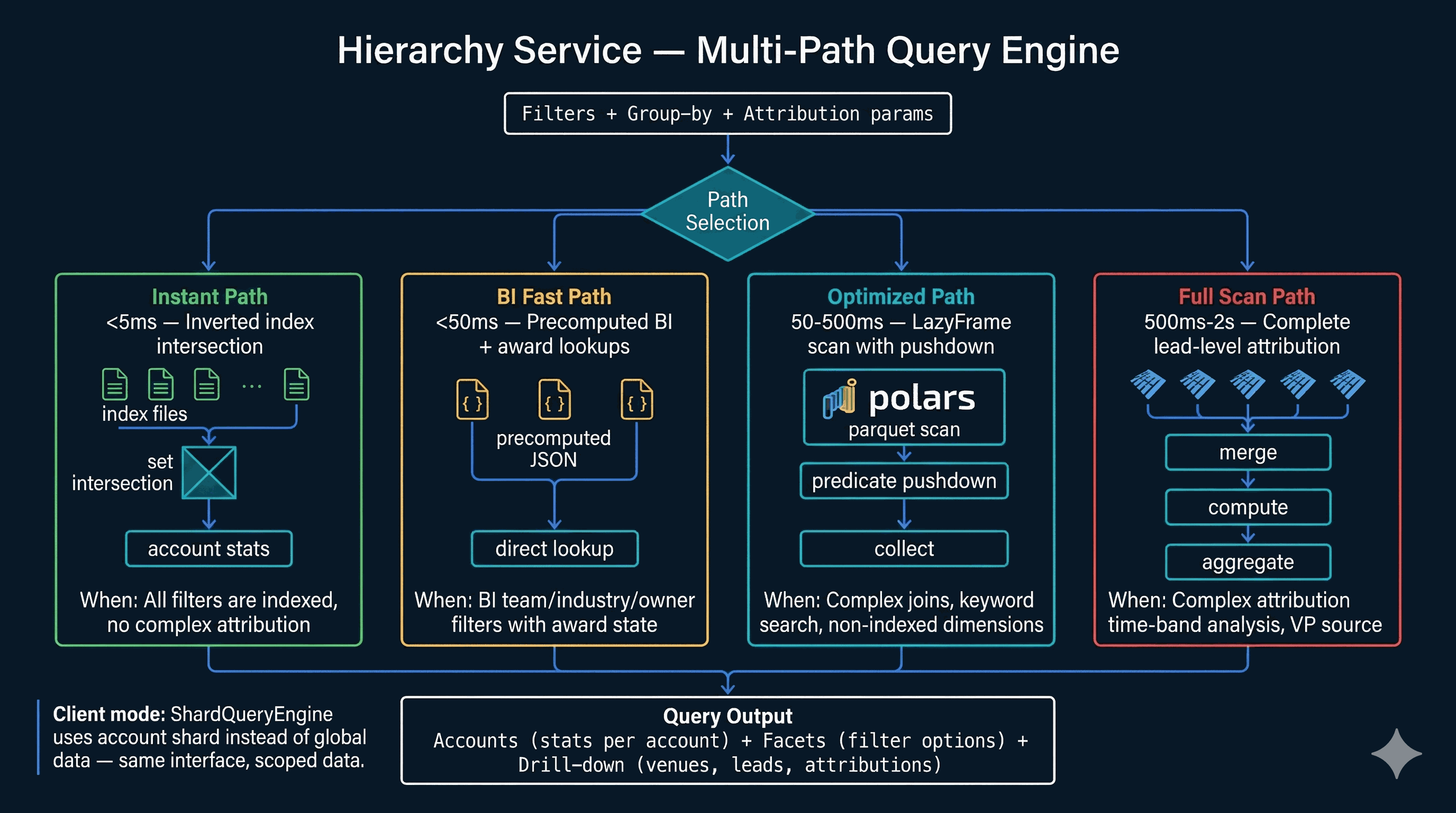
The Hierarchy Service is the central query engine — every data request in DataOS routes through it. It selects from four execution paths based on query complexity. The instant path (<5ms) uses inverted index intersection — either in-memory via InstantFilterEngine or server-side via sql_filter_engine (PostgreSQL). The BI fast path (<50ms) handles precomputed BI lookups. The optimized path (50-500ms) uses Polars LazyFrames or SQL with predicate pushdown. The full scan path (500ms-2s) tackles complete lead-level attribution analysis.

Client requests route through either ShardQueryEngine (file-based isolation) or PgShardQueryEngine (PostgreSQL + Row-Level Security), selected by the USE_PG_SHARDS flag — same interface, scoped isolation, zero cross-account leakage regardless of backend.

Hierarchy Service
III
Intelligence Engines
Attribution, entity resolution, ML, and the AI agent that ties it together
06

Attribution System

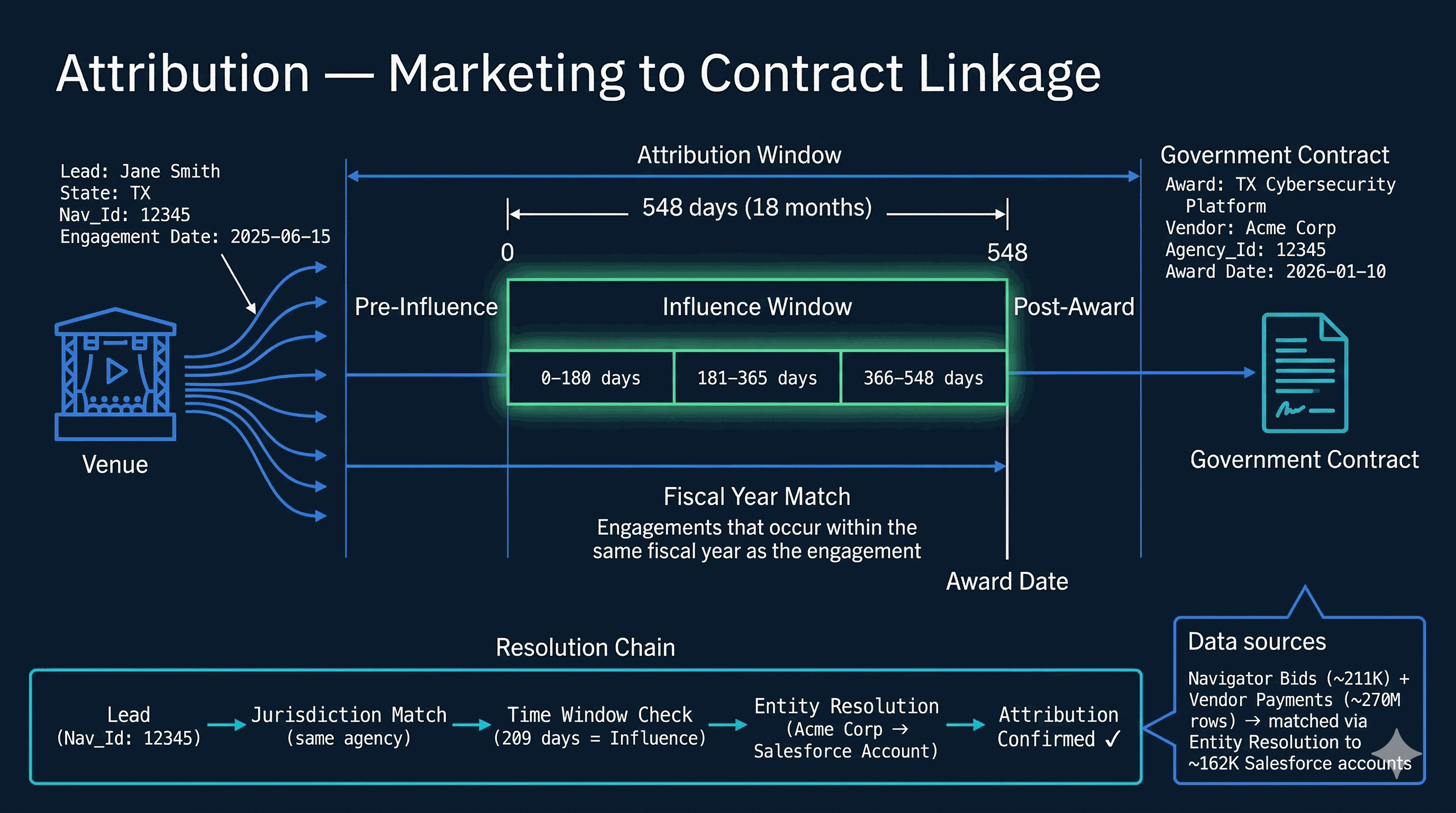
Attribution is the core value proposition of DataOS — proving that B2G marketing influences government contract wins. The system links a lead's engagement (attending an event, downloading a paper) to a government contract award through jurisdiction matching and temporal proximity.

The influence window spans 548 days (18 months) before the award date, subdivided into time bands: 0-180 days, 181-365 days, and 366-548 days. A lead is attributed when their jurisdiction (state agency) matches the awarding agency and their engagement falls within the window. Two data sources feed the system: Navigator bids (~211K contracts) and state vendor payments (~270M rows), both linked to Salesforce accounts through entity resolution.

Attribution System
07

Entity Resolution

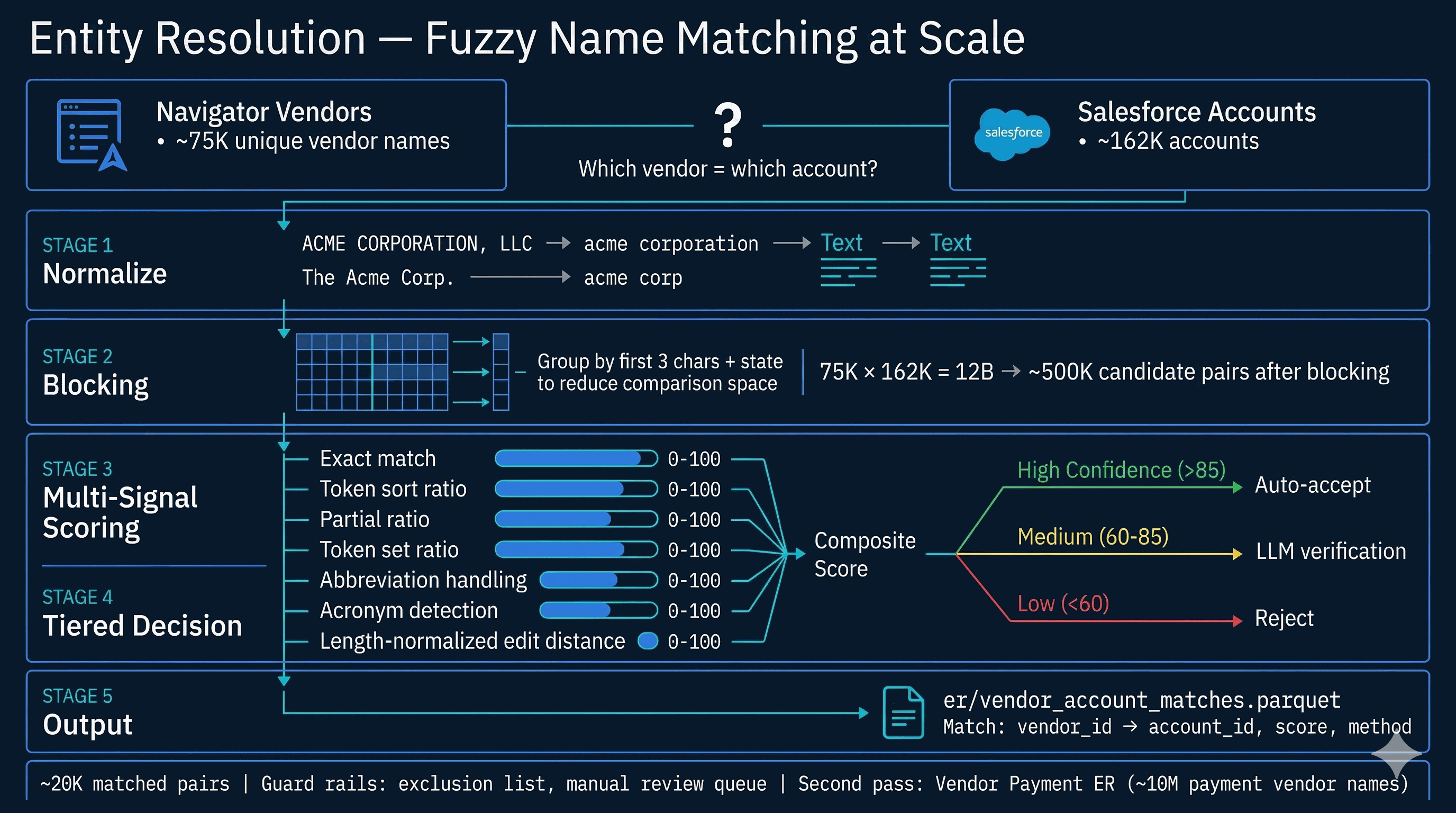
Government contract data and CRM data don't share keys — vendor names appear differently across systems. Entity resolution bridges this gap by fuzzy-matching ~75K Navigator vendor names to ~162K Salesforce accounts. The pipeline runs in five stages: normalization strips punctuation and legal suffixes, blocking reduces the 12-billion comparison space to ~500K candidate pairs, and multi-signal scoring combines 7 similarity metrics — exact match, token sort ratio, partial ratio, token set, abbreviation handling, acronym detection, and length-normalized edit distance.

Results fall into three tiers: high-confidence matches (>85) are auto-accepted, medium-confidence (60-85) get LLM verification, and low-confidence (<60) are rejected. A separate pass handles vendor payment ER across ~10M payment vendor names. Guard rails include an exclusion list and manual review queue.

Entity Resolution
08

ML Pipeline

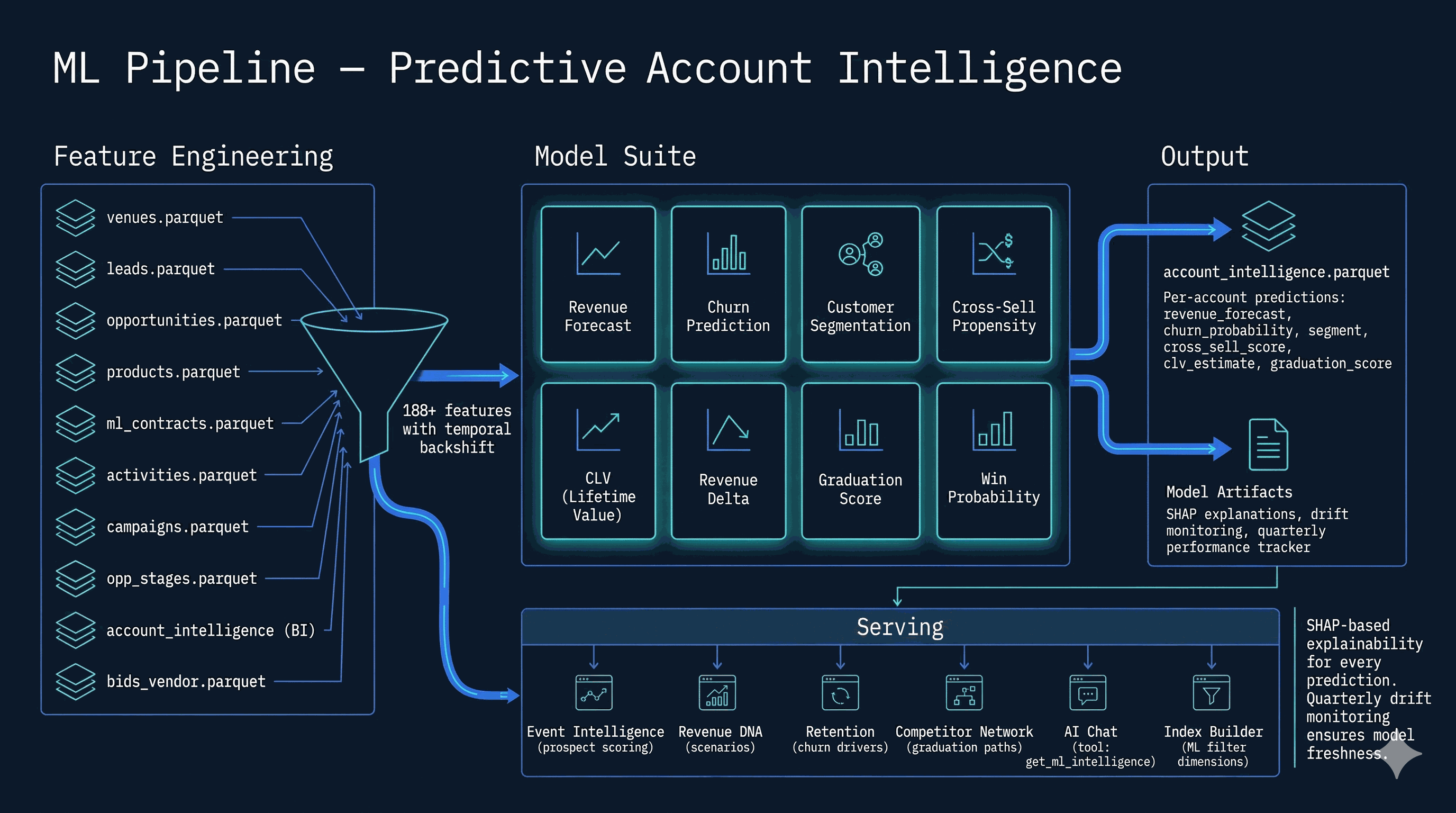
The ML pipeline trains 10 production scoring models (plus supporting segmentation/dependency models) from 188+ engineered features with temporal backshift to prevent data leakage. Feature sources span the entire data layer: venues, leads, opportunities, products, contracts, activities, campaigns, opportunity stage history, BI profiles, and government contract data.

The fleet consumed in-app includes revenue forecast, retention risk, category and event expansion, cross-sell graduation, event-series and subscription renewal, opportunity win probability, and related intelligence exports—each with SHAP explainability where applicable, plus PSI drift monitoring in System Intelligence.

ML Pipeline
09

AI Chat Agent

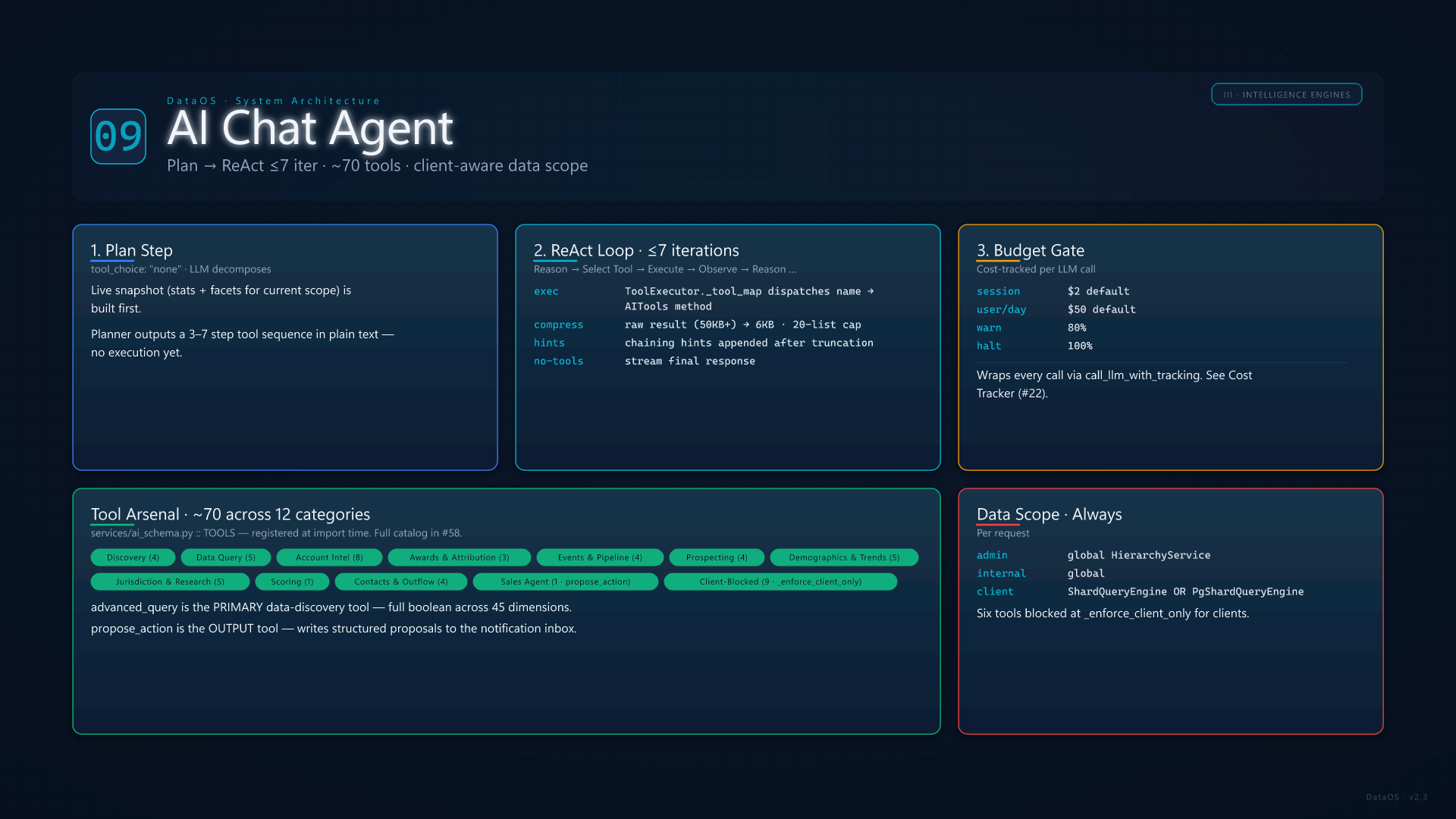
The AI agent uses a Plan → ReAct architecture with up to 7 iterations per turn. On each user question, a planning step (with tool_choice: "none") decomposes the query into a sequence of tool calls, then a reasoning loop executes tools, observes compressed results, and decides next steps. services/ai_schema.py registers ~70 tools in the canonical TOOLS dict, organised across discovery (discover_filters, search_accounts, get_platform_stats, semantic_search_accounts); data query (advanced_query, execute_query, query_leads, aggregate, account_set_operation); account intelligence (get_account_detail, get_business_intel, get_account_dossier, get_account_topics, get_account_predictions, get_industry_context, generate_account_brief); awards & attribution; events & pipeline (get_event_series_intelligence, build_event_target_report, get_event_operations, get_pipeline_intelligence); prospecting; demographics & trends; jurisdiction & deep research; scoring; contacts & outflow; and sales-agent actions (propose_action as the output tool).

Raw tool results (often 50KB+) are recursively compressed to a 6,000-char ceiling with a 20-item list cap before being fed back to the model; chaining hints (sample IDs, example downstream calls, scoping reminders) are appended after truncation. Admin and internal users query against global data via the Hierarchy Service; client users are automatically routed through ShardQueryEngine (or the PG-RLS variant), with admin-only tools blocked at the _enforce_client_only gate. Cost tracking applies per-session ($2 default) and per-day ($50 default) budgets via cost_tracker, with the Ops Assistant available as a parallel mode for operational guidance backed by the same agent loop.

AI Chat Agent
21

Taxonomy & Topic Classification

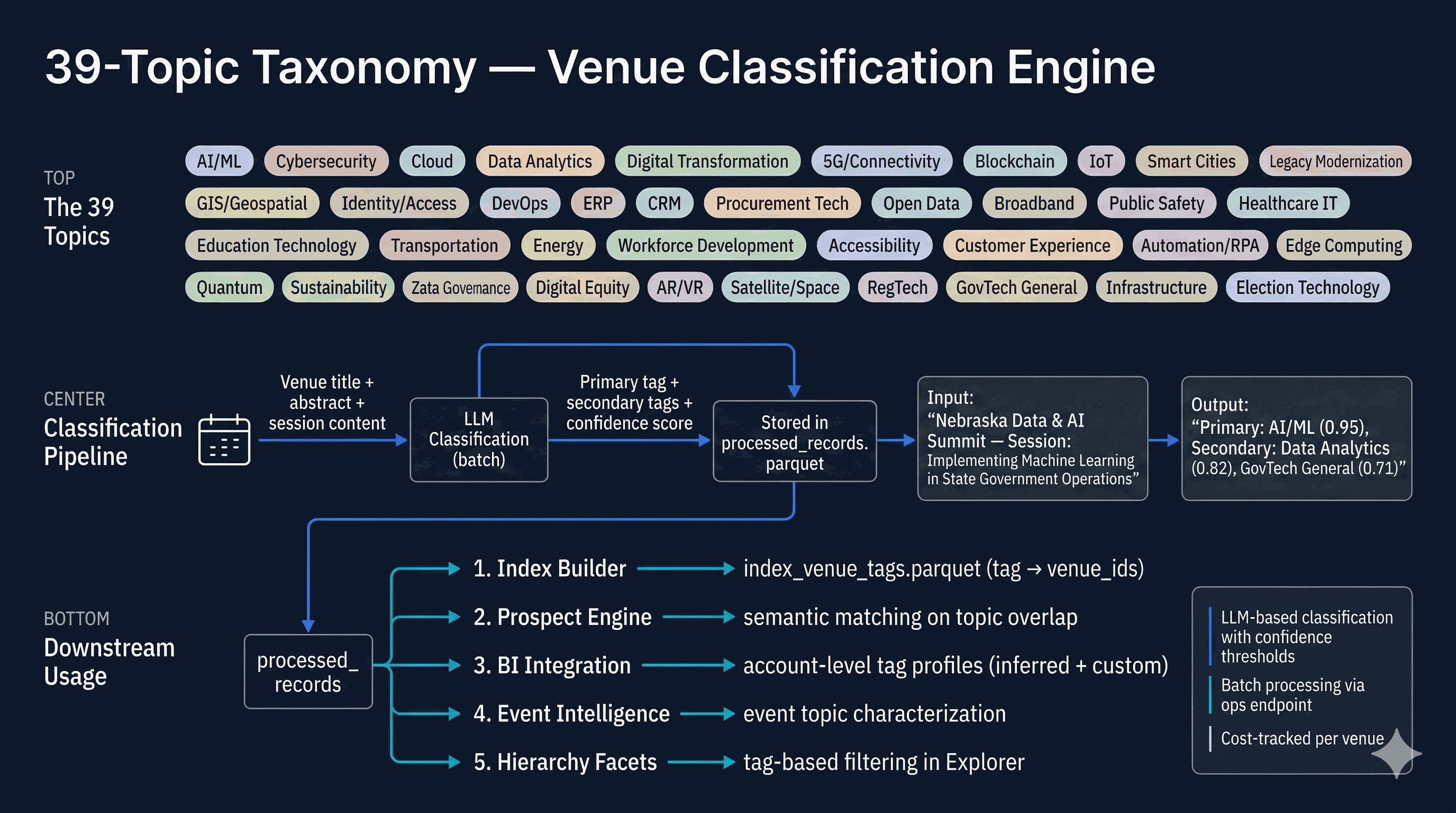
Every venue in DataOS is classified against a 39-topic taxonomy covering the full SLED government technology landscape: AI/ML, Cybersecurity, Cloud, Data Analytics, Digital Transformation, Smart Cities, GIS, Zero Trust, and 31 more. Classification runs through an LLM pipeline that analyzes venue titles, abstracts, and session content, assigning a primary tag, secondary tags, and confidence scores.

These tags power five downstream systems: the index builder creates tag-to-venue inverted indexes, the prospect engine uses tag overlap for semantic matching, BI integration builds account-level topic profiles, event intelligence characterizes events by topic mix, and the hierarchy facets enable tag-based filtering in the data explorer.

Taxonomy & Topic Classification
IV
Tools & Features
Event intelligence, account briefs, prospect targeting, and the competitive landscape
10

Event Intelligence & Tearsheets

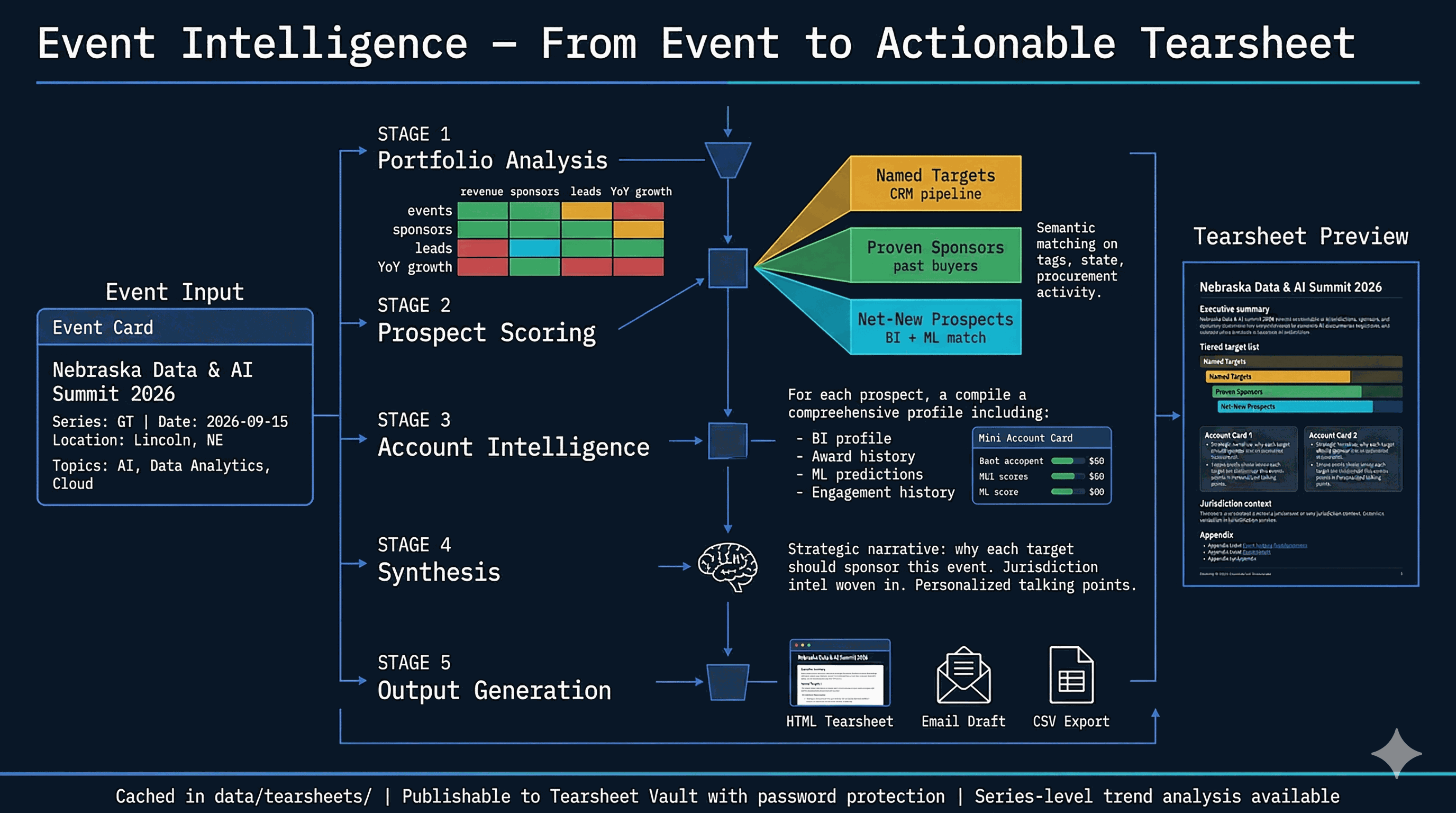
The event intelligence engine transforms raw event metadata into actionable sales collateral. Starting from an event's series, date, location, and topics, the system runs a five-stage analysis: portfolio analysis (revenue, sponsors, leads, YoY growth across the event matrix), prospect scoring across three tiers (named CRM targets, proven past sponsors, net-new semantic matches), per-account intelligence assembly, LLM-powered strategic synthesis with jurisdiction context, and finally output generation.

The output is an HTML tearsheet — a self-contained document with an executive summary, tiered target list, per-account talking points woven with jurisdiction intelligence, and an appendix. Tearsheets are cached locally, publishable to the Sales Library with password protection, and can be exported as email drafts or CSV target lists.

Event Intelligence & Tearsheets
11

Account Brief & Dossier

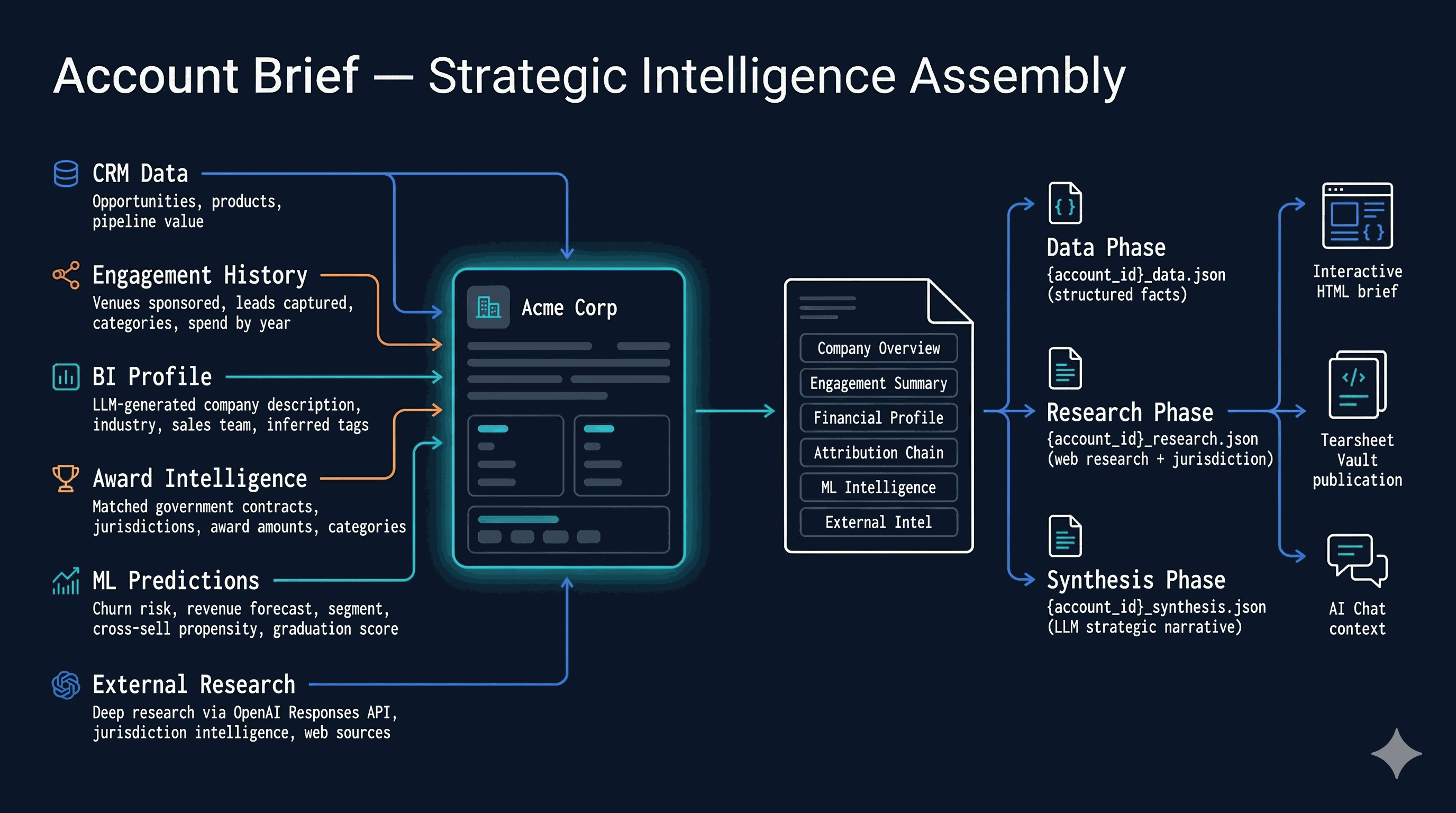
An account brief assembles six intelligence streams into a strategic narrative for a single account. CRM data (opportunities, pipeline value), engagement history (venues sponsored, leads captured, spend by year), the BI company profile (LLM-generated description, industry, tags), award intelligence (matched government contracts with jurisdictions and amounts), ML predictions (churn risk, revenue forecast, segment, graduation score), and external research (deep research via OpenAI, jurisdiction intelligence).

The dossier builder merges these streams into a structured payload, then brief generation runs in three phases: data (structured facts), research (web research + jurisdiction context), and synthesis (LLM strategic narrative). The result is a comprehensive account intelligence document usable in the UI, publishable to the library, or injected as context for AI chat conversations.

Account Brief & Dossier
12

Prospect Engine

The prospect engine builds config-driven target lists for events through a three-tier funnel. Named Targets (amber tier) come from the CRM pipeline — open opportunities matching the event's series or state. Proven Sponsors (green tier) are past buyers of this series or similar events in the same state. Net-New Prospects (cyan tier) have never sponsored but match on semantic tag similarity, procurement activity in the jurisdiction, and ML graduation scores.

Scoring combines five weighted signals: tag overlap (35%), state procurement volume (25%), ML graduation score (20%), BI industry match (10%), and recency bonus (10%). The output is a ranked list with match reasons, exportable as CSV for sales team distribution.

Prospect Engine
13

Competitor Network

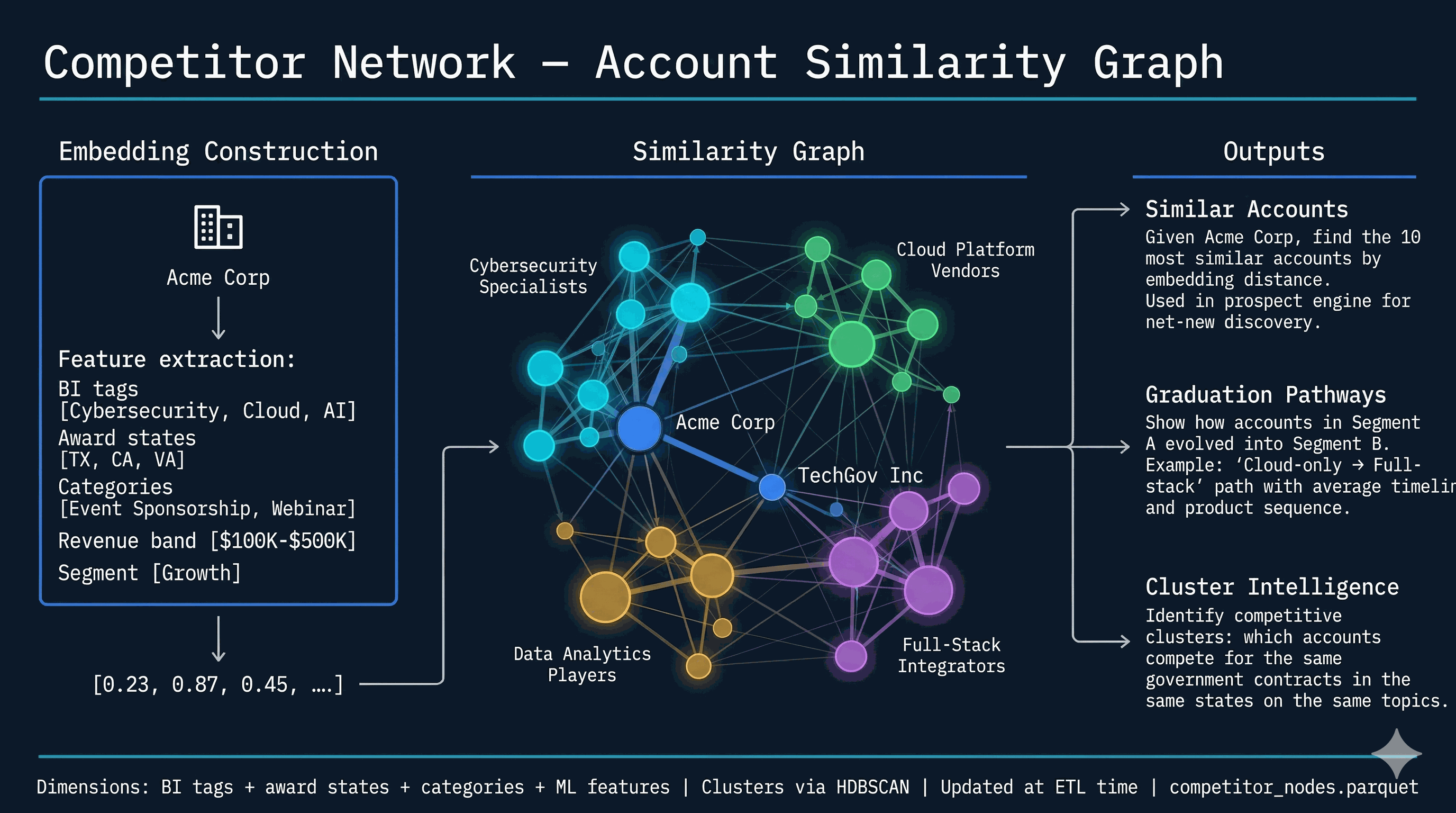
The competitor network converts account attributes into dense embeddings and builds a similarity graph. Each account becomes a vector from its BI tags, award states, product categories, revenue band, and behavioral segment. Cosine similarity between vectors produces edges; HDBSCAN clustering groups similar accounts into competitive clusters like "Cybersecurity Specialists," "Cloud Platform Vendors," or "Full-Stack Integrators."

Three outputs serve different use cases: similar accounts (find the 10 nearest neighbors for prospect discovery), graduation pathways (how did accounts in Segment A evolve into Segment B — with average timelines and product sequences), and cluster intelligence (which accounts compete for the same government contracts in the same states on the same topics).

Competitor Network
14

Revenue DNA

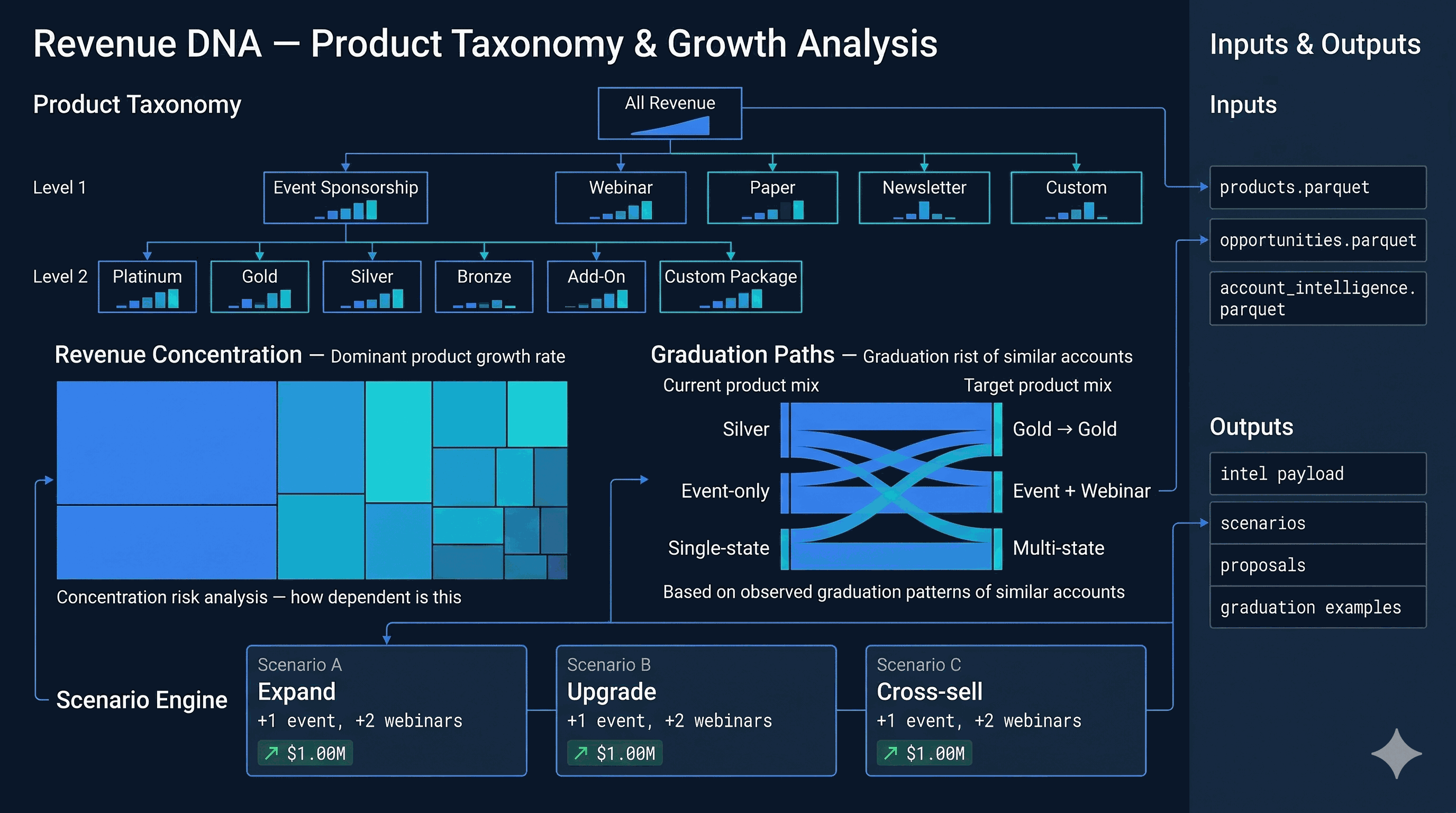
Revenue DNA decodes the product taxonomy and concentration structure of the revenue base. A treemap visualization reveals how revenue distributes across product families (Event Sponsorship, Webinar, Paper, Newsletter, Custom) and tiers within each family (Platinum, Gold, Silver, Bronze). Color intensity maps to growth rate; block size maps to revenue — making concentration risk instantly visible.

The graduation path analysis shows observed upgrade patterns (Silver → Gold, single-event → multi-event, single-state → multi-state) based on historical account trajectories. The scenario engine lets users model "what if" interventions: adding events, upgrading tiers, or cross-selling new product bundles, each projecting revenue delta against the current base.

Revenue DNA
15

Retention Intelligence

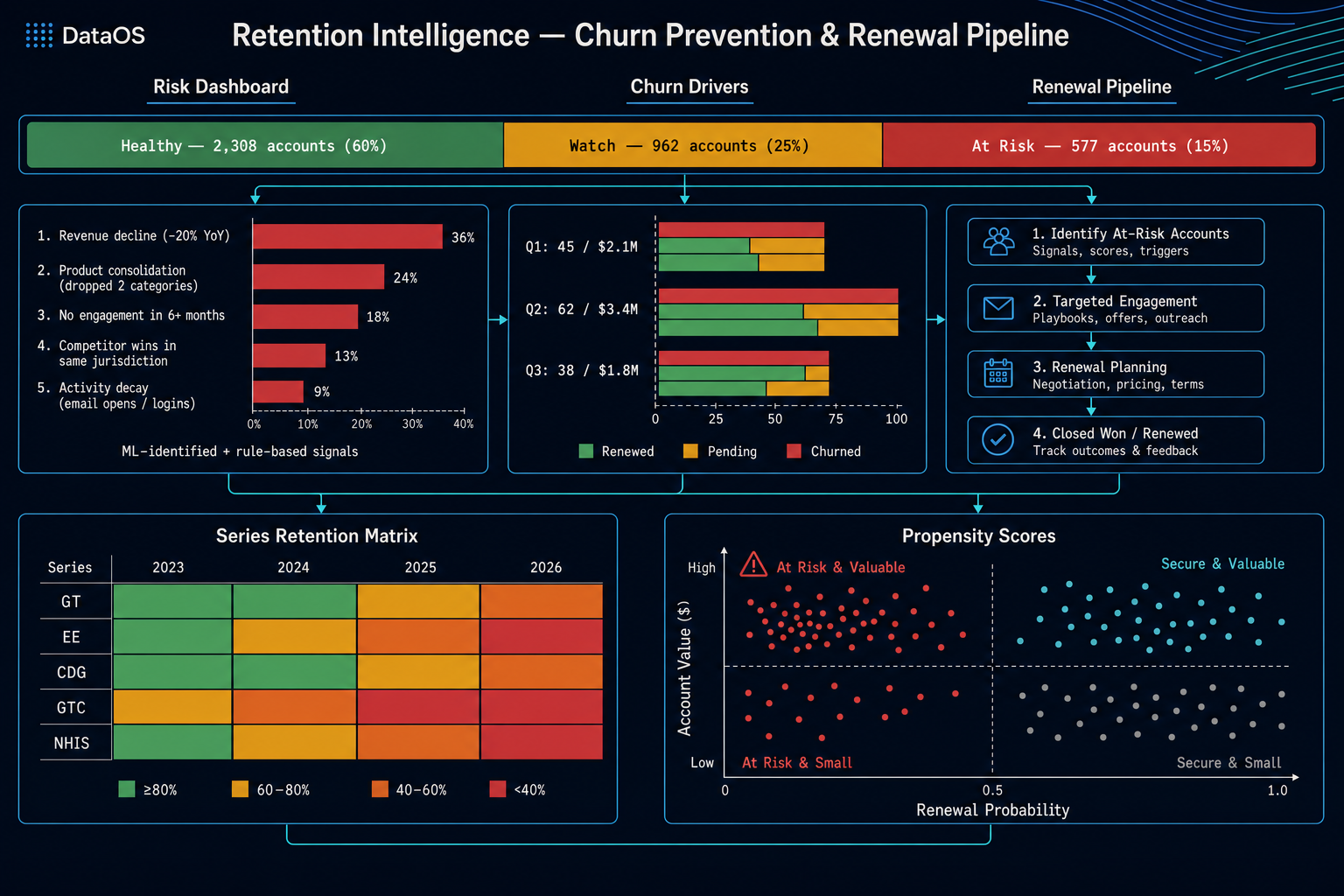
Retention intelligence is the churn prevention system. A risk dashboard distributes accounts across health zones — healthy, watch, and at-risk — based on ML churn predictions and rule-based signals. Churn drivers are ranked by impact: revenue decline, product consolidation, engagement gaps, competitor wins in the same jurisdiction, and activity decay (declining email opens and logins).

The renewal pipeline tracks upcoming renewals by quarter with dollar values, showing a stacked view of renewed, pending, and churned. A series retention matrix shows which event series retain sponsors year over year, making it easy to spot series with structural retention problems. Propensity scores plot accounts on a value-vs-probability scatter, highlighting the "at risk and valuable" quadrant that demands immediate attention.

Retention Intelligence
24

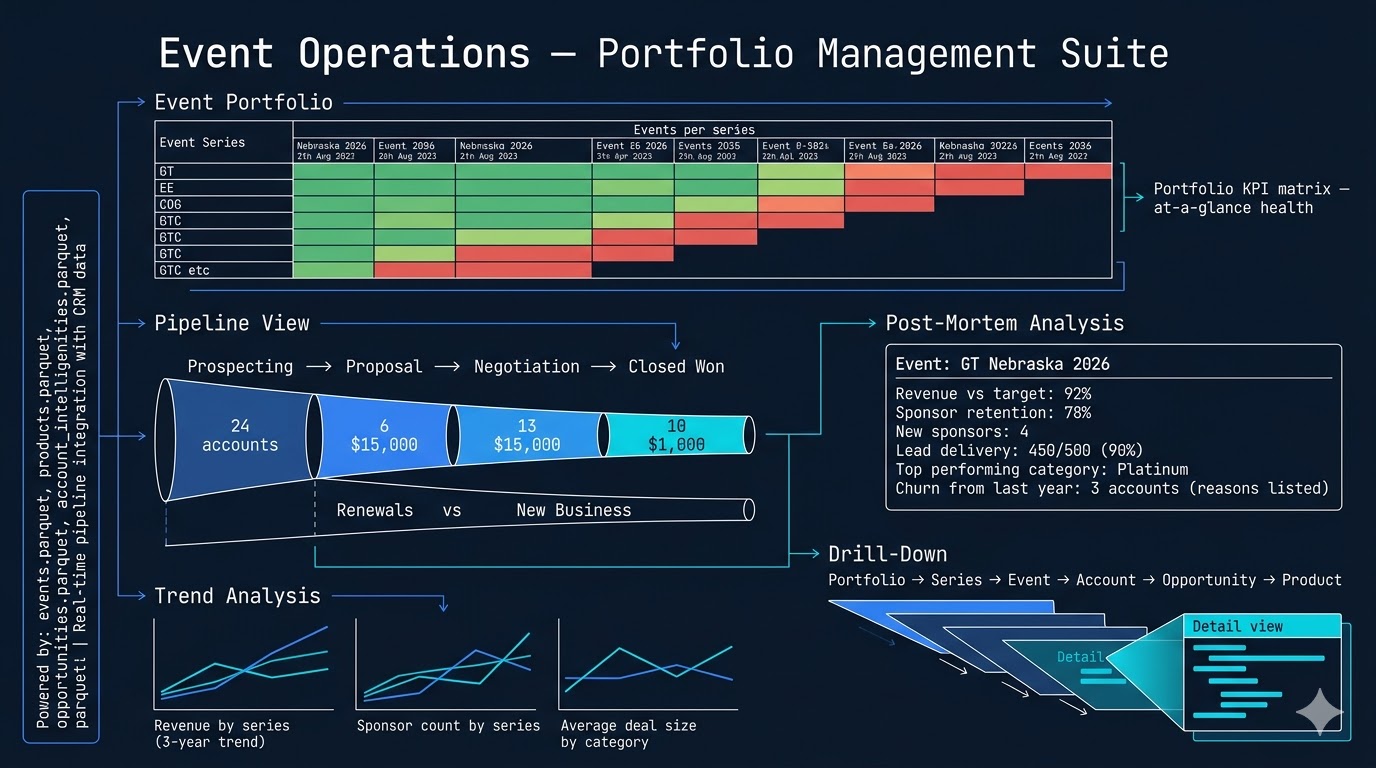
Event Operations Center

The event operations center is the portfolio management suite for the events business. A portfolio matrix shows every event series against key metrics — revenue, sponsor count, leads delivered, and year-over-year growth — with color-coded cells for at-a-glance health assessment. The pipeline view visualizes the full sales funnel from prospecting through closed-won, splitting renewals from new business.

Post-mortem analysis generates report cards for completed events: revenue vs. target, sponsor retention rate, new sponsor count, lead delivery ratio, top-performing sponsorship categories, and churned accounts with reasons. Trend analysis tracks three-year trajectories by series, and a six-level drill-down navigates from portfolio → series → event → account → opportunity → product.

Event Operations Center
18

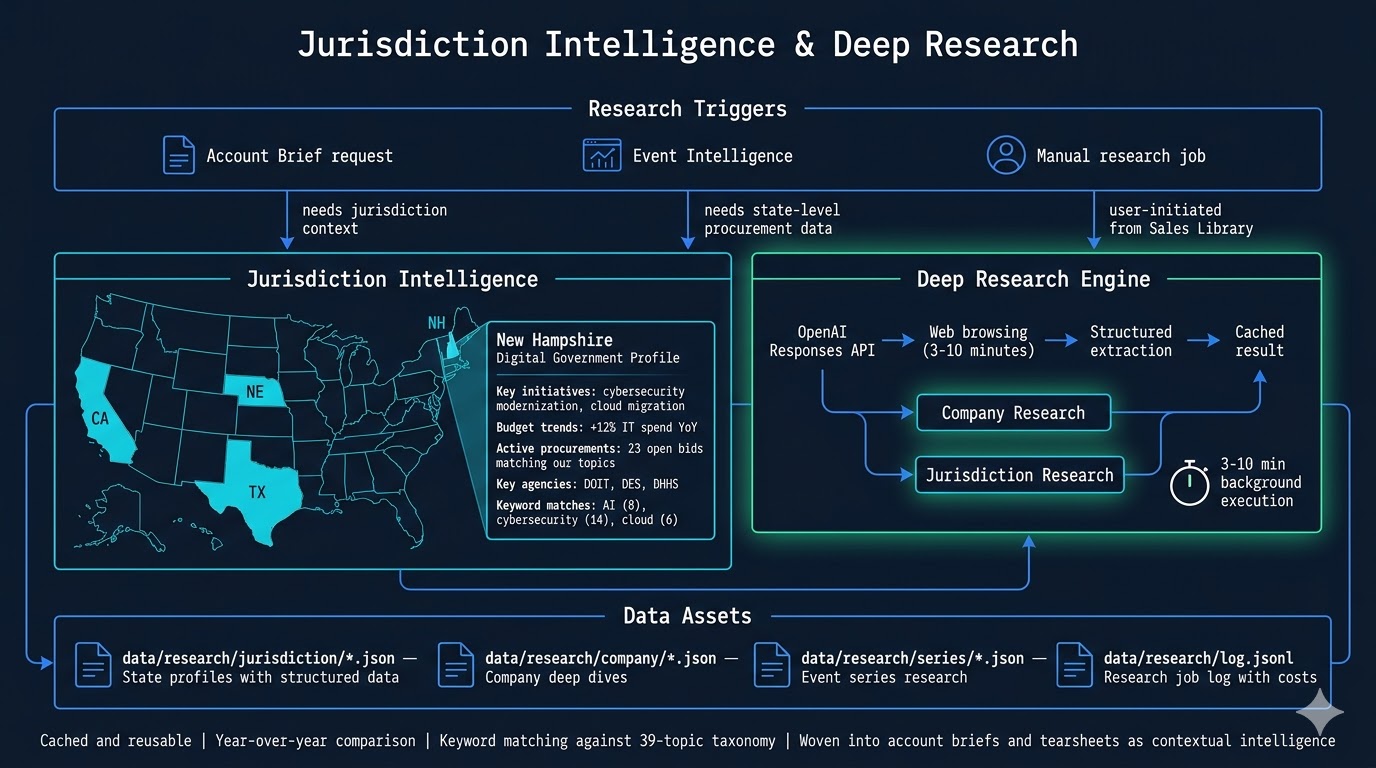
Jurisdiction Intelligence & Deep Research

Jurisdiction intelligence provides state-level procurement context for sales conversations. For any target state, the system generates a structured profile: key IT initiatives, budget trends, active procurements matching the 39-topic taxonomy, key agencies, and keyword frequency analysis. These profiles are triggered by account brief requests, event intelligence runs, or manual research jobs from the Sales Library.

Deep research leverages the OpenAI Responses API with web browsing for company and jurisdiction intelligence — 3-10 minute background jobs that produce cached, reusable research artifacts. Results are stored in data/research/ organized by type (jurisdiction, company, event series), with year-over-year comparison capability and full cost tracking per research job.

Jurisdiction Intelligence
26

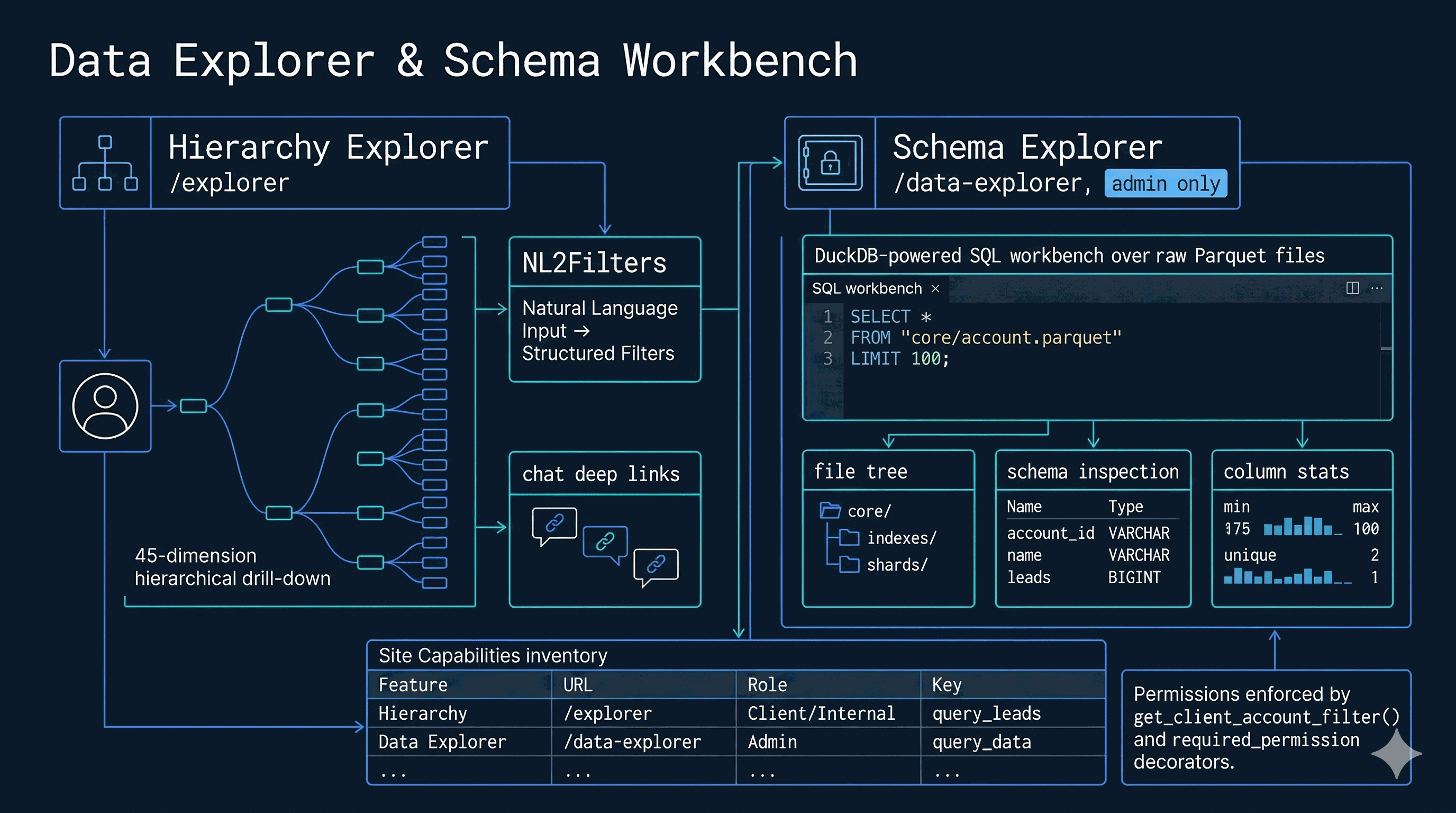
Data Explorer & Schema Workbench

DataOS has two complementary exploration interfaces. The Hierarchy Explorer (/explorer) is the primary analytical tool — a hierarchical drill-down browser where users apply filters across 45 dimensions (state, category, tags, attribution, BI fields, ML predictions), then expand from accounts → categories → venues → leads. An advanced query mode accepts natural language like "cybersecurity sponsors in TX with attribution," which the NL2Filters engine converts into structured filter JSON. Deep links from the AI chat open the explorer with pre-applied filters, bridging conversational and visual analysis.

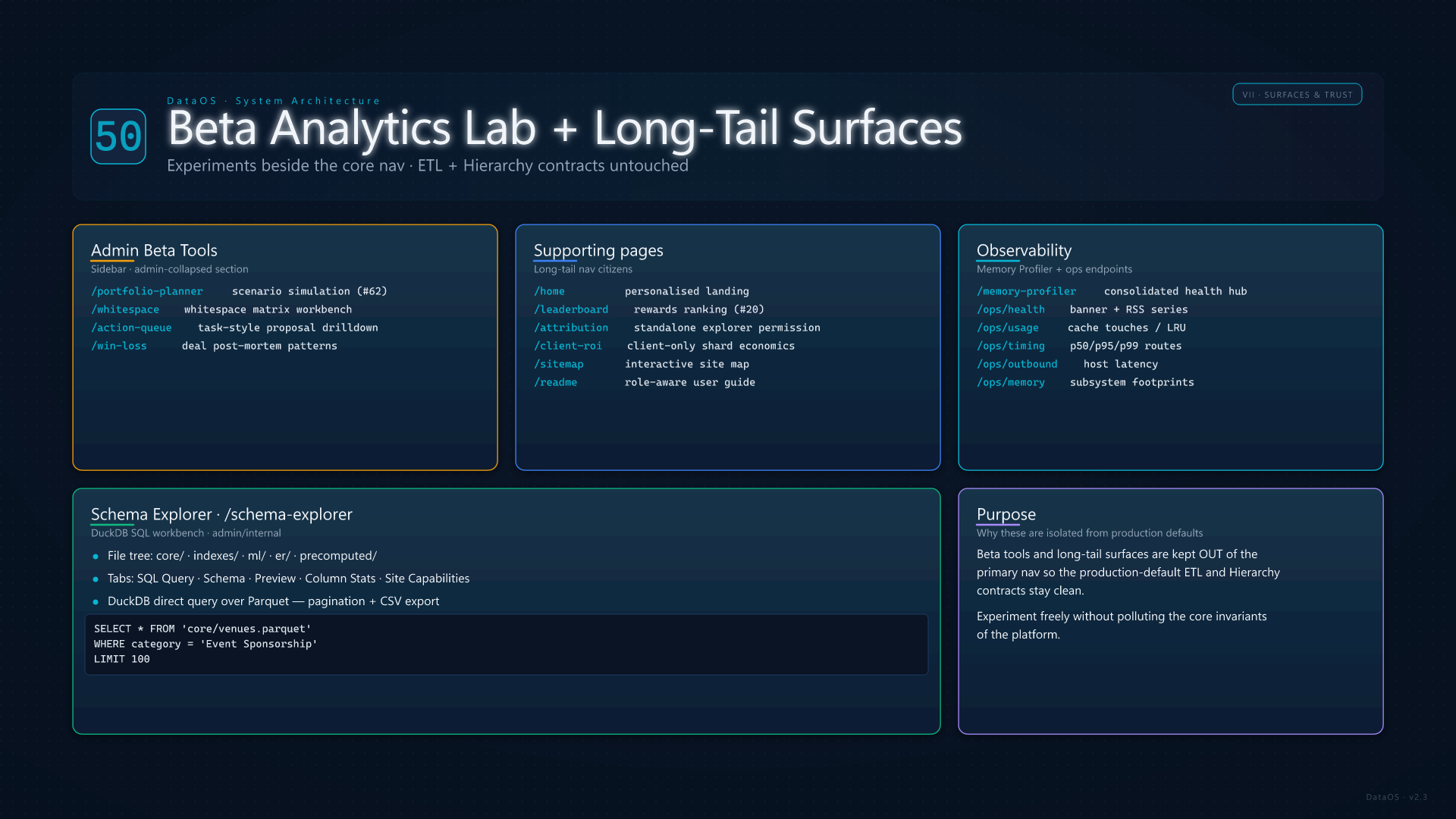
The Schema Explorer (/data-explorer, admin only) is a DuckDB-powered SQL workbench over the raw Parquet files. A file tree sidebar lets admins browse data/ by directory, then inspect schema, preview rows, view column statistics, or write freeform SQL like SELECT * FROM 'core/venues.parquet' WHERE category = 'Event Sponsorship'. Results are paginated and exportable as CSV. A "Site Capabilities" tab inventories every page, AI tool, ETL module, ML model, and data asset in the system.

Data Explorer & Schema Workbench
27

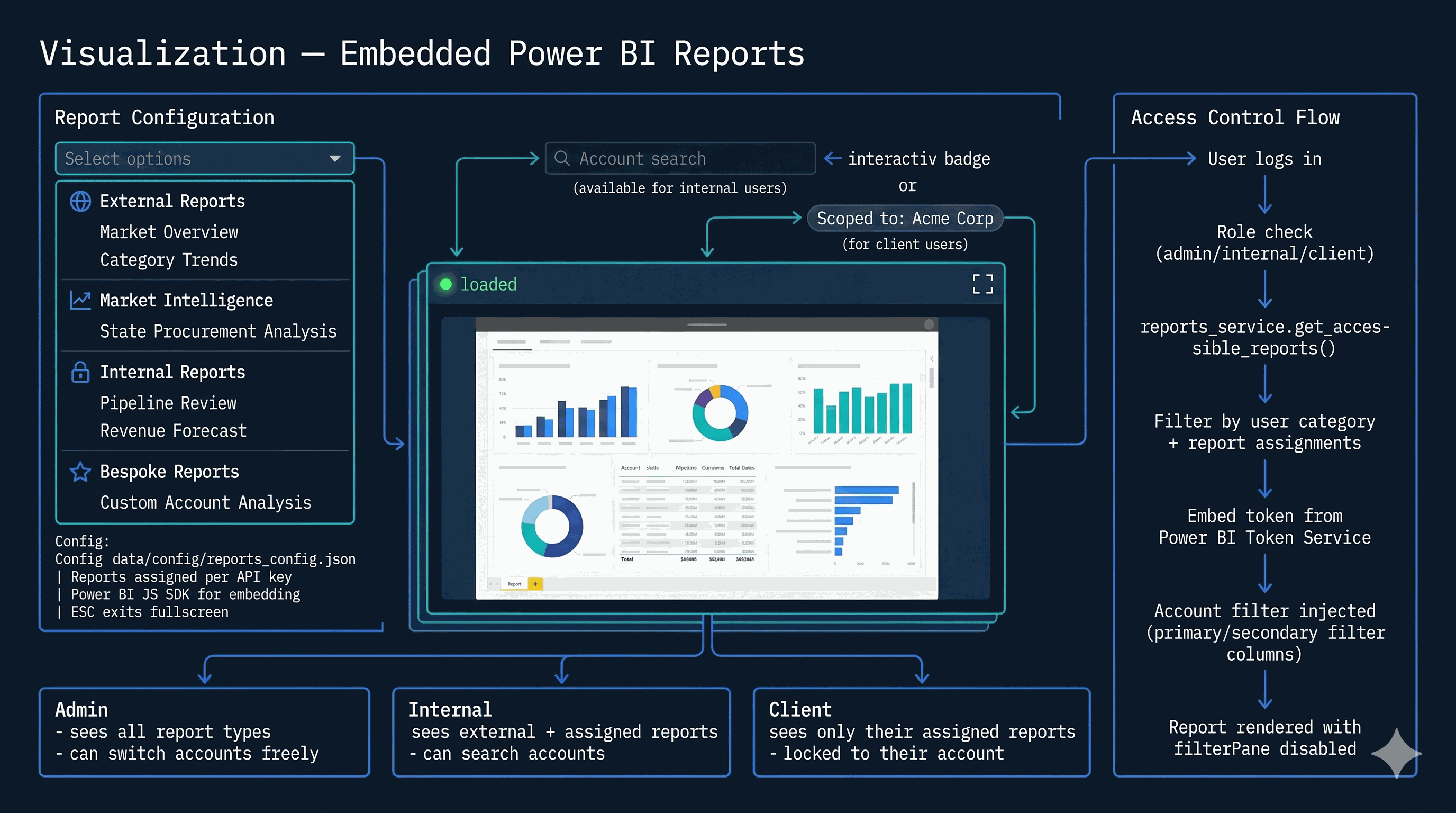
Visualization — Power BI Embedding

The visualization module embeds Power BI reports directly inside DataOS, organized into four types: External (market-facing), Market Intelligence, Internal (pipeline and revenue), and Bespoke (custom account analyses). Reports are configured in reports_config.json and assigned per API key, so each user sees only the reports their role and account grant access to.

The embed flow handles access control end-to-end: the user's role determines which report types are visible, reports_service.get_accessible_reports() filters the dropdown, an embed token is fetched from the Power BI Token Service, and account-level filters are injected automatically through primary/secondary filter columns. Admin users see all report types and can switch accounts freely. Internal users see external plus assigned reports with account search. Client users see only their assigned reports, permanently locked to their account scope. The filter pane and navigation pane are disabled — reports render clean and focused.

Visualization — Power BI Embedding
28

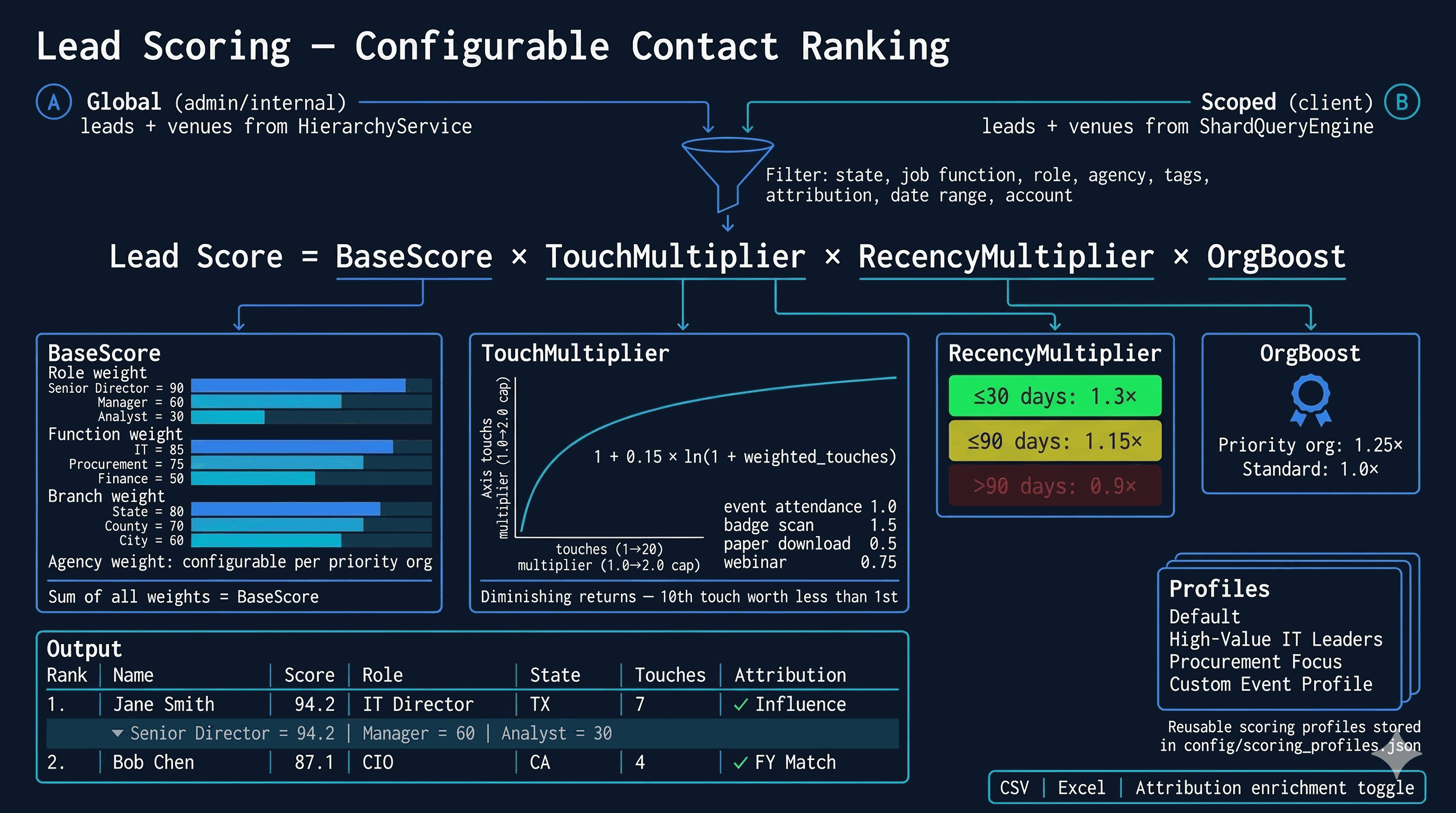
Lead Scoring Engine

The lead scoring engine ranks government contacts using a four-component formula: Score = BaseScore × TouchMultiplier × RecencyMultiplier × OrgBoost. The BaseScore sums configurable weights for job role (Senior Director: 90, Manager: 60, Analyst: 30), job function (IT: 85, Procurement: 75), government branch (State: 80, County: 70), and agency priority. The TouchMultiplier uses a logarithmic curve — 1 + 0.15 × ln(1 + weighted_touches), capped at 2.0 — so the first few engagements matter most. RecencyMultiplier boosts recent contacts (1.3x within 30 days) and discounts stale ones (0.9x beyond 90 days). OrgBoost gives a 1.25x lift to priority organizations.

The UI provides a full configuration panel for filters (demographics, venue/event, attribution, tags, account), weight sliders, and scoring profiles that can be saved and reused from config/scoring_profiles.json. Results render as a sortable table with expandable score breakdowns per lead, showing the exact contribution of each component. Optional attribution enrichment links scored leads to government contract awards. Client users are automatically scoped through the ShardQueryEngine; admin and internal users can score globally or by account.

Lead Scoring Engine
V
Platform Services
Security, isolation, performance, content management, and operational telemetry
16

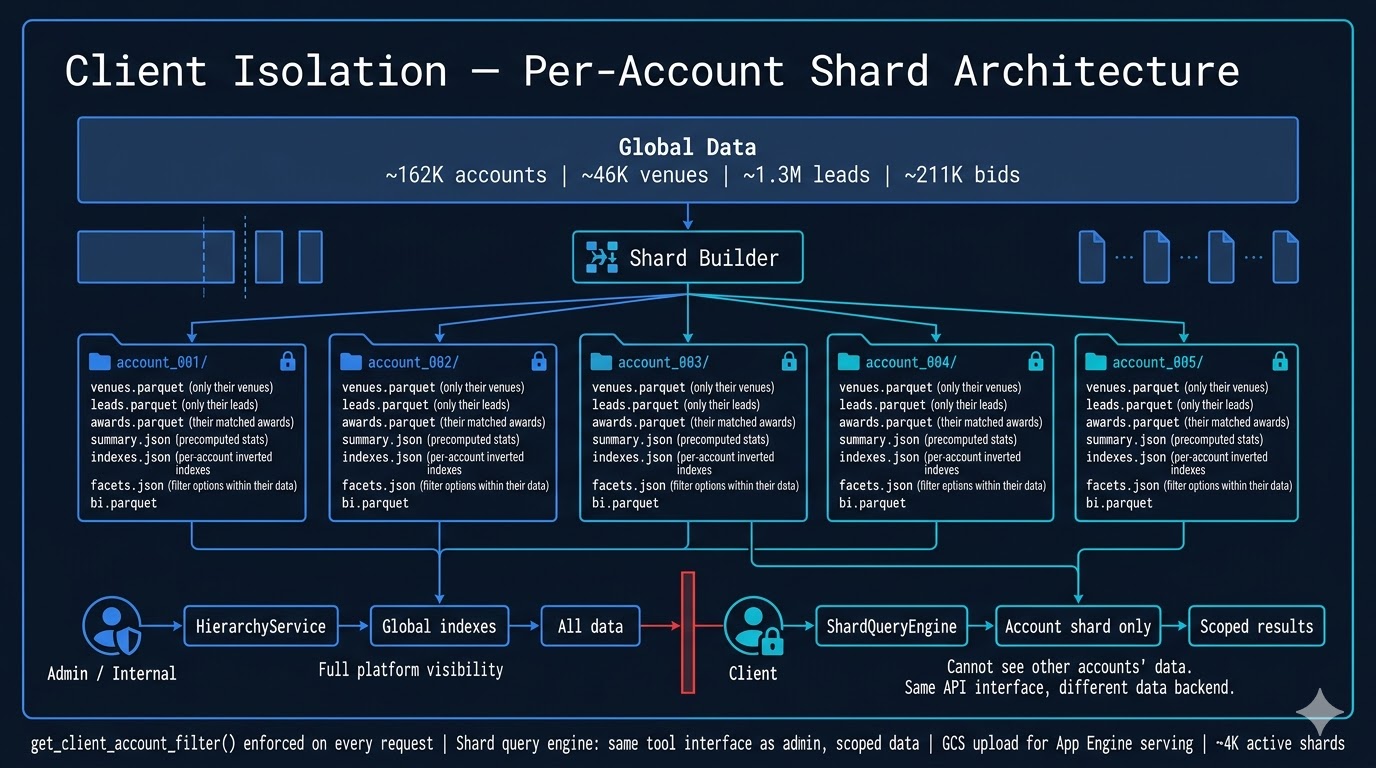
Client Isolation — Dual-Mode Tenant Scoping

Client isolation is enforced at the data layer through two selectable mechanisms. The file-based path partitions the global dataset into ~4K per-account shard packages, each containing the account's venues, leads, awards, BI profile, summary stats, inverted indexes, and facet options — a complete, self-contained data slice served by the ShardQueryEngine. The PostgreSQL + RLS path uses Row-Level Security on the venues and leads tables, with PgShardQueryEngine setting app.tenant_id per connection. RLS policies enforce scoping at the database engine level — even SELECT * returns only the tenant's rows. Fail-closed: unset tenant_id blocks all rows.

Admin and internal users query through the HierarchyService against global indexes with full platform visibility. Client users are routed to the appropriate shard engine (file or PG) based on the USE_PG_SHARDS environment flag. Both engines expose the identical API interface. The get_client_account_filter() function remains enforced on every request as the last line of defense.

Client Isolation
17

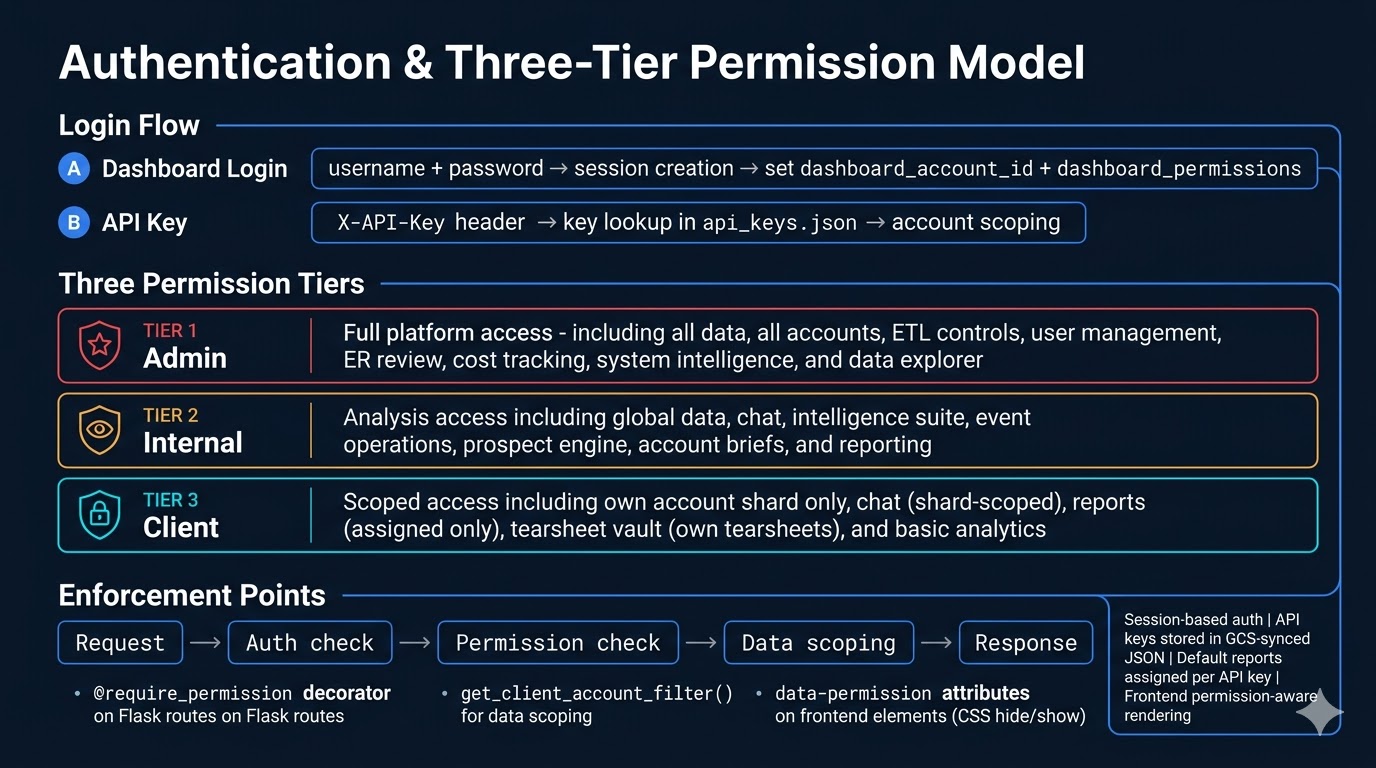
Authentication, Permissions & Send-As Identity

DataOS uses a three-tier permission model. Admin has full platform access: all data, ETL controls, user management, entity resolution review, cost tracking, and system intelligence. Internal has analysis access: global data, AI chat, the intelligence suite, event operations, prospect engine, account briefs, and reporting. Client sees only their own account shard: scoped chat, assigned reports, their tearsheets, and basic analytics. Authentication flows through two paths: dashboard login (username + password → session with account ID and permissions) and API key (header-based lookup from a GCS-synced JSON file with account scoping). Three enforcement mechanisms work in concert: @require_permission decorators on Flask routes, get_client_account_filter() for data scoping, and data-permission attributes on frontend elements for CSS-based visibility control.

A second permissions layer governs outbound send identity. core/user_permissions.py stores per-key BD (Business Development) / SO (Sales Operations) flags plus a send_as_mode of self, owner, or pick. Storage moved Apr-2026 to user_permissions/<key_hash> so the BD/SO checkbox persists even for users without an audit email. Every APIKey can be bound to a real Salesforce User via the live SOQL typeahead in the admin modal — salesforce_user_id + salesforce_user_name are persisted on the key, hydrated onto session['dashboard_sf_user_id'] at login, and consumed as a fast-path before the legacy email lookup hops in services/sf_activity_writer.py::resolve_sf_user_id. can_impersonate = admin OR impersonate permission OR BD OR SO; non-impersonators are restricted to self, and POST /outflow/send enforces the same gate as defense-in-depth. Admin sessions auto-default to owner with a synthetic <username>@admin.dataos.local audit email when no real one is configured. See card 56 for the full activity-writeback chain.

Authentication & Permissions
19

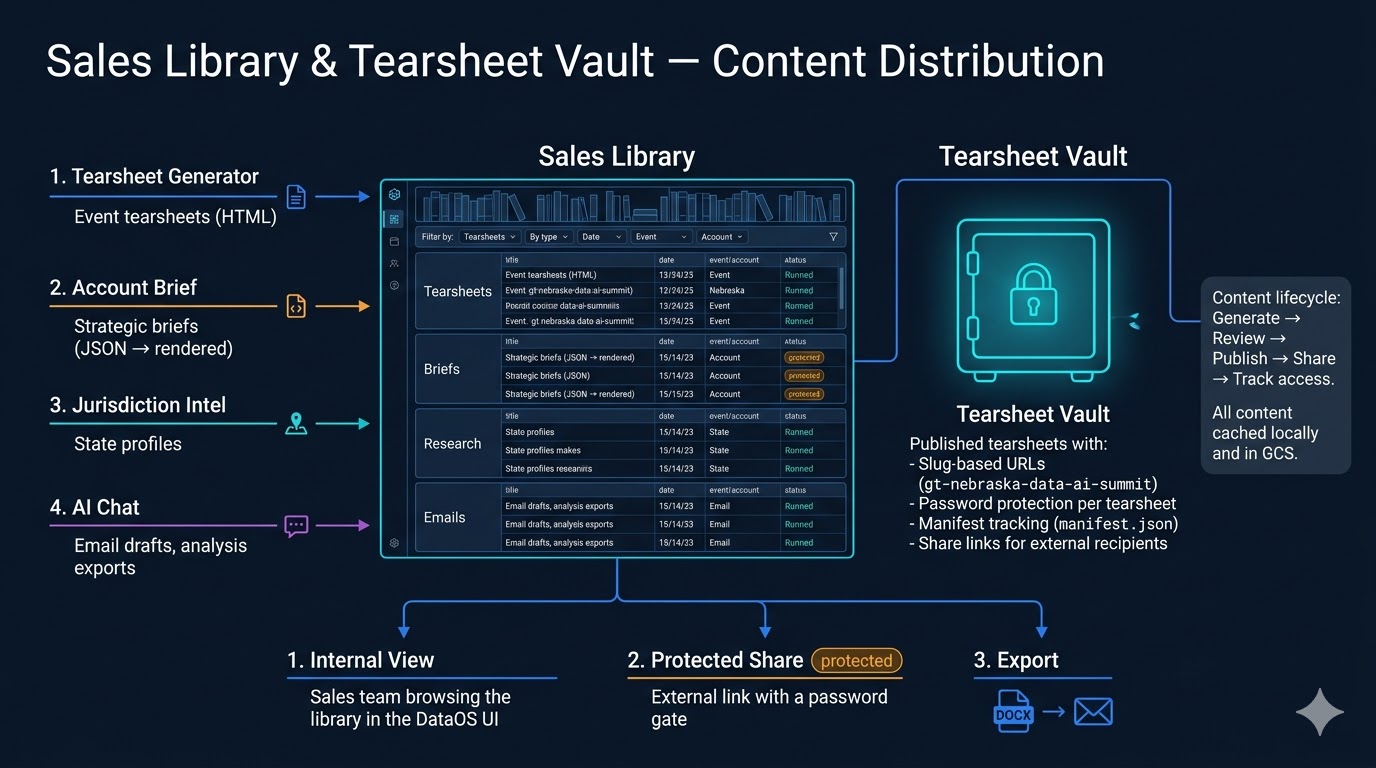
Sales Library

The Sales Library is the central content hub — a single place to browse tearsheets, account briefs, jurisdiction research, email drafts, and chat logs generated across the platform. Content flows in from five sources: the tearsheet generator, the account brief builder, jurisdiction intelligence, AI chat exports, and the chat log system.

Published tearsheets get slug-based URLs (like gt-nebraska-data-ai-summit), optional password protection per document, and manifest tracking. Sales reps can share a protected link with external stakeholders — clients, prospects, or partners — without exposing the full platform. The content lifecycle runs: generate → review → publish → share → track access. Chat logs are saved automatically after every AI conversation and are visible to admins.

Sales Library
20

Rewards & Gamification

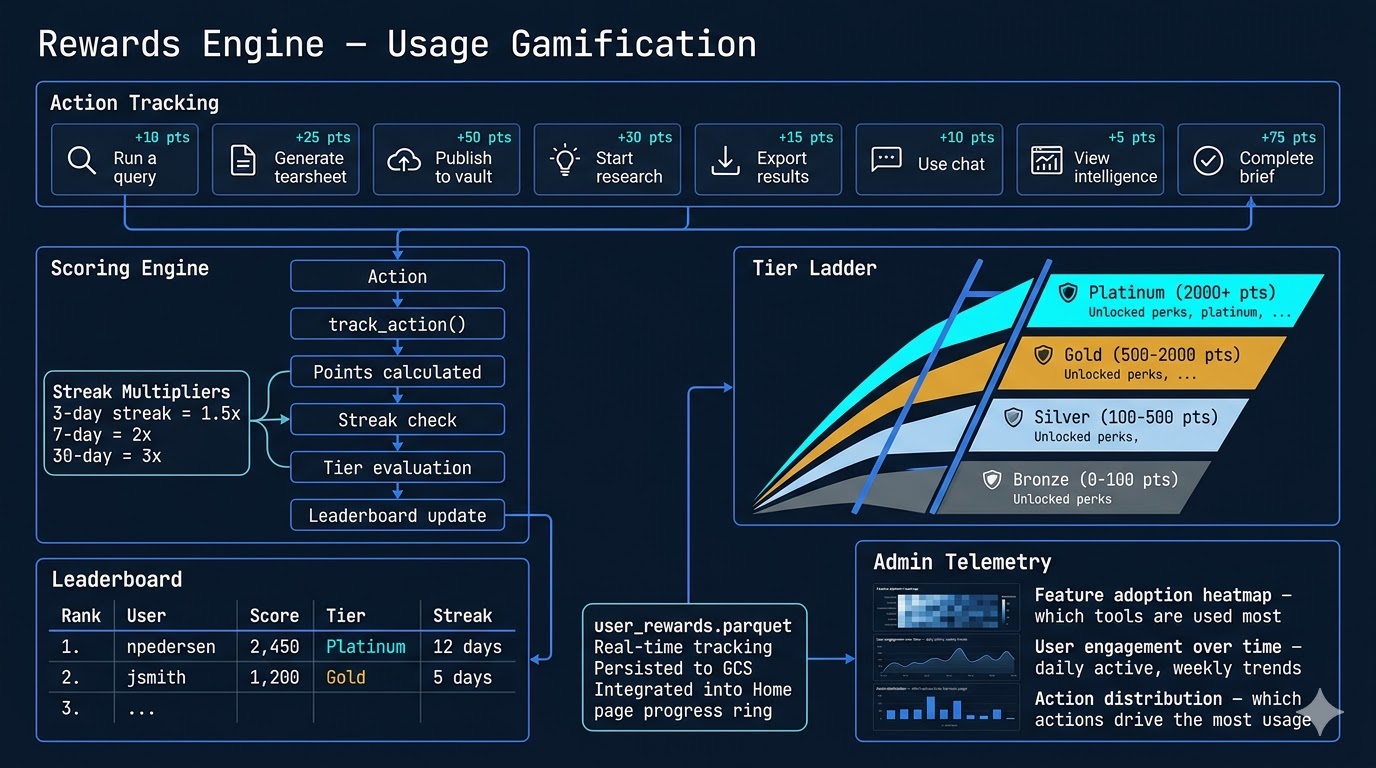
The rewards engine drives platform adoption through gamification. Eight tracked actions — running queries, generating tearsheets, publishing to the library, starting research, exporting results, using chat, viewing intelligence, and completing briefs — each earn points. Streak multipliers reward consistency: 3-day streaks earn 1.5x, 7-day earns 2x, and 30-day streaks earn 3x points.

Users progress through four tiers: Bronze, Silver, Gold, and Platinum. A leaderboard ranks users by score. Behind the scenes, the rewards engine doubles as admin telemetry — tracking feature adoption heatmaps, user engagement trends, and action distribution to understand which tools drive the most value. All reward data persists in user_rewards.parquet and syncs to GCS.

Rewards & Gamification
22

Cost Tracker & LLM Economics

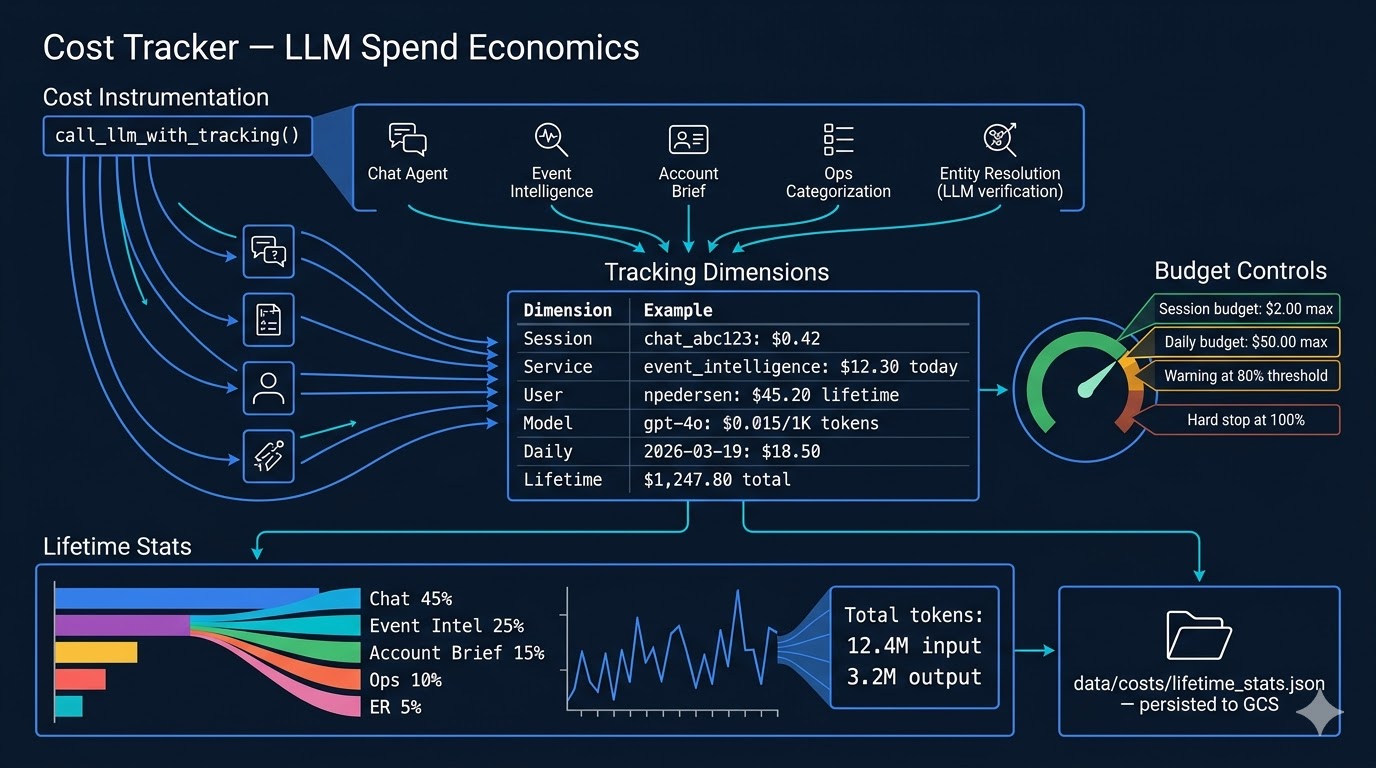
Every LLM call in DataOS is wrapped in core.utils.call_llm_with_tracking(), feeding a multi-dimensional cost tracker. Spend is tracked across six dimensions: per session, per service (chat, event intelligence, account brief, ops categorization, entity resolution, sales agent, deep research, BI integration), per user, per model, per call (with prompt/response token counts), and per day. core.outbound_telemetry ties the call site to the outbound HTTP host so latency to OpenAI / Mailgun / Graph / ZoomInfo is observable in /ops/outbound.

Budget controls include per-session limits ($2 chat / $8 sales-agent default), per-day limits ($30 sales-agent / $50 chat default), and a global kill switch via OUTBOUND_PAUSED=true in env.yaml that the SRE flips through the admin Pause toggle (independent of cost — see card 44). Warnings fire at 80% and hard stops at 100%. Lifetime statistics in data/costs/lifetime_stats.json maintain running totals — input/output tokens, spend by service, daily trends, per-user breakdowns — making LLM cost a first-class operational metric, visible in the admin dashboard alongside feature usage and system health, with the per-route p50/p95/p99 in /ops/timing and outbound-host latency in /ops/outbound closing the loop on where money is being spent.

Cost Tracker
23

Performance Architecture

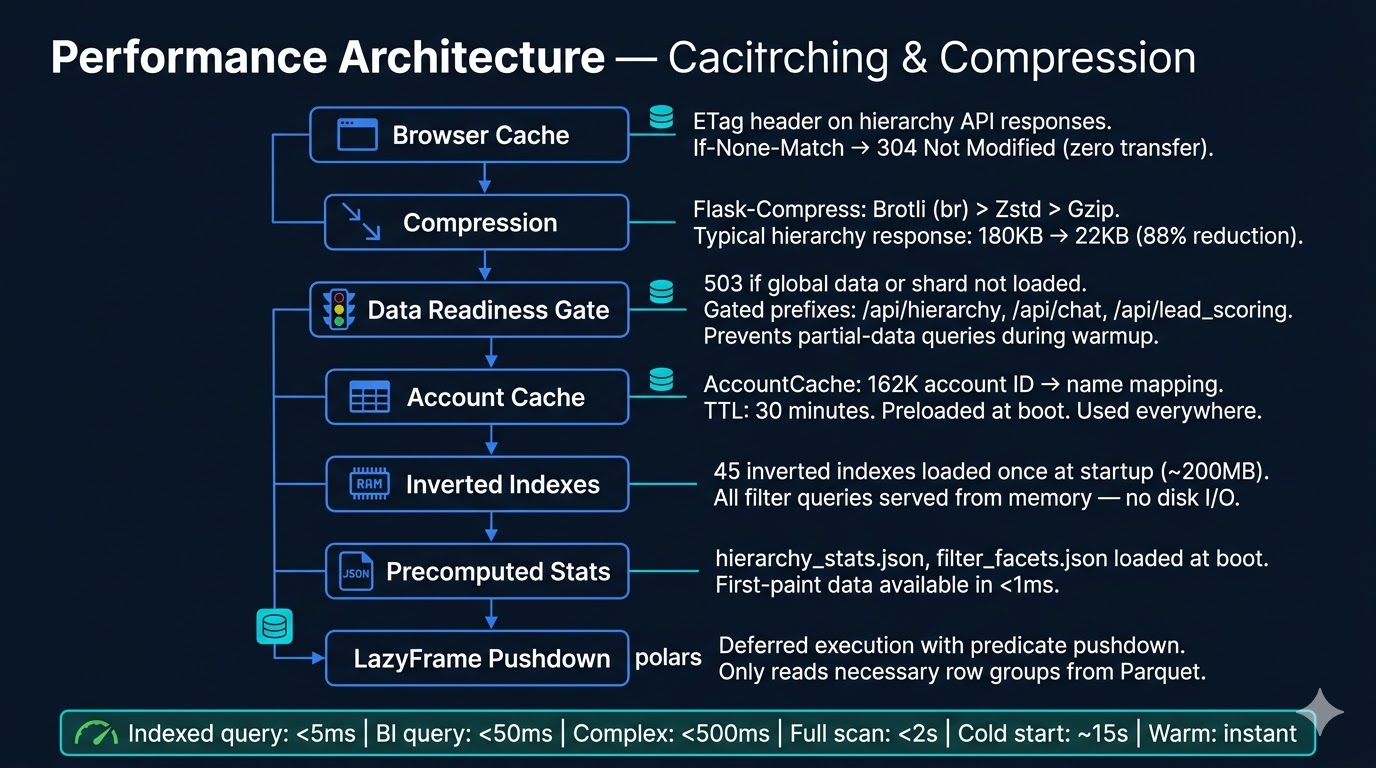
Performance is a seven-layer stack. Browser-level caching uses ETag headers on hierarchy API responses, returning 304 Not Modified for unchanged data. Compression via Flask-Compress applies Brotli/Zstd/Gzip, shrinking typical responses by 88%. A data readiness gate returns 503 for gated prefixes (/api/hierarchy, /api/chat, /api/lead_scoring) until global data or shard loading completes — preventing partial-data queries during warmup. The warmup orchestrator at boot runs the phases listed in WARM_PHASES (attribution, hierarchy_stats, event_intelligence, competitor_network, pipeline_manager, dossier, zi_resolver, sf_schema, semantic_engine), each of which can be skipped to trade cold-start latency for tighter steady-state RSS.

The account cache holds 162K ID-to-name mappings in memory with a 30-minute TTL. 45 inverted indexes (~200MB) load once at startup and serve every filter query from RAM. Precomputed stats (JSON files) provide sub-millisecond first-paint data. Polars LazyFrames with predicate pushdown ensure that even complex queries only read the necessary row groups from Parquet. The DossierBuilder LRU is bounded (DOSSIER_LRU=1 prewarms the 200 most recently active accounts) and the Entity-Creation enrich cache bounds at ENTITY_CREATION_LRU_CAP=5000 per process. Result: indexed queries complete in under 5ms, and even full-scan attribution analysis finishes within 2 seconds. See card 57 for the Cloud Run topology and the GLIBC allocator knobs (MALLOC_ARENA_MAX, MALLOC_TRIM_THRESHOLD_, PYTHONMALLOC) that keep memory predictable at one-instance-absorbs-everything sizing.

Performance Architecture
VI
New in v2.1
Autonomous sales intelligence, ML operations, personalized dashboards, and governance tooling
29

Sales Agent — Autonomous Rep Intelligence

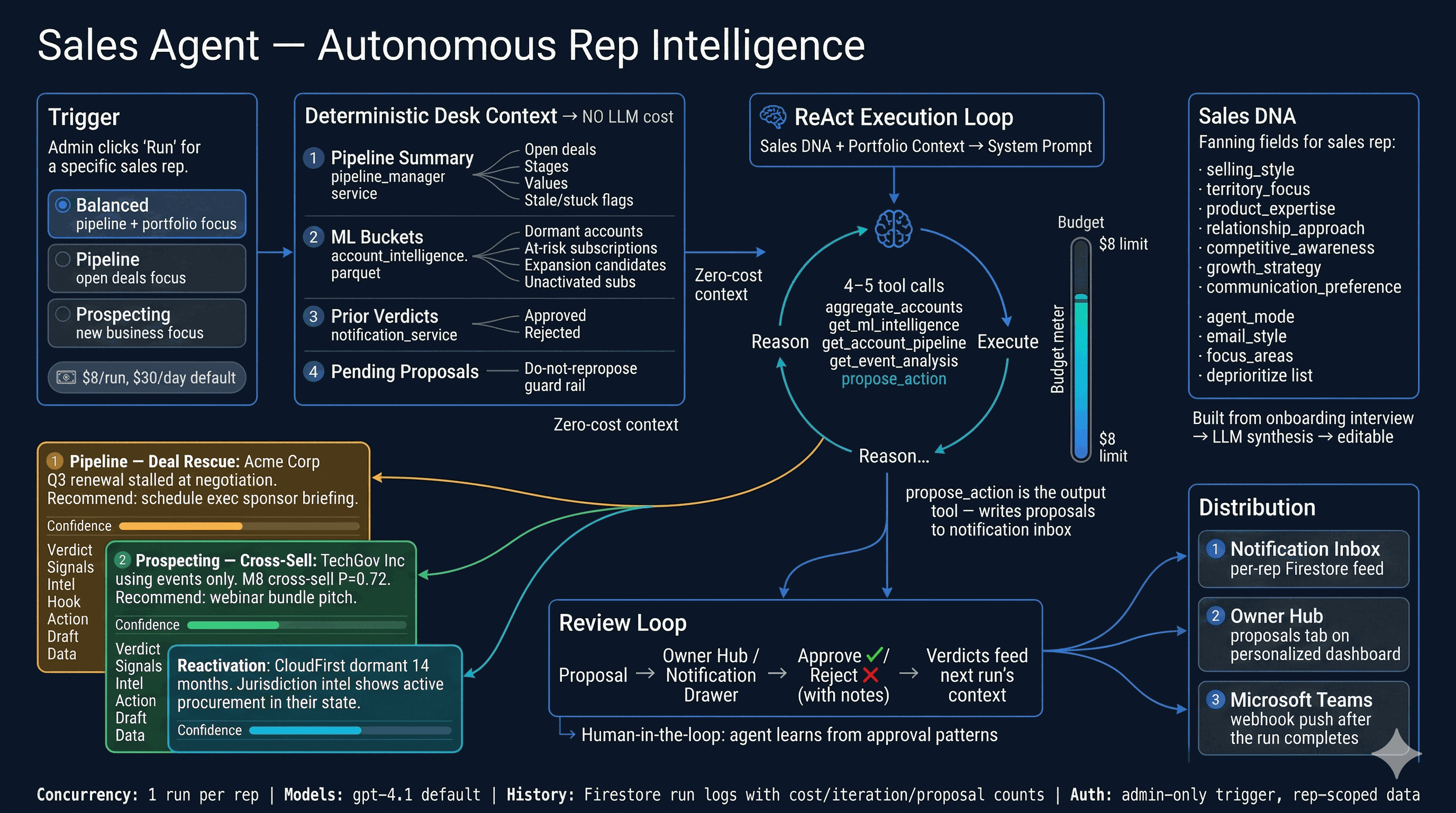
The Sales Agent is an autonomous, per-rep LLM agent that scans a rep's Salesforce pipeline and account book, then generates concrete proposals — follow-ups, reactivation plays, cross-sell pitches, event recommendations, and deal rescue actions. It uses the same DataAgent ReAct loop and tool suite as AI Chat, but operates in sales_agent_mode with a specialized system prompt built from the rep's Sales DNA profile.

Before the LLM runs, a zero-cost deterministic context assembles pipeline health (stale/stuck/at-risk deals), ML bucket analysis (dormant accounts, expansion candidates, at-risk subscriptions), and prior approval verdicts — so the agent doesn't repropose rejected ideas. Output flows through propose_action into the notification system. Reps review proposals in the Owner Hub or notification drawer, approving or rejecting with notes that feed the next run's context. Budget controls ($8/run, $30/day default) prevent runaway spend. Three run modes — balanced, pipeline, and prospecting — steer the agent's focus.

Sales Agent
30

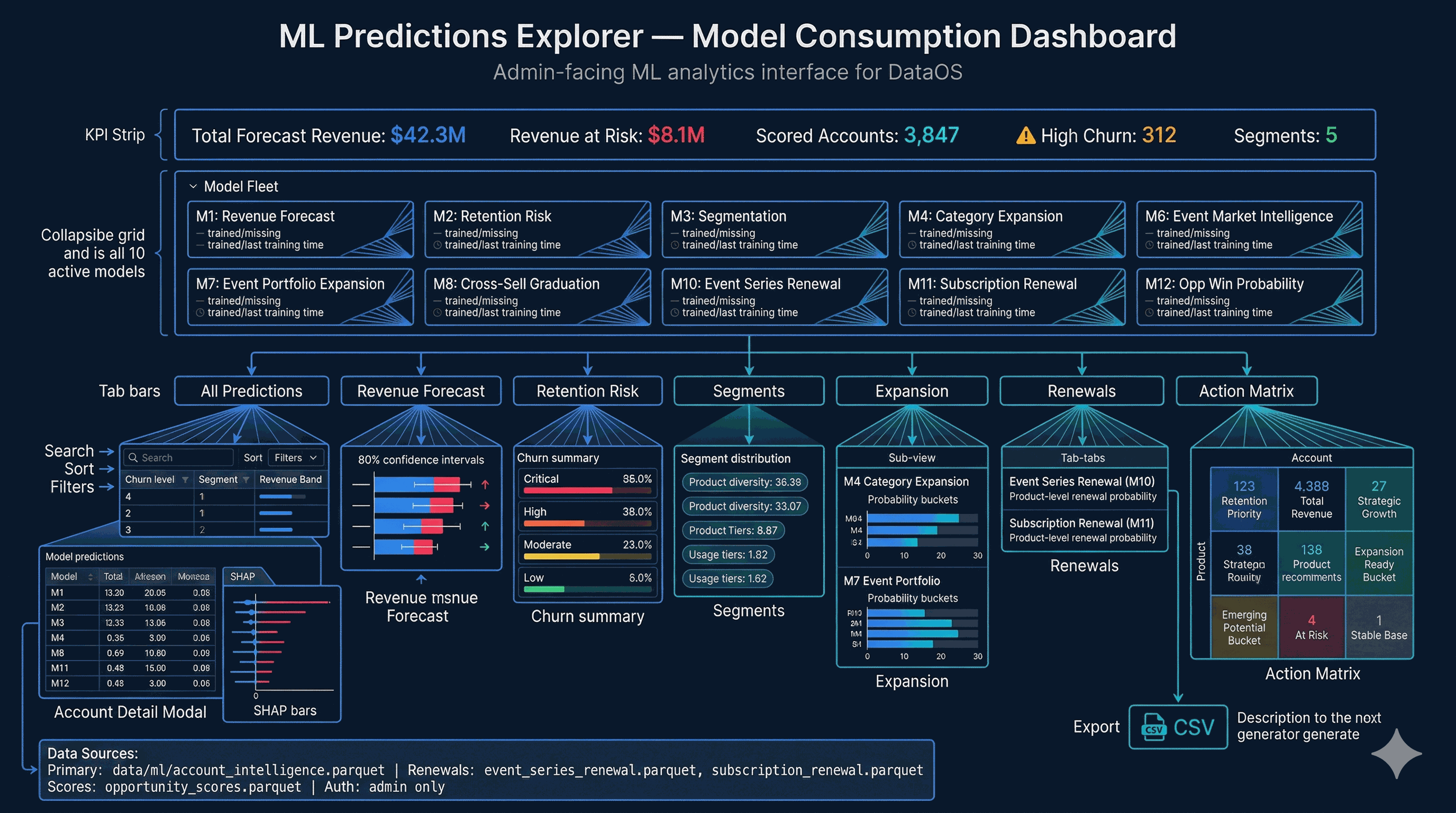
ML Predictions Explorer

The ML Predictions Explorer is the admin-facing consumption dashboard for all model outputs. A KPI strip headlines total forecast revenue, revenue at risk, scored account count, and high-churn flags. A model fleet panel shows all 10 active models (M1–M4, M6–M8, M10–M12) with trained/missing status and training timestamps.

Seven tabs organize the predictions: All Predictions (master table with search/filter/sort), Revenue Forecast (with 80% confidence intervals and direction arrows), Retention Risk (churn probability bars and revenue-at-risk), Segments (behavioral clusters), Expansion (M4 category expansion + M7 event portfolio signals), Renewals (M10 event series + M11 subscription renewal probabilities), and the Action Matrix — six strategic buckets (Retention Priority, Strategic Growth, Expansion Ready, Emerging Potential, At Risk, Stable Base) with prescriptive next-best-product recommendations. Clicking any account opens a detail modal with per-model predictions and SHAP-based explainability.

ML Predictions Explorer
31

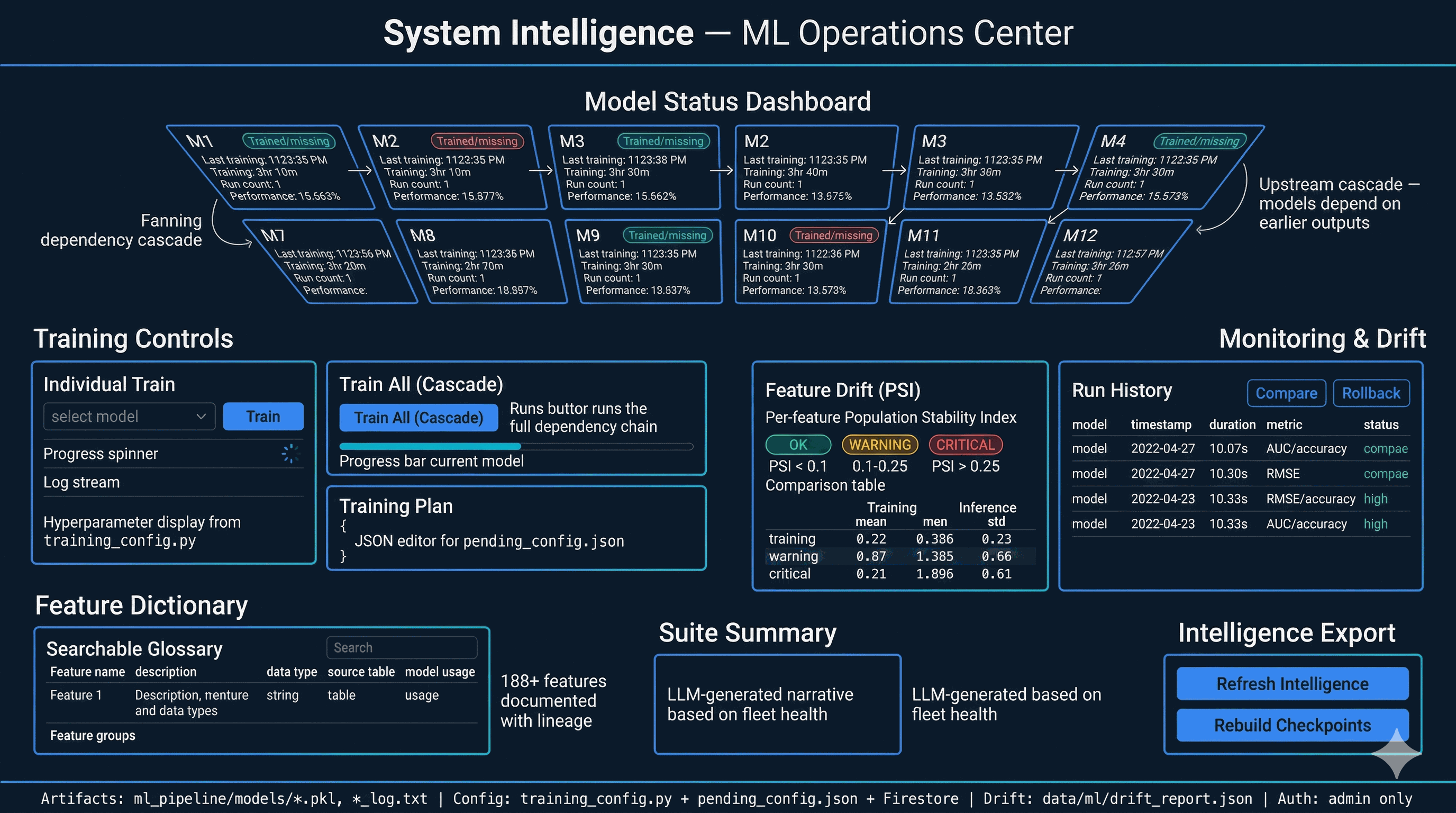
System Intelligence — ML Operations Center

System Intelligence is the ML operations control plane. A model status dashboard shows all models arranged by their upstream dependency cascade (M3 → M6 → M1 → M2 → M4 → M7, M8, M10, M11, M12), with trained/missing badges, training durations, and run counts. Individual models can be retrained with tunable hyperparameters, or the full cascade can be triggered in dependency order.

A training plan editor lets admins adjust hyperparameters via JSON and apply changes to pending_config.json. Drift monitoring uses Population Stability Index (PSI) to detect feature distribution shifts between training and inference, flagging OK / WARNING / CRITICAL per feature. Run history supports side-by-side metric comparison and checkpoint rollback. A searchable feature dictionary documents all 188+ features with lineage, and an LLM-generated suite summary provides a narrative assessment of fleet health and recommended actions.

System Intelligence — ML Ops
32

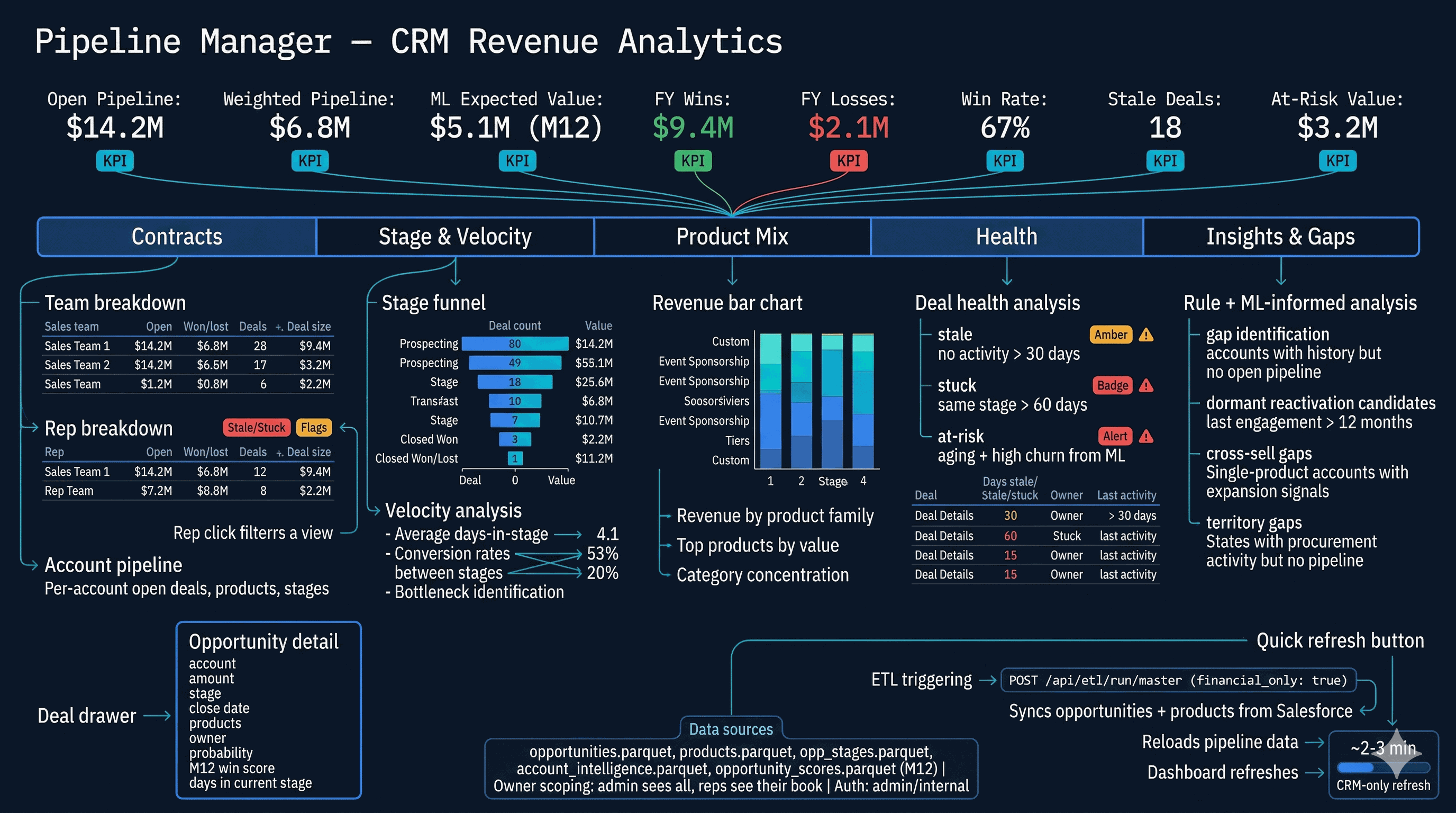
Pipeline Manager — CRM Revenue Analytics

The Pipeline Manager provides CRM pipeline intelligence for admin and internal users. A KPI strip shows open pipeline, Salesforce weighted value, ML expected value (from M12 opportunity win scores), fiscal-year wins/losses, win rate, stale deal count, and at-risk value. Five tabs organize the analysis: Contracts (team/rep/account breakdowns), Stage & Velocity (funnel visualization and days-in-stage analysis), Product Mix (revenue by product family), Health (stale, stuck, and ML-flagged at-risk deals), and Insights & Gaps (accounts with history but no pipeline, dormant reactivation candidates, cross-sell gaps).

Owner scoping lets reps see their own book while admins see the full portfolio. A deal drawer slides open with opportunity detail including M12 win probability. Quick Refresh triggers a CRM-only ETL sync (opportunities + products from Salesforce) so the dashboard can update in 2-3 minutes without a full pipeline run.

Pipeline Manager
33

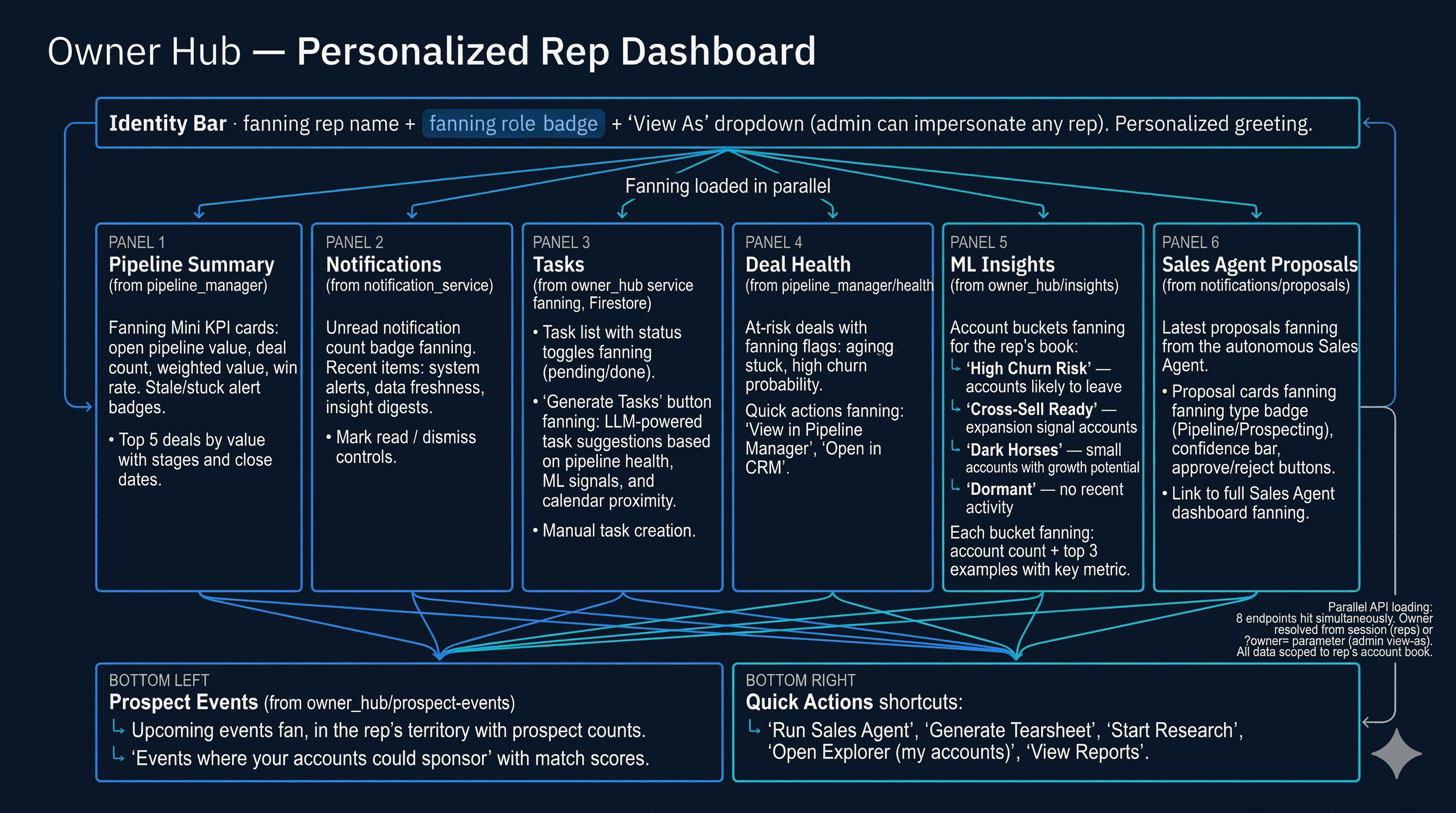
Owner Hub — Personalized Rep Dashboard

The Owner Hub is a personalized command center for each sales rep. It loads data from eight APIs in parallel: pipeline summary (open deals, weighted value, win rate), notifications (unread count, recent alerts), Firestore-backed tasks (with LLM-generated suggestions), deal health (stale/stuck/at-risk flags), ML insights for the rep's account book (high churn risk, cross-sell ready, dark horses, dormant accounts), Sales Agent proposals (latest autonomous recommendations), and prospect events (upcoming events matching the rep's territory).

Admin users can view-as any rep via a dropdown, seeing the same dashboard the rep would see. Tasks support manual creation and AI-generated suggestions based on pipeline health and ML signals. Sales Agent proposals appear with confidence bars and approve/reject buttons. All data is scoped to the rep's account book through the owner filter — the same scoping used by Pipeline Manager and the notification system.

Owner Hub
34

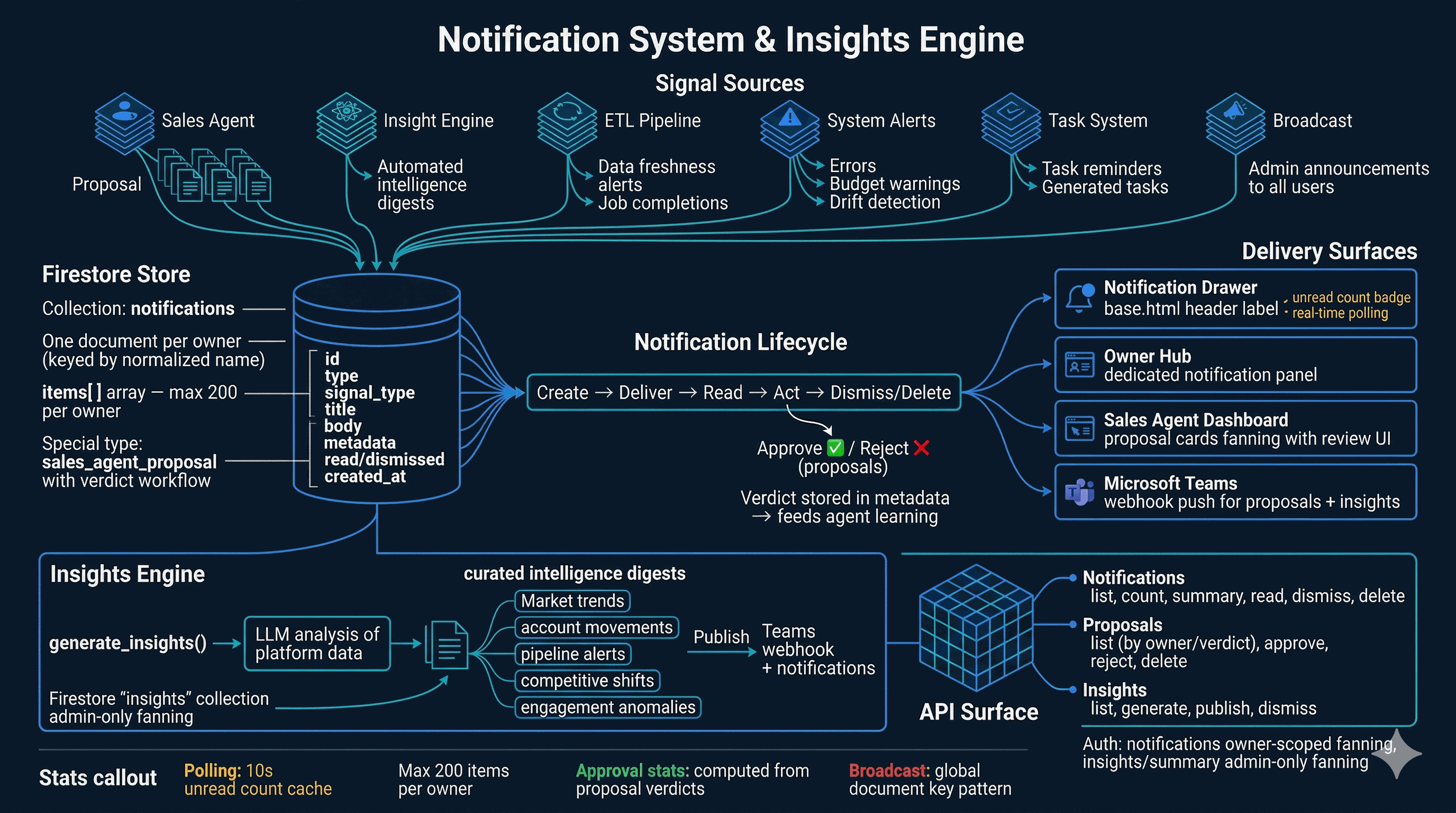
Notification System & Insights Engine

The notification system is the platform-wide messaging infrastructure. Six signal sources generate notifications: the Sales Agent (proposals), the Insight Engine (automated digests), the ETL pipeline (data freshness alerts), system alerts (errors, budget warnings), the task system (reminders), and admin broadcasts. All notifications are stored in Firestore — one document per owner, with an items array capped at 200.

Sales Agent proposals follow a verdict workflow: each proposal can be approved or rejected with notes, and verdicts are stored in metadata to feed the agent's learning on subsequent runs. Four delivery surfaces consume notifications: the slide-out notification drawer in the header (with unread badge), the Owner Hub panel, the Sales Agent dashboard, and Microsoft Teams webhooks. The Insights Engine runs separately — generating LLM-powered intelligence digests on demand, publishable to Teams and the notification feed.

Notifications & Insights
35

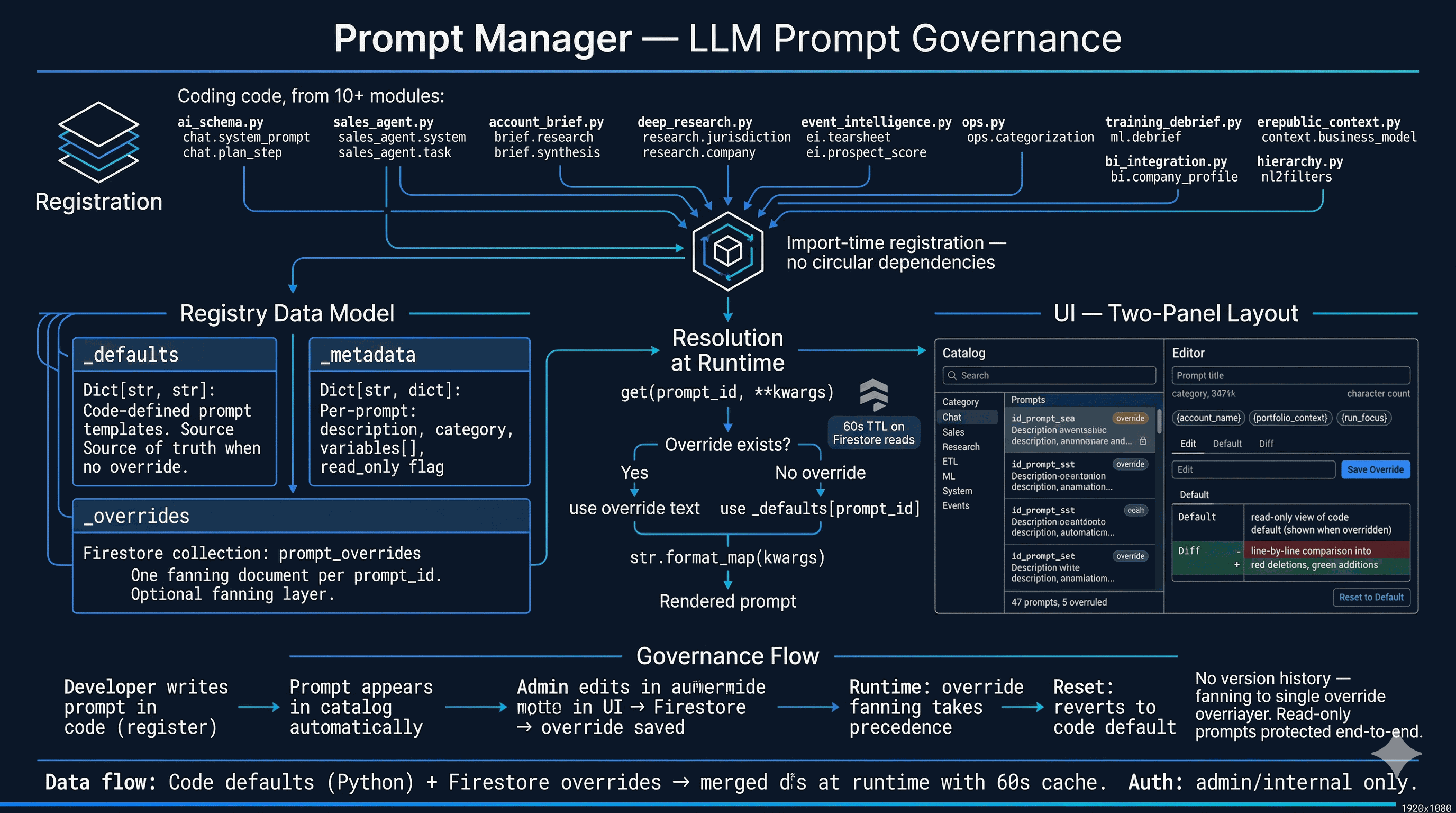
Prompt Manager — LLM Prompt Governance

The Prompt Manager provides centralized governance for every LLM prompt in DataOS. Prompts are registered at import time via register() calls across 10+ modules — chat, sales agent, account brief, deep research, event intelligence, BI integration, ops categorization, and more. The registry stores code defaults plus metadata (description, category, variable placeholders, read-only flag).

A Firestore override layer lets admins edit production prompts without redeploying. The two-panel UI shows a searchable catalog on the left (filterable by category: Chat, Sales, Research, ETL, ML, System, Events) and an editor on the right with three tabs: Edit (with dirty tracking and save), Default (read-only code version), and Diff (line-by-line comparison). Overrides take effect within 60 seconds via TTL-cached Firestore reads. Reset-to-default deletes the override, reverting to the code version. Read-only prompts are protected end-to-end.

Prompt Manager
36

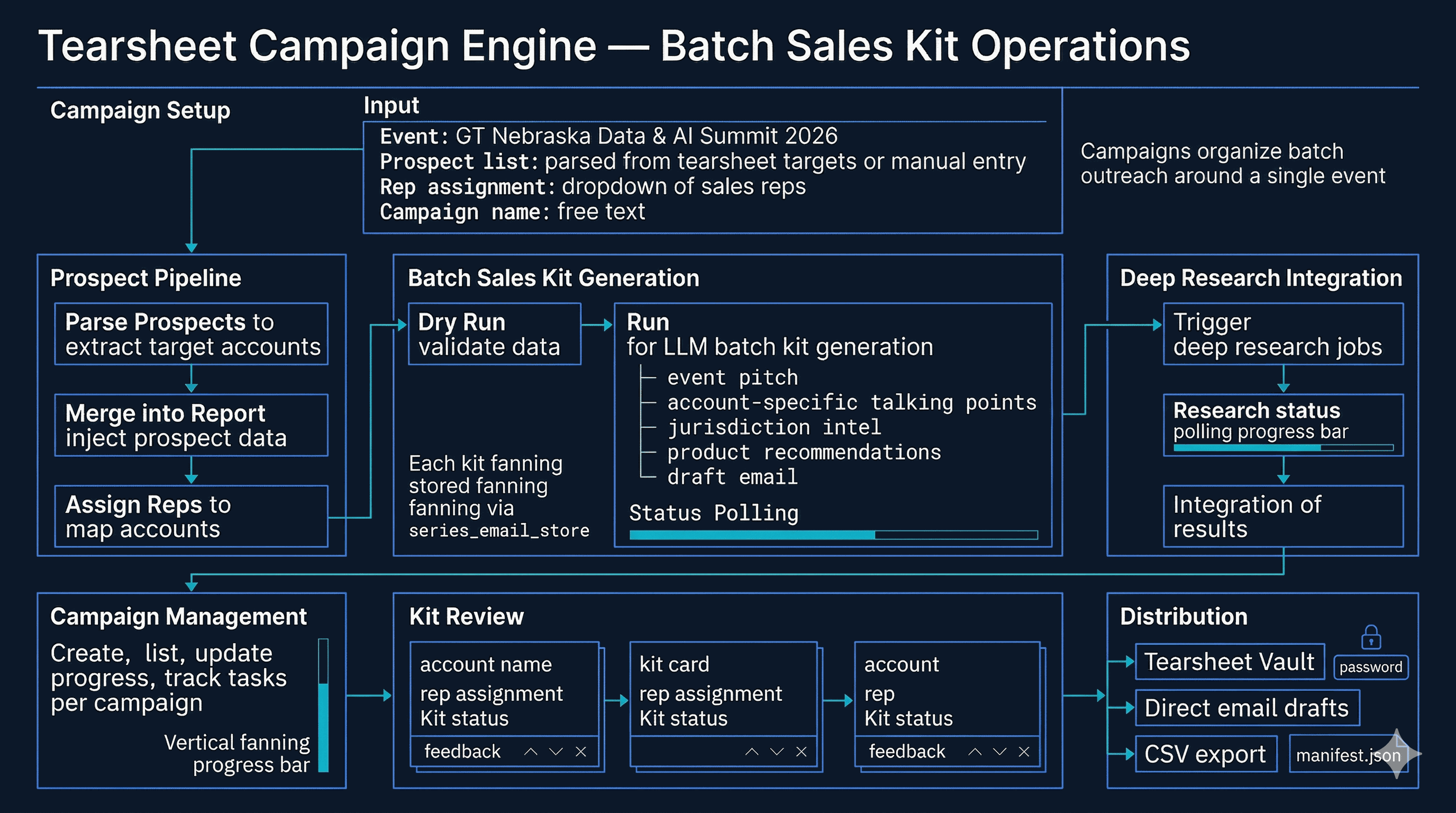
Tearsheet Campaign Engine

The campaign engine extends tearsheets into batch sales kit operations. Starting from an event's prospect list, the system parses target accounts, assigns sales reps, and generates personalized kits at scale. Each kit contains an event pitch, account-specific talking points, jurisdiction intelligence, product recommendations, and a draft email — all produced by LLM with deep research context woven in.

A dry run previews which accounts will receive kits before committing. During execution, status polling shows progress as accounts are processed. Each kit is persisted as an individual Firestore document via the series email store (one document per account to stay under the 1MB limit). Campaign management supports CRUD, progress tracking, and per-kit feedback for quality control. Completed kits flow to the Tearsheet Vault for password-protected sharing or direct email distribution.

Tearsheet Campaign Engine
37

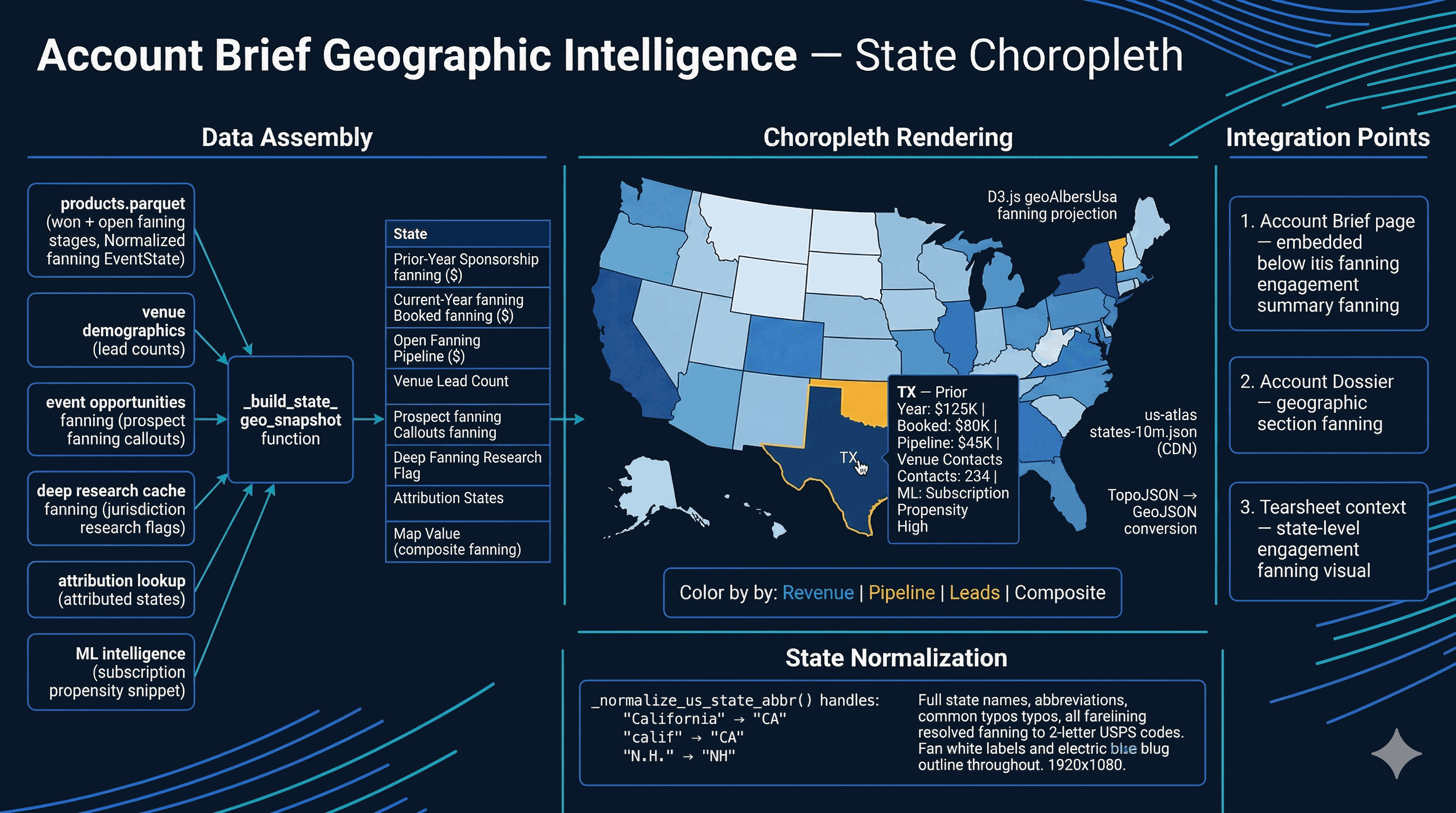
Account Brief Geographic Intelligence

Geographic intelligence adds a state-level choropleth map to account briefs. For each US state relevant to an account, the system assembles prior-year sponsorship revenue, current-year booked revenue, open pipeline value, venue lead counts, prospect callouts, deep research flags, and attribution data. A composite map value drives the color gradient.

The map renders via D3.js with a geoAlbersUsa projection and TopoJSON state boundaries from the US Atlas CDN. States are colored on a sequential blue scale — light for low activity, dark for high. Tooltips show the full data payload per state, including ML signals like subscription propensity. A state normalization function handles abbreviations, full names, and common typos (e.g. "calif" → "CA", "N.H." → "NH"). The map integrates into account briefs, dossiers, and tearsheet context sections.

Account Brief Geographic Intelligence
38

Automated Outflow & Grounded Generation

The Automated Outflow engine combines contact discovery with personalized email sequence generation. For a given account, the system searches ZoomInfo for contacts by company name and job title, then resolves discovered contacts against existing Salesforce records to avoid duplicates. A gap analysis identifies missing decision-maker coverage — roles like CIO, procurement lead, or technical director that have no existing contacts.

Generation is grounded by three deterministic context layers that ride alongside the LLM call. services/outflow_signals.py batch-loads account_narratives, account_tier_preference, ml_inference, and event_inventory to inject 3–5 verified one-liners per opp (tenure, tier history, nearest deadline, peer sponsors, low-inventory pressure — never invented). services/comm_strategist.py assembles a CommunicationPlan from per-opp strategy, account narrative, and the operator's owner fingerprint (built nightly by etl/build_owner_fingerprints.py + etl/build_comm_strategies.py from prior reply threads — see card 61). services/simple_outflow_prompt.py renders the final prompt with these signals so the LLM produces verifiable copy. Outputs are copy-ready email drafts with subject lines, body text, and follow-up cadence; sends route through the email-egress chokepoint (card 44) and stamp Salesforce activity via card 56. Admin/internal access only.

39

Entity Creation

Entity Creation provides a ZoomInfo-to-Salesforce pipeline for creating new CRM entities. Users search ZoomInfo by company name, industry, employee count, and revenue range. Results are cross-referenced against existing Salesforce accounts through a three-outcome deduplication check: exact match (skip), possible match (manual review), and no match (create new). Confirmed new entities are pushed to Salesforce via the simple-salesforce API with structured field mapping.

The system tracks creation history with source attribution, creator identity, and the resulting Salesforce record IDs. Deterministic ZoomInfo→Salesforce account chains, optional gated Firestore overrides, pre-push confirmation modals, and contact reparent are part of the same intake rail. Internal access only.

40

Memory Profiler

The Memory Profiler (/memory-profiler) is the admin-facing performance hub: consolidated health banner, live RSS and 24h time-series, in-flight request gauge, organic cache hit rates, per-route latency percentiles with by-account and by-key breakdowns, sampled RSS deltas, and outbound HTTP host timing. Subsystem cards still expose cache footprints — AccountCache (~162K entries), InstantFilterEngine (~200MB), cached leads LazyFrame, DossierBuilder, PgShardQueryEngine LRU, chat cache — plus GC stats and a manual gc.collect() trigger.

Ops JSON routes (/ops/health, /ops/usage, /ops/timing, /ops/outbound) back the dashboards; admin access only.

41

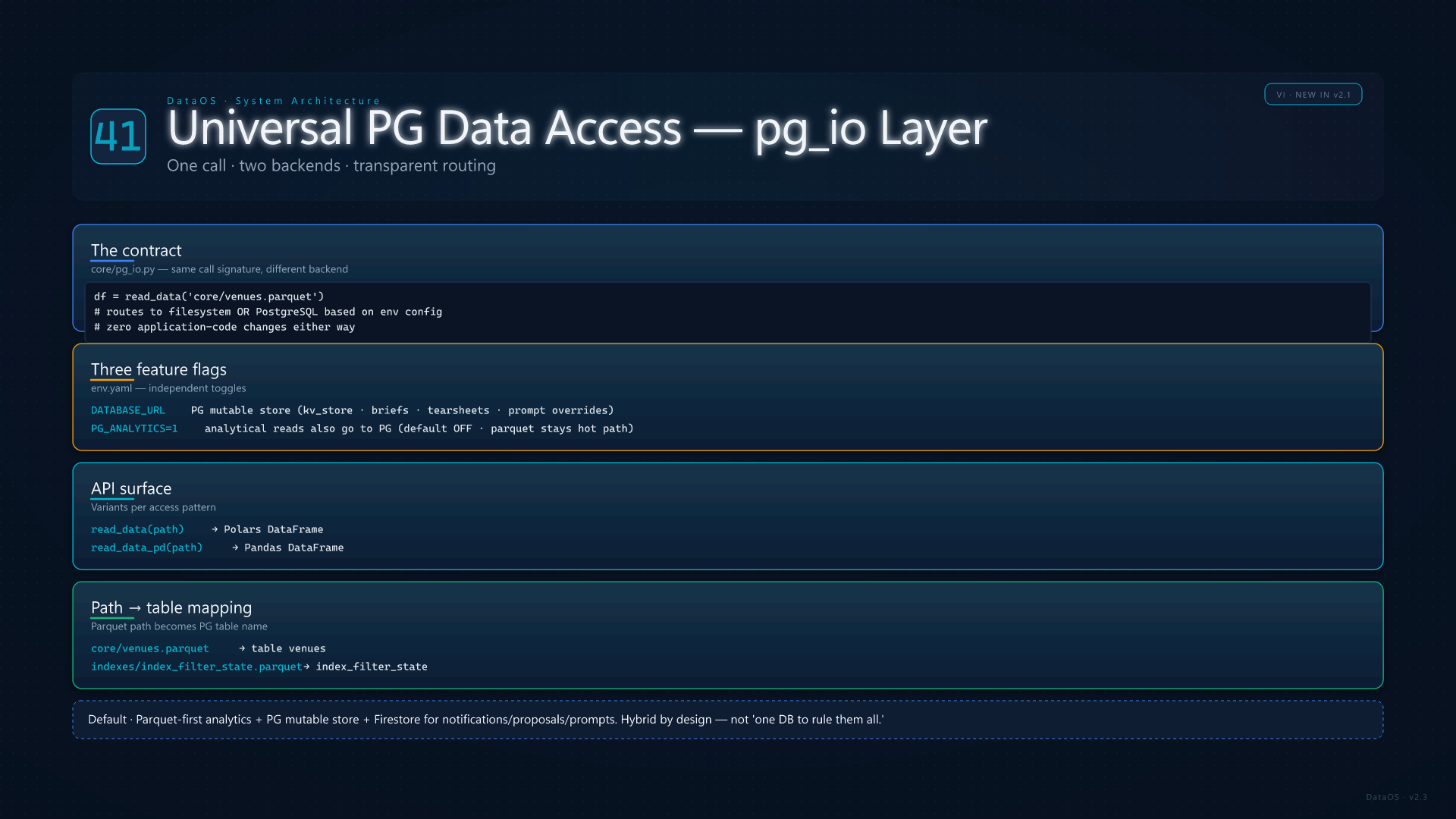
Universal PG Data Access (pg_io)

The pg_io.py module is the universal data access abstraction for analytical reads and some mutable JSON. A single call — read_data("core/venues.parquet") — routes to Parquet on disk or PostgreSQL when DATABASE_URL is set. Analytical routing is independent of PG_ANALYTICS (off by default): Postgres holds the mutable store, while large ETL parquets stay the hot path unless ops enables SQL analytics explicitly.

File paths map to table names (e.g. core/venues.parquetvenues). Column names round-trip via schema-aware mapping. Variants: read_data, read_data_pd, scan_data; read_json / write_json use kv_store for key-value JSONB. Firestore still backs notifications, prompt overrides, book dossiers, and other operational documents — the platform is deliberately hybrid.

Universal PG Data Access
VII
Surfaces & Trust
Synthesis engine, books, egress, API doors, ops pages, and beta lenses
42

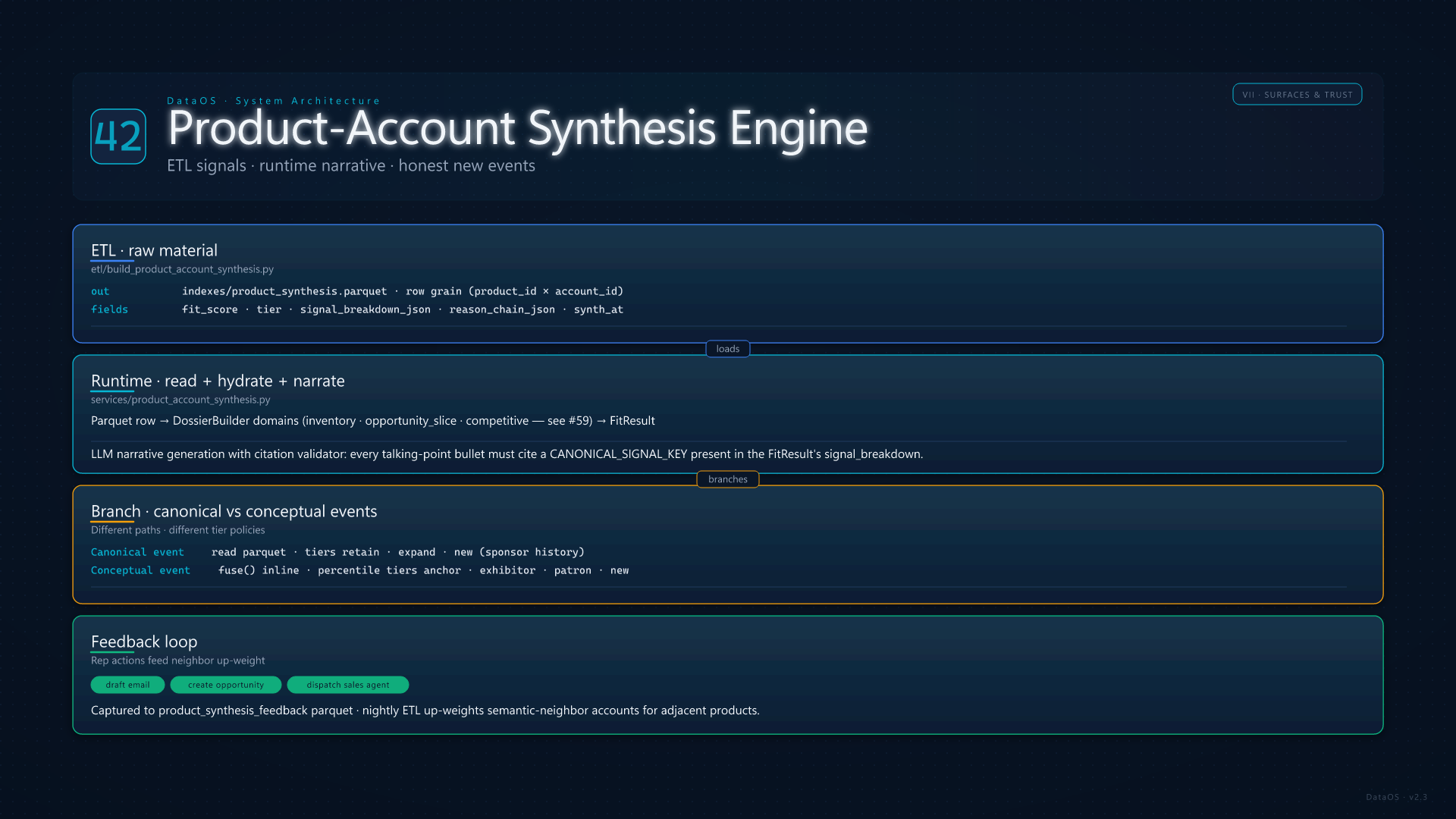
Product-Account Synthesis Engine

The tearsheet stack fuses event product context with per-account intelligence through a deliberate split: ETL precomputes deterministic fit signals into indexes/product_synthesis.parquet (scores, tier, signal breakdown, reason chains — no LLM prose). Runtime loads those rows, hydrates dossiers, and calls the narrative layer for talking points and executive synthesis with citation validation against canonical signal keys.

Canonical events read parquet; conceptual (proposed) events run fuse inline with percentile tiering. Feedback from rep actions (draft email, create opportunity, dispatch sales agent) records to product_synthesis_feedback for downstream weighting. This is the analytical core behind priority call lists and honest-empty tiles for events with no prior instance.

Product-Account Synthesis
43

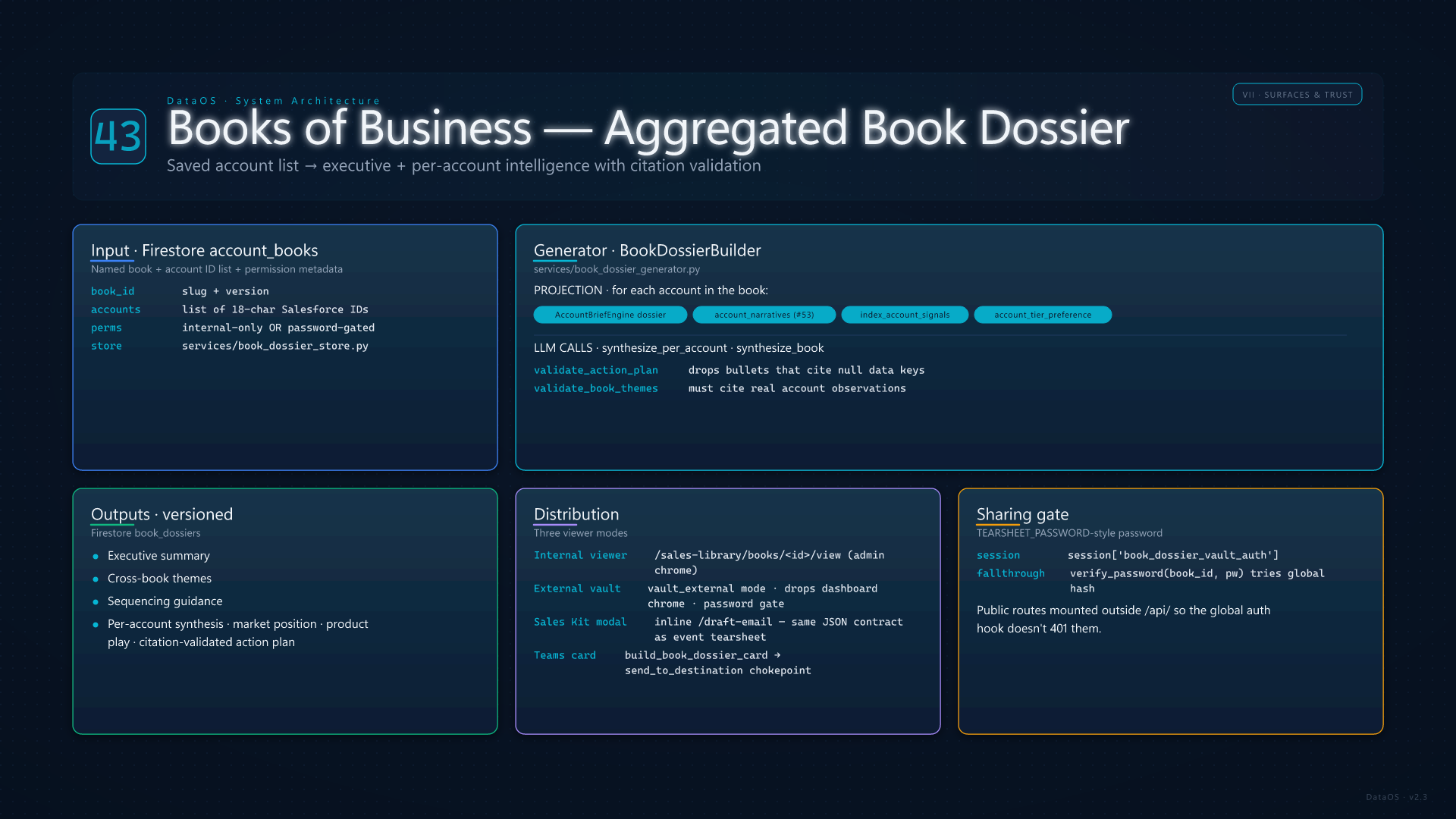
Books of Business — Book Dossier

Books are saved account lists that roll up into a single book dossier: executive summary, cross-book themes, sequencing guidance, and per-account synthesis (market position, product play, citation-validated action plan). Generation projects Account Brief–style dossier fields, narratives, tier preference, and the account-signals index.

Firestore stores book metadata and versioned dossiers. Operators share read-only viewer links (password gate mirrors tearsheet vault semantics). APIs support generate, export HTML, Teams card push, and public draft-email for per-account prospecting kits grounded in the book synthesis.

Books of Business
44

Email Egress, Intents & Engagements

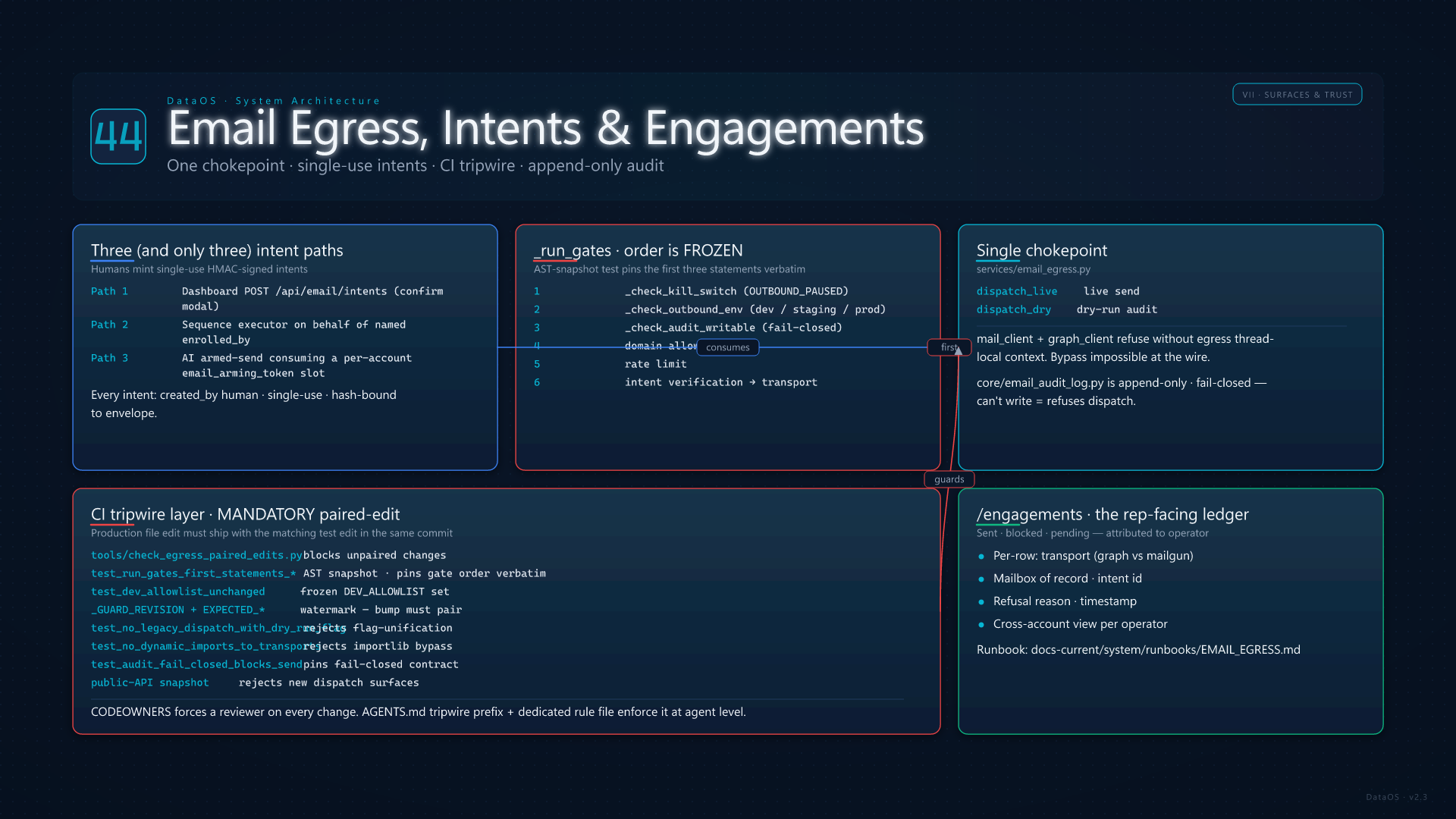
Every live send routes through one chokepoint: services/email_egress.py::dispatch_live (or dispatch_dry) after _run_gates in a frozen order — kill-switch (OUTBOUND_PAUSED) → environment (OUTBOUND_ENV ∈ {dev, staging, prod}) → audit writability → domain allowlist → rate limit → intent verification. Transports (mail_client / Mailgun, graph_client / Microsoft Graph) refuse to fire without egress thread-local context, so bypass is impossible at the wire layer. Humans mint single-use, HMAC-signed intents via three paths only: dashboard POST /api/email/intents (confirm modal), sequence executor on behalf of the named enrolled_by human, or AI armed-send consuming a per-account email_arming_token slot. core/email_audit_log.py is append-only and fail-closed — if it can't write, dispatch refuses.

This is the only subsystem with mandatory paired-edit CI enforcement: tools/check_egress_paired_edits.py blocks any change to a protected file that doesn't ship with the matching test edit; test_run_gates_first_statements_are_kill_switch_then_env_then_audit is an AST snapshot test that pins the first three statements verbatim; test_dev_allowlist_unchanged freezes the DEV_ALLOWLIST frozenset; _GUARD_REVISION is a watermark with a paired EXPECTED_GUARD_REVISION in tests; test_no_legacy_dispatch_with_dry_run_flag rejects unifying live/dry into a flag; test_no_dynamic_imports_to_transports rejects importlib.import_module("services.mail_client"); test_audit_fail_closed_blocks_send pins the fail-closed contract; the public-API snapshot rejects new dispatch surfaces. CODEOWNERS forces a reviewer on every change. The Engagements page (/engagements) is the rep-facing ledger of sent / blocked / pending mail attributed to the authenticated operator with transport (graph vs mailgun), mailbox, intent id, and refusal reason for each row. Operator runbook: docs-current/system/runbooks/EMAIL_EGRESS.md.

Email Egress and Engagements
45

HTTP API Surfaces — V1, V2 & Teams

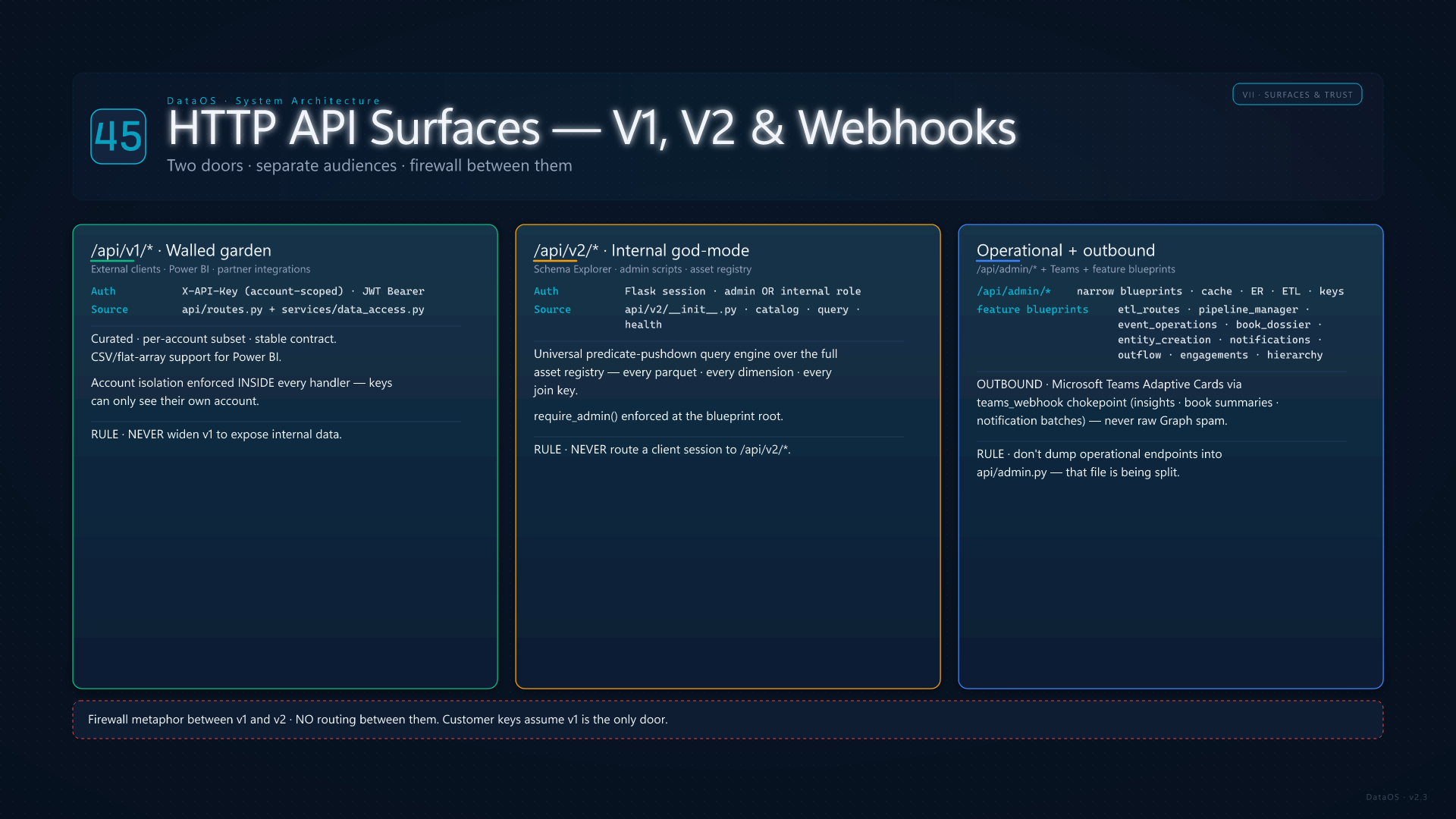
/api/v1/* is the customer-facing wall: API-key or JWT auth, account-scoped payloads, stable contracts for Power BI and partners — never widened to internal catalog data. /api/v2/* is admin/internal god-mode: asset registry, predicate-pushdown query, joins across registered parquets — never exposed to client sessions.

Operational blueprints (ETL, cache, ER tooling) stay under /api/admin/* or feature-specific prefixes. Microsoft Teams receives Adaptive Cards and webhook pushes from insights, book dossier summaries, and notification batches — always through the shared webhook chokepoint, not ad-hoc HTTP from features.

HTTP API Surfaces
46

Open Opportunities & Quarterly Mass Outflow

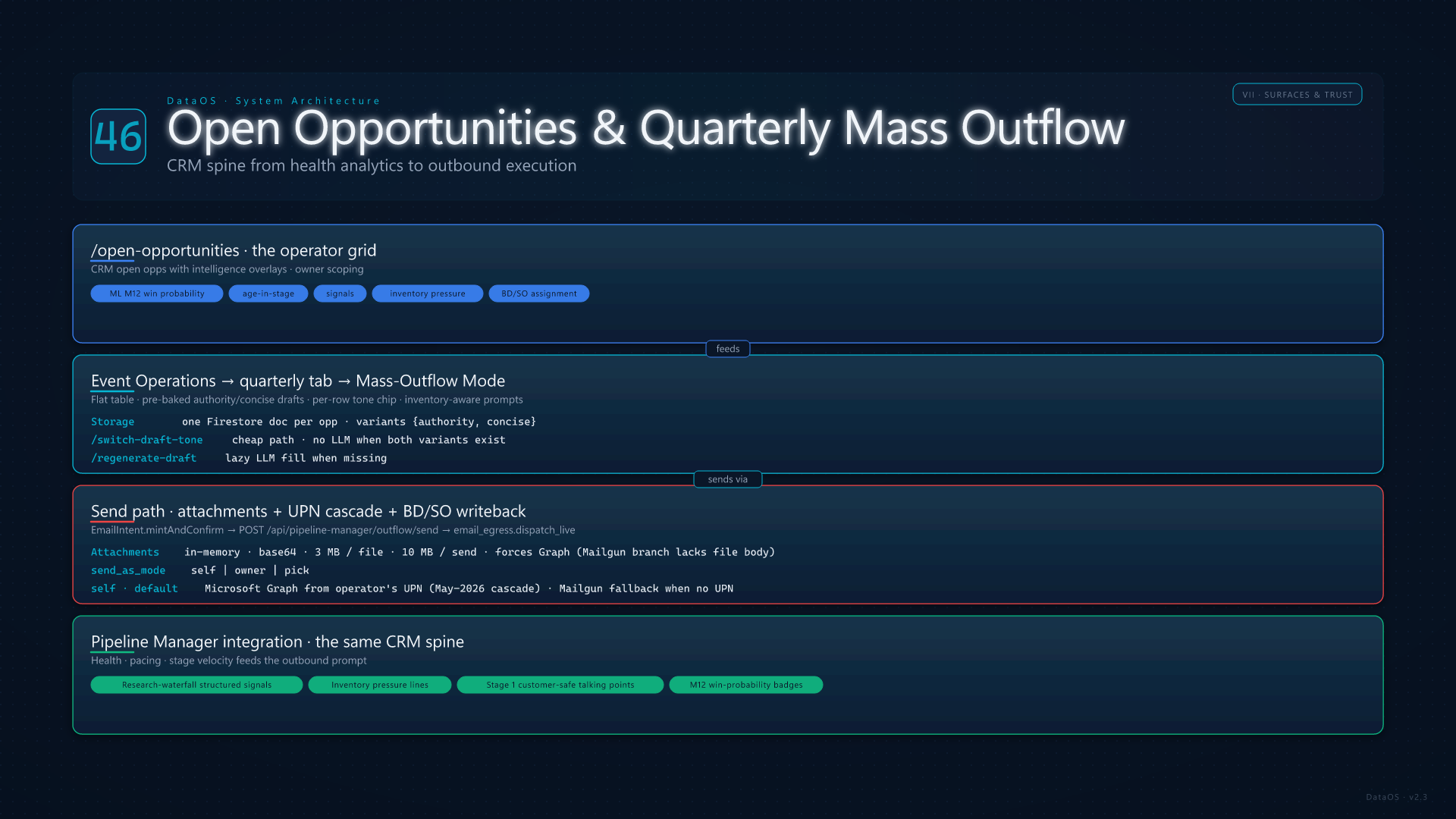
The Open Opportunities workspace (/open-opportunities) is the operator-facing grid over CRM open opps with intelligence overlays — owner scoping, ML M12 win probability, age in stage, signals, and inventory pressure. Event Operations → quarterly pipeline adds Mass-Outflow Mode: a flat table where each row carries a pre-baked authority/concise draft pair (one Firestore doc per opp, both variants in variants{authority,concise}) with a per-row tone chip that swaps via /switch-draft-tone (no LLM round-trip when both exist) or /regenerate-draft (lazy LLM fill when missing). The toolbar's Bake tone button is a bulk default. Authority-tone prebake injects 3–5 grounded signals from services/outflow_signals.py (tenure, tier history, deadlines, peer sponsors, low-inventory saturation — see card 38), and the inventory grid is server-side filtered to the opp's pitched tier in services/quarterly_pipeline.py. Detail Mode (the original tree) is one toggle click away.

Sends route through EmailIntent.mintAndConfirmPOST /api/pipeline-manager/outflow/sendemail_egress.dispatch_live with attachments base64-encoded in memory (3 MB per file, 10 MB per send; attachments force Graph because the Mailgun branch doesn't ship file bodies). Send-as mode is self | owner | pick: self defaults to Microsoft Graph from the operator's own Outlook mailbox via the May-2026 UPN cascade (APIKey.email → sales-agent personalization lookup → session user_email, excluding synthetic admin emails) and falls back to Mailgun only when no UPN is available; owner promotes the send to Graph from the opp owner's mailbox while still attributing SF activity to the operator; pick chooses per-row. Salesforce activity writeback uses the pre-resolved salesforce_user_id binding (card 56) instead of the legacy Email LIKE SOQL lookup, with first-touch BD/SO stamping on BD_Rep__c / Sales_Associate__c when the actor carries those flags. Pipeline Manager integrates the research-waterfall structured signals + inventory-pressure lines into the same Stage 1 prompt that produces customer-safe talking points — one CRM spine from health analytics to outbound execution.

Open Opportunities and Mass Outflow
47

Research Waterfall, Deep Research & Signal Index

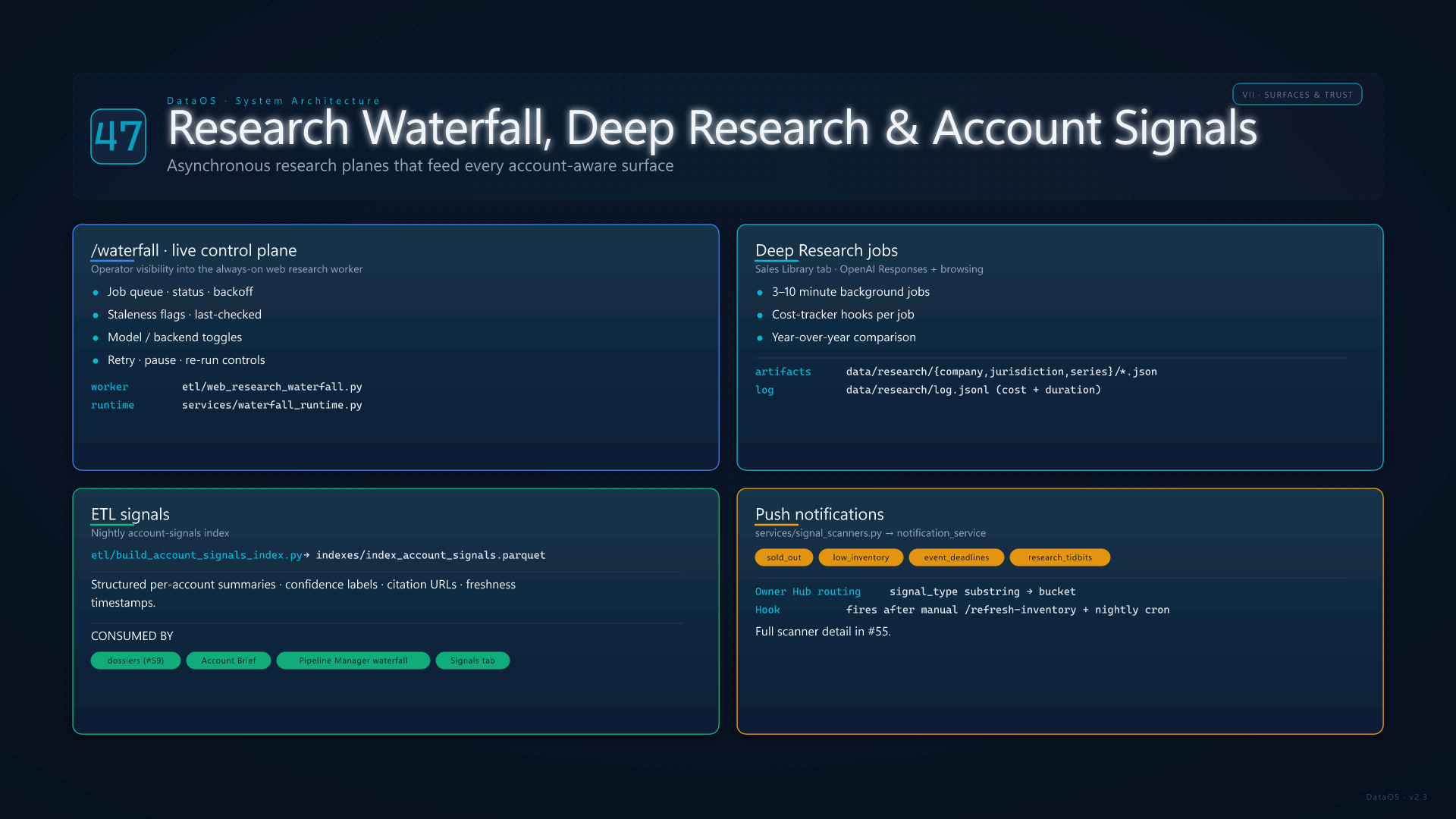
The Research Waterfall UI (/waterfall) is the live control plane for the web-research worker: job status, backoff, and operator visibility into always-on enrichment. Deep Research (Sales Library tab) runs longer OpenAI jobs with browsing; artifacts land under data/research/ with cost tracking.

Nightly ETL builds indexes/index_account_signals.parquet — structured summaries per account consumed by dossiers, briefs, and pipeline intelligence. Signal scanners (sold-out inventory, low-inventory pressure) feed Owner Hub and notifications on a fixed cadence plus manual inventory refresh hooks.

Research Waterfall and Signals
48

Award Collection, Tag Manager & CRM Intake Rail

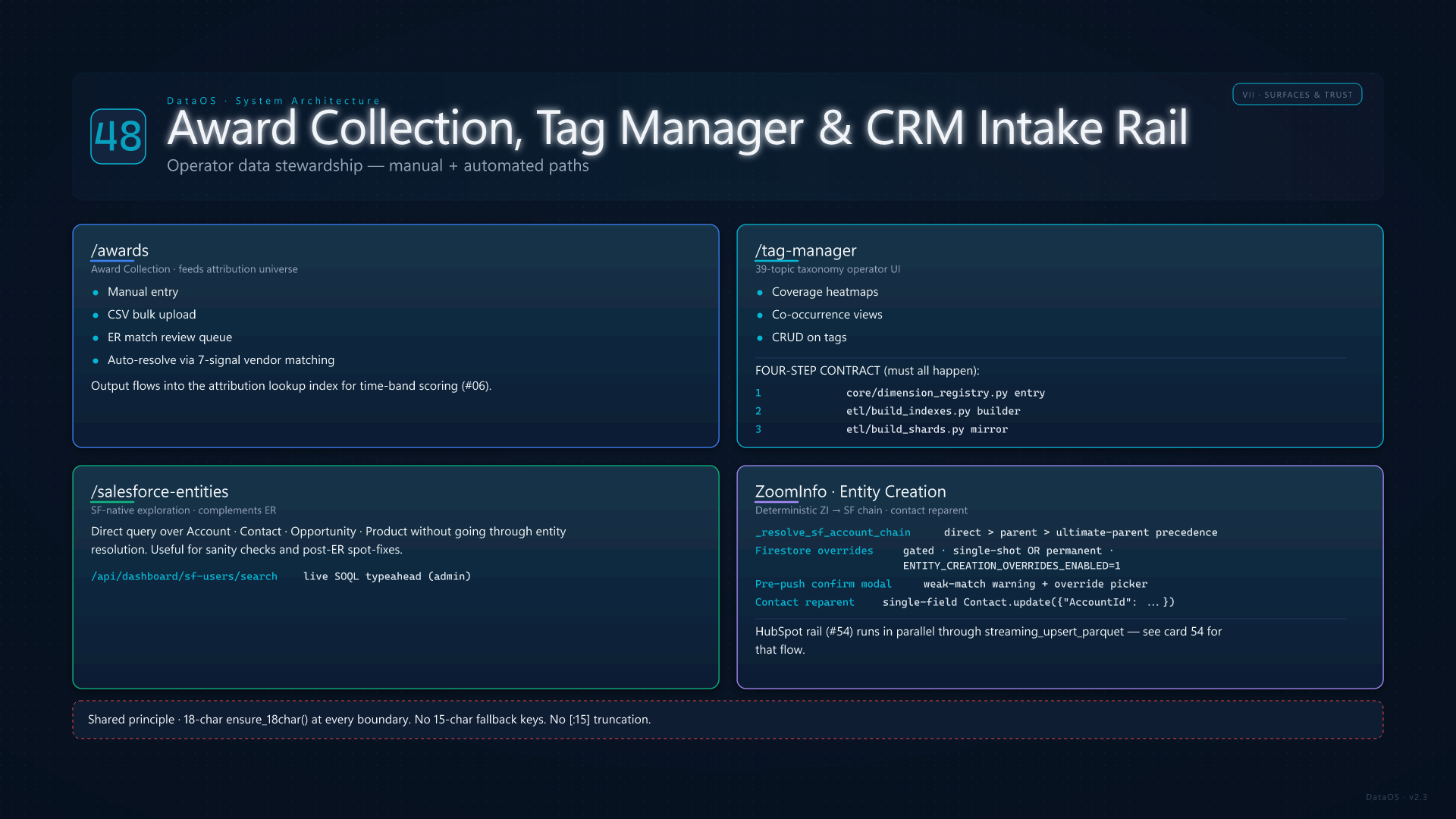
Award Collection (/awards) ingests government contract awards for attribution — manual entry or CSV bulk upload with ER match review. Tag Manager (/tag-manager) is the operator UI on the 39-topic taxonomy: coverage heatmaps, co-occurrence views, CRUD on tags. Every taxonomy or dimension change triggers a four-step ETL contract: (1) entry in core/dimension_registry.py, (2) index builder in etl/build_indexes.py, (3) shard mirror in etl/build_shards.py, (4) AI schema registration in services/ai_schema.py. Skip a step and the filter engine, agent, or schema explorer silently fails.

Salesforce Entities (/salesforce-entities) complements Entity Resolution with SF-native exploration. ZoomInfo / Entity Creation adds deterministic ZI-to-SF chain resolution (_resolve_sf_account_chain precedence: direct > parent > ultimate-parent), optional gated Firestore overrides (ENTITY_CREATION_OVERRIDES_ENABLED=1, single-shot or permanent), pre-push confirmation modals with weak-match warnings, and a one-line contact reparent flow (single-field Contact.update({"AccountId": new_id})) — see card 39. The HubSpot intake rail (card 54) runs in parallel: etl/hubspot_entities.py upserts contacts/companies/engagements; etl/hubspot_email_events.py captures opens/clicks; etl/hubspot_campaigns.py mirrors campaign membership — all through the chokepoint etl/parquet_io.py::streaming_upsert_parquet to keep memory bounded on multi-million-row tables.

Awards Tags and CRM Intake
49

Department Dashboards — Teams Lenses

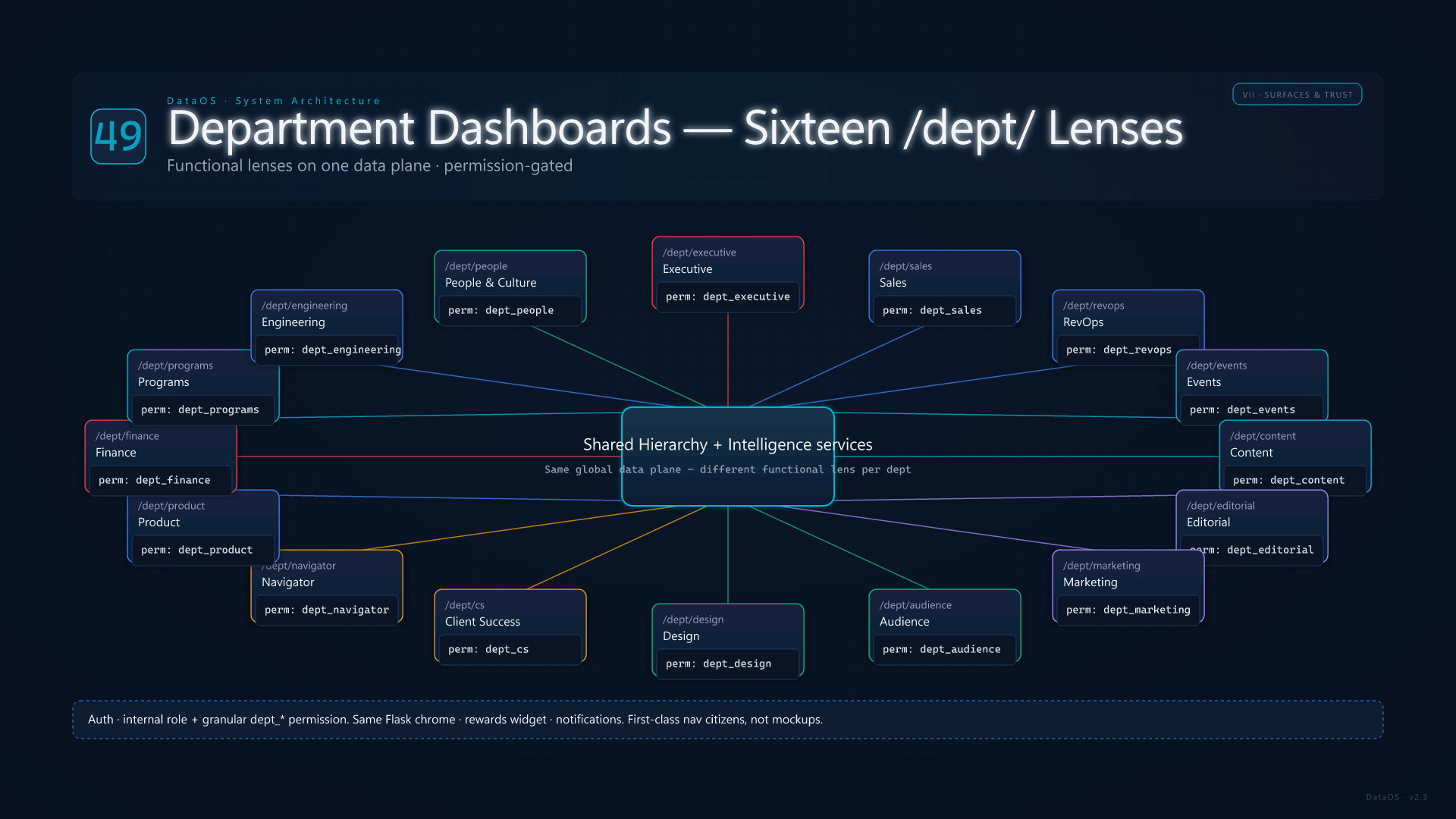
Sixteen /dept/<slug> routes (Executive, Sales, RevOps, Events, Content, Editorial, Marketing, Audience, Design, Client Success, Navigator, Product, Finance, Programs, Engineering, People) provide permission-gated landing pages that slice the same global data plane for functional audiences. Access is module-driven (dept_* permissions) alongside the general internal role.

These pages are first-class nav citizens — not mockups — and pair with the rewards widget, notifications, and shared static bundles for mobile-safe chrome.

Department Dashboards
50

Beta Analytics Lab

Admin-only Beta Tools in the sidebar surface experimental analytics without polluting the core nav: Portfolio Planner (launch scenarios and gap simulation on top of planner services), whitespace matrix, Action Queue task-style drill-downs, and Win/Loss Intelligence for deal post-mortems.

Together with Home (/home), Leaderboard (rewards ranking), standalone Attribution explorer permissions, Client ROI Dashboard (client-only shard economics), Sitemap, README, and the consolidated Memory Profiler / ops timing endpoints, these cover the long tail of URL-level behavior outside the primary feature cards above.

Beta Analytics Lab
VIII
Hidden Pillars
The engines, indexes, and operator levers that don't have their own page but underpin every page that does
51

Revenue Intelligence Hub — Five-Tab Workspace

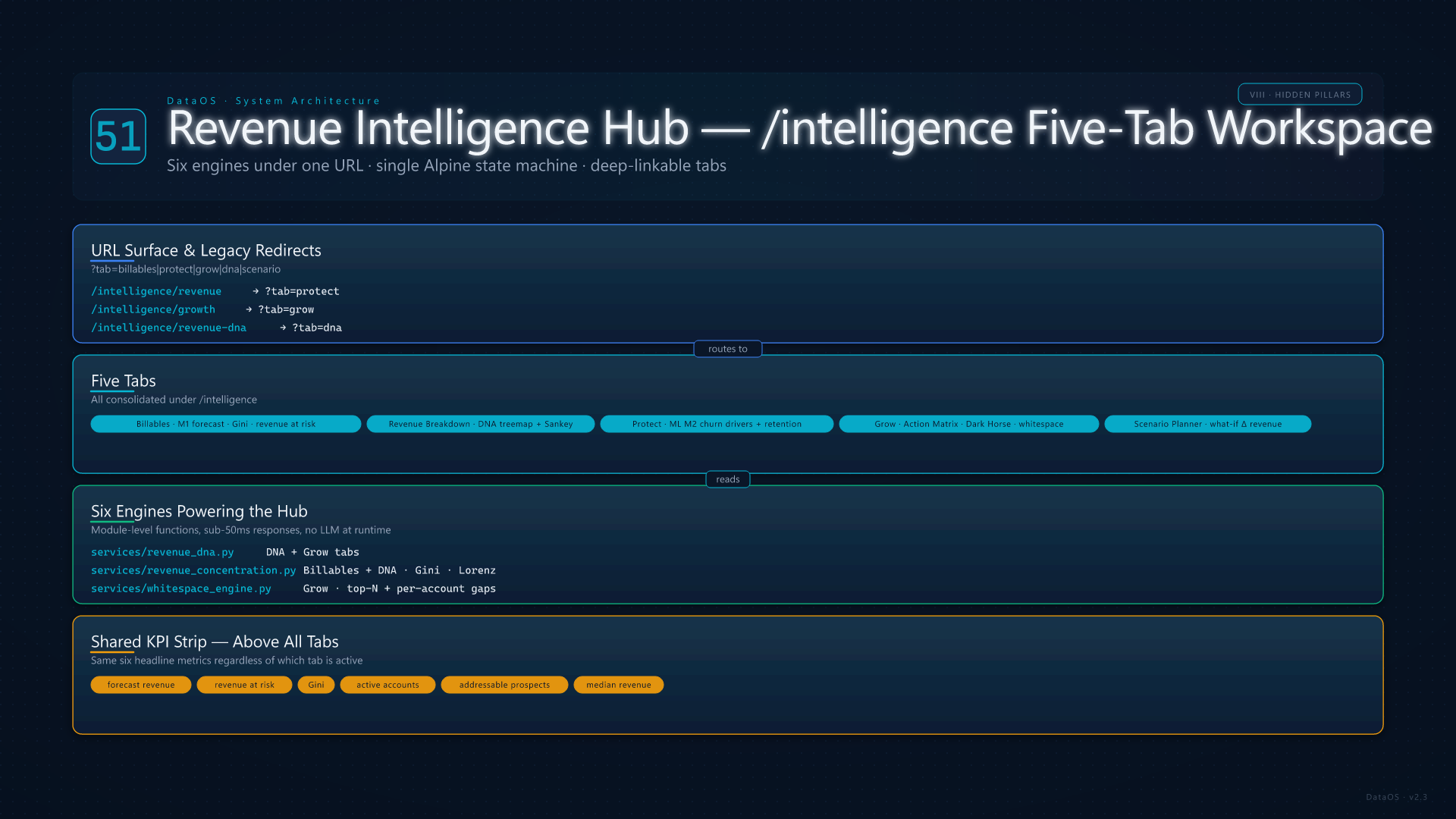
Card 14 (Revenue DNA) describes only one slice. /intelligence is actually a five-tab consolidation reached via ?tab=billables|protect|grow|dna|scenario, with legacy URLs (/intelligence/revenue, /intelligence/growth, /intelligence/revenue-dna, /scenario) redirecting in. Billables is the on-page revenue performance pane (forecasted vs booked vs at-risk, ML M1 forecast totals, Gini concentration, addressable prospects). Revenue Breakdown renders the DNA treemap and graduation-path Sankey from services/revenue_dna.py + services/revenue_concentration.py. Protect is the retention dashboard backed by ML M2 and rule-based churn drivers. Grow surfaces the Action Matrix, Dark Horse / cross-sell expansion, and whitespace gaps via services/revenue_dna.py + services/whitespace_engine.py (see card 62). Scenario Planner drives services/portfolio_planner.py for "what if" simulations — adding events, upgrading tiers, cross-sell bundles, each projecting Δ revenue against the current base.

The hub stitches together six engines that would otherwise be pages of their own — DNA, concentration, retention, win/loss, whitespace, planner — under one URL with a single Alpine state machine, tab-deep-linkable, and shared KPI strip (forecast revenue, revenue at risk, Gini, active accounts, addressable prospects, median revenue).

Revenue Intelligence Hub
52

Solicitations & Procurement Trends Pipeline

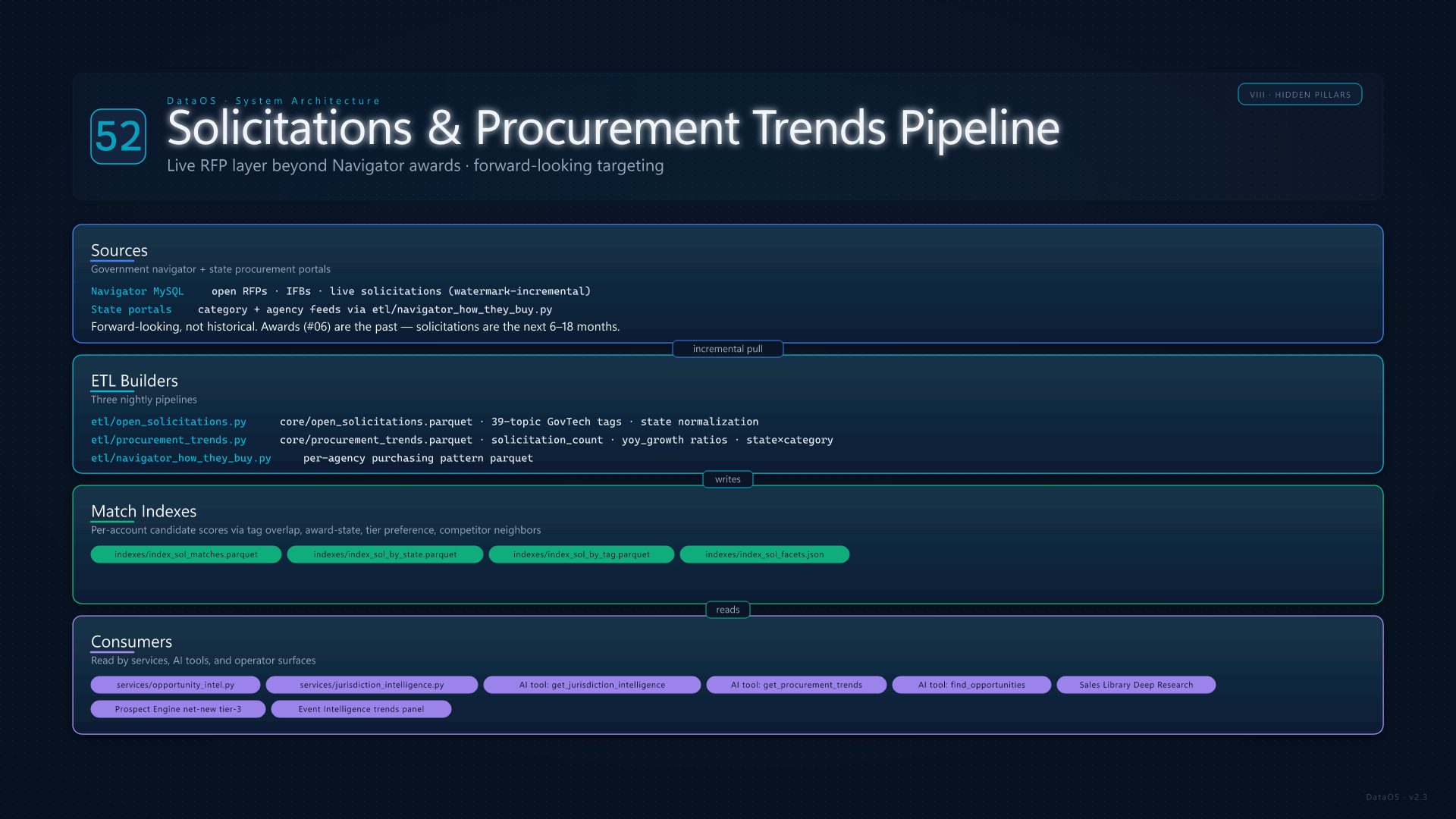
Beyond bid history (Navigator awards), DataOS ingests open solicitations — live RFPs and IFBs not yet awarded. etl/open_solicitations.py pulls from Navigator with watermark-incremental fetch into core/open_solicitations.parquet, enriches with state and 39-topic GovTech tags, then builds indexes/index_sol_matches.parquet (per-account candidate scores from tag overlap, award-state overlap, tier preference, competitor-neighbor signals), indexes/index_sol_by_state.parquet, indexes/index_sol_by_tag.parquet, and indexes/index_sol_facets.json. The result is a precomputed map of "which open solicitations match which accounts" served by services/opportunity_intel.py.

Companion: etl/procurement_trends.py aggregates state-by-category procurement into core/procurement_trends.parquet with solicitation_count and YoY growth ratios — the data behind the IT Category Trends page (/event-intelligence) and the Jurisdiction Intelligence service. etl/navigator_how_they_buy.py distills purchasing patterns per agency. These three artifacts feed the AI agent's get_jurisdiction_intelligence, get_procurement_trends, and find_opportunities tools, the Sales Library Deep Research jurisdiction profiles, and the prospect engine's tier-3 net-new scoring (card 12).

Solicitations and Procurement Trends
53

Account Intelligence Indexes — Narratives, Signals, Tier Affinity

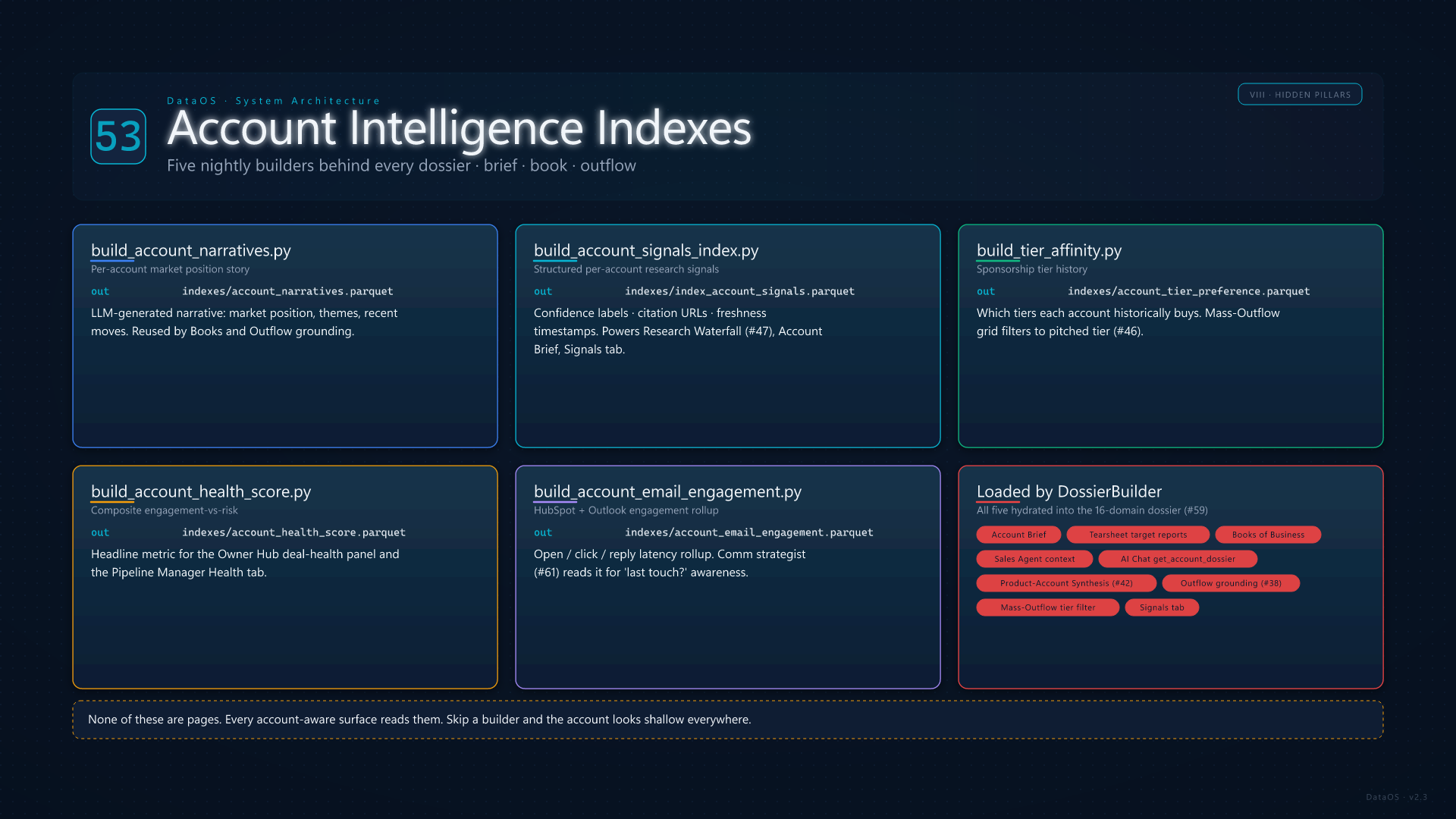
Five nightly ETL builders produce the account-intelligence layer that feeds dossiers, briefs, books, outflow grounding, and the AI agent — none of these have their own page, but every account-aware surface depends on them. etl/build_account_narratives.py writes a per-account LLM-generated narrative (indexes/account_narratives.parquet): market position, themes, recent moves. etl/build_account_signals_index.py writes indexes/index_account_signals.parquet — structured per-account research summaries with confidence labels, citation URLs, and freshness timestamps consumed by the Research Waterfall (card 47), Account Brief, and the Signals tab.

etl/build_tier_affinity.py writes indexes/account_tier_preference.parquet (which sponsorship tiers each account historically buys, used by Mass-Outflow grid filtering and tier-pitched signal injection). etl/build_account_health_score.py writes a composite engagement-vs-risk score. etl/build_account_email_engagement.py rolls up HubSpot opens/clicks and Outlook reply latency into indexes/account_email_engagement.parquet for the comm strategist (card 61). All five are loaded by services/account_dossier.py (card 59) and exposed through get_account_dossier + get_account_predictions tools.

Account Intelligence Indexes
54

HubSpot Intake Pipeline

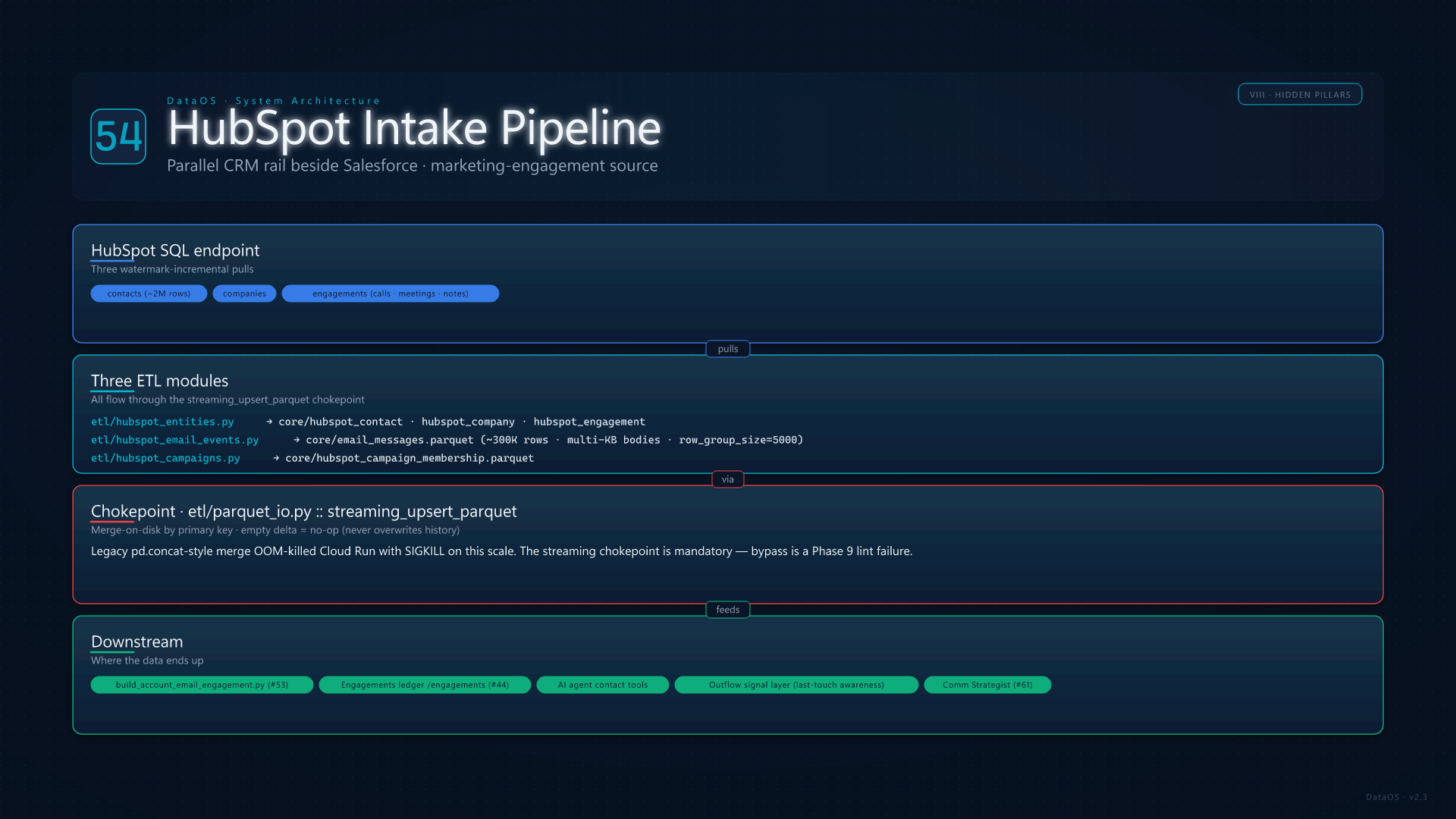
Salesforce is the system of record for revenue, but HubSpot is where marketing engagement lives — and DataOS ingests both. Three ETL modules form a parallel intake rail: etl/hubspot_entities.py upserts contacts (~2M), companies, and engagements through etl/parquet_io.py::streaming_upsert_parquet with primary-key merge-on-disk and watermark-incremental SQL pulls; etl/hubspot_email_events.py captures opens/clicks/bounces (~300K rows with multi-KB bodies) at row_group_size=5000 to keep Cloud Run RAM bounded; etl/hubspot_campaigns.py mirrors campaign membership.

The streaming_upsert_parquet chokepoint is mandatory — the legacy pd.concat-style merge has OOM-killed Cloud Run with SIGKILL on this scale. Empty deltas are no-ops (never overwrite history). Outputs feed etl/build_account_email_engagement.py (card 53), the Engagements ledger (card 44), the AI agent's contact tools, and the Outflow signal layer's "did this contact open the last touch?" check.

HubSpot Intake Pipeline
55

Inventory Intelligence & Signal Scanners

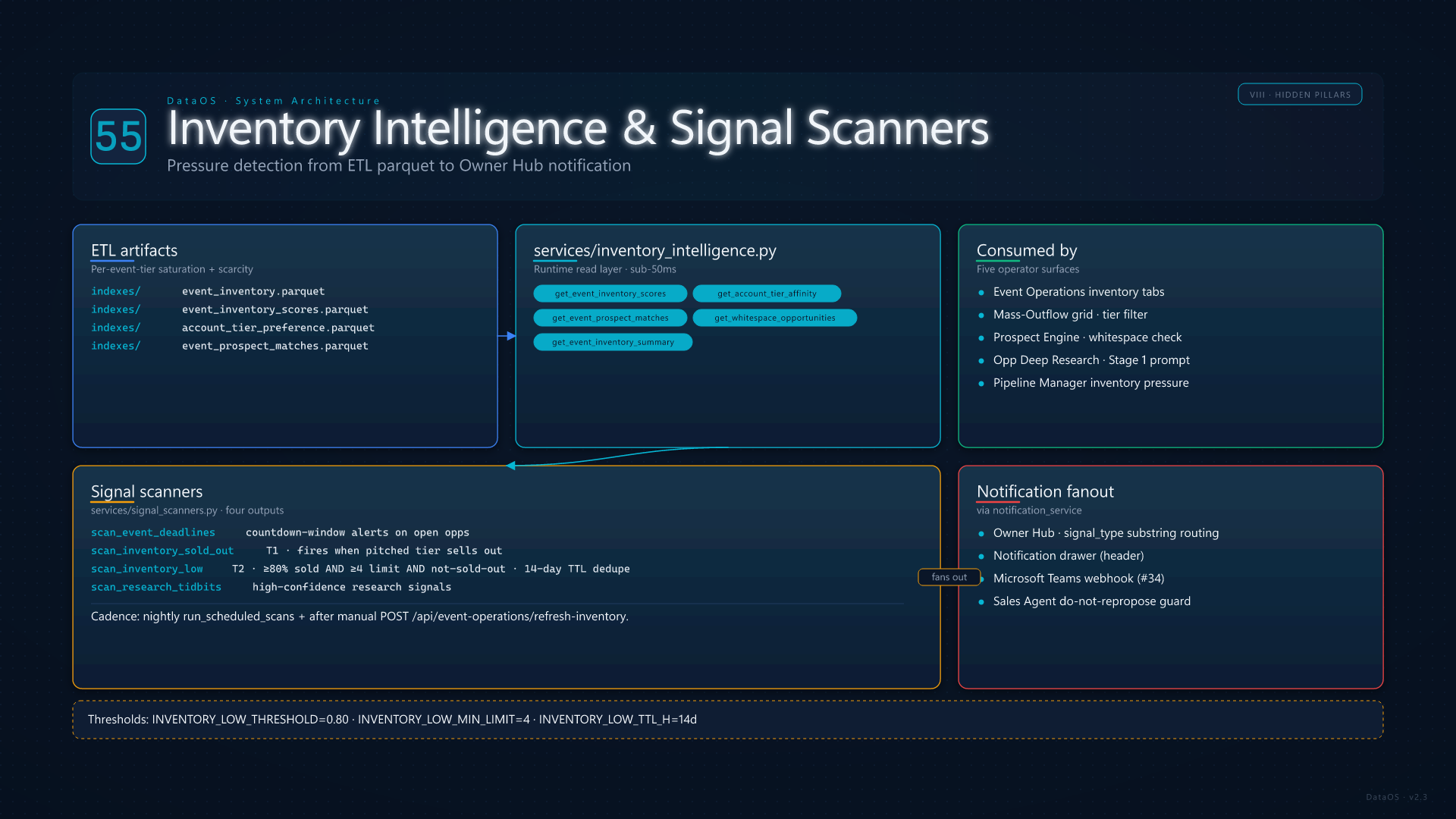
services/inventory_intelligence.py is the runtime read layer over four ETL artifacts: indexes/event_inventory.parquet (per-event-tier sold counts and limits), indexes/event_inventory_scores.parquet (saturation + scarcity score), indexes/account_tier_preference.parquet, and indexes/event_prospect_matches.parquet. It powers Event Operations inventory tabs, Mass-Outflow grid filtering, the prospect engine's whitespace check, and the Stage-1 talking-points prompt for opp Deep Research (which renders per-tier saturation lines like "Bronze at TX DGS: 92% sold (11/12) — filling fast").

services/signal_scanners.py rides on top, emitting four scanner outputs into the notification system: scan_event_deadlines (countdown-window alerts on open opps), scan_inventory_sold_out (T1, fires when a pitched tier sells out), scan_inventory_low (T2, fires at ≥ 80% sold AND ≥ 4 limit AND not-sold-out, 14-day TTL), and scan_research_tidbits (high-confidence research signals). All scanners run in run_scheduled_scans nightly and re-fire after manual /api/event-operations/refresh-inventory. Owner Hub buckets them by signal_type substring; notification_service fans them to Teams (card 34).

Inventory Intelligence and Signal Scanners
56

Send-As Identity, SF User Binding & Activity Writeback

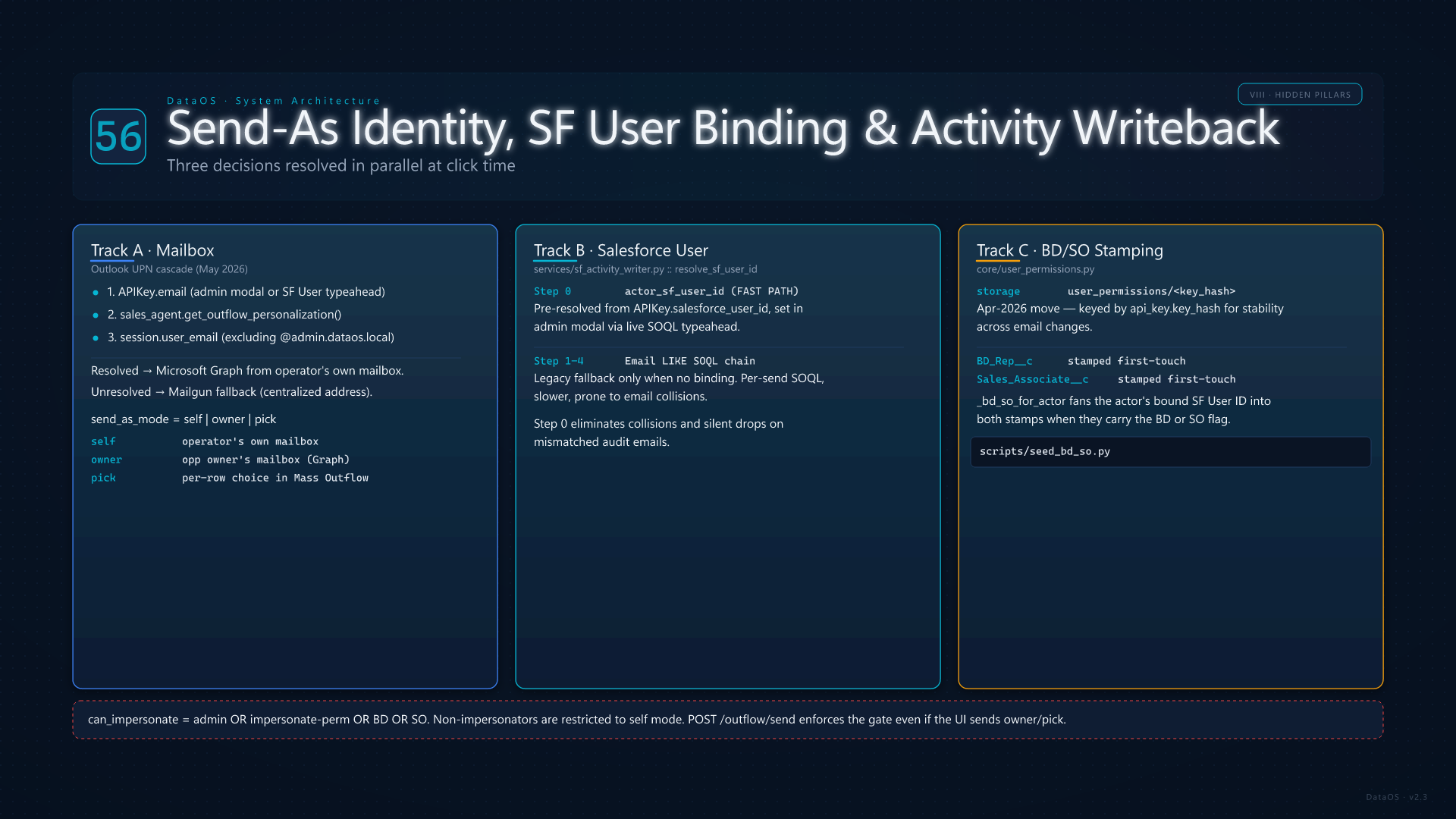
When a rep clicks Send in Mass Outflow, three identity questions get answered in parallel: which mailbox the message leaves from, which Salesforce User the activity attributes to, and which BD/SO fields get stamped on the opp. core/user_permissions.py stores the per-key send-as mode and BD/SO flags (post-Apr-2026 keyed by api_key.key_hash for stability). services/sf_activity_writer.py::resolve_sf_user_id walks a five-step priority chain whose fast-path step 0 is the pre-resolved actor_sf_user_id bound to the API key via the live SOQL typeahead in the admin modal — no per-send Email LIKE SOQL, no email-collision risk, no silent drops on mismatched audit emails.

The Outlook UPN cascade (May 2026) makes Self-mode default to Microsoft Graph from the operator's own mailbox: APIKey.email → sales-agent personalization lookup → session user_email (excluding synthetic @admin.dataos.local). When no UPN resolves, the send falls back to Mailgun's centralized address. Owner-mode promotes the send to Graph from the opp owner's mailbox while still attributing activity to the operator. stamp_opp_bd_so writes BD_Rep__c / Sales_Associate__c on first touch only, sourced from _bd_so_for_actor which fans the actor's own bound SF User ID into both stamps when they carry the BD/SO flag. Seed BD/SO assignments live in scripts/seed_bd_so.py.

Send-As Identity and SF Writeback
57

Cloud Run Topology & Memory Levers

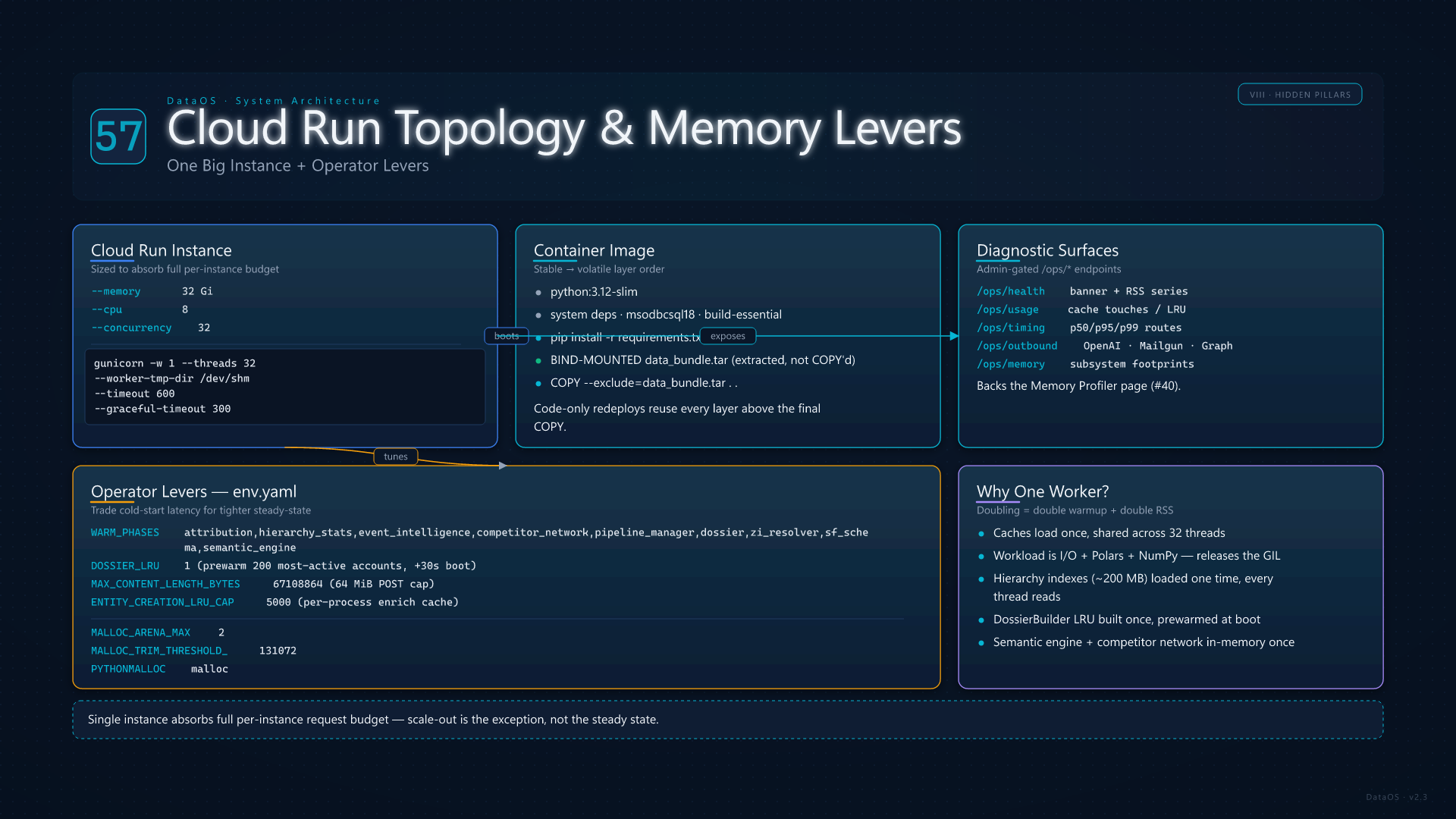
DataOS runs on Cloud Run sized to --memory 32Gi --cpu 8 --concurrency 32 with gunicorn -w 1 --threads 32 --worker-tmp-dir /dev/shm --timeout 600 defined in the Dockerfile. A single instance is built to absorb the entire per-instance request budget so scale-out is the exception, not the steady state — doubling workers would double warmup and double resident memory because the in-memory caches (hierarchy indexes, semantic engine, dossier builder, competitor network) load once and are shared by all 32 GIL-releasing threads (Polars + NumPy). Data is baked into the image as data_bundle.tar (bind-mounted at build, never COPY-embedded) so the runtime starts with the parquet tree already extracted at /app/data/.

Operators tune steady-state behavior with a small set of env knobs documented in AGENTS.md: WARM_PHASES (skip heavy boot phases to trade cold-start latency for tighter RSS — none through the full default set), DOSSIER_LRU=1 (prewarm the bounded LRU with the 200 most active accounts, +30s boot), MAX_CONTENT_LENGTH_BYTES=67108864 (64 MiB inbound POST cap), ENTITY_CREATION_LRU_CAP=5000 (per-process enrich cache bound), and the GLIBC allocator triple MALLOC_ARENA_MAX=2 / MALLOC_TRIM_THRESHOLD_=131072 / PYTHONMALLOC=malloc in env.yaml that prevents per-thread arenas from pinning freed memory. Diagnostic surfaces (/ops/health, /ops/usage, /ops/timing, /ops/outbound, /ops/memory) are admin-gated and back the Memory Profiler page (card 40).

Cloud Run Topology
58

AI Tool Arsenal — ~70 Tools by Category

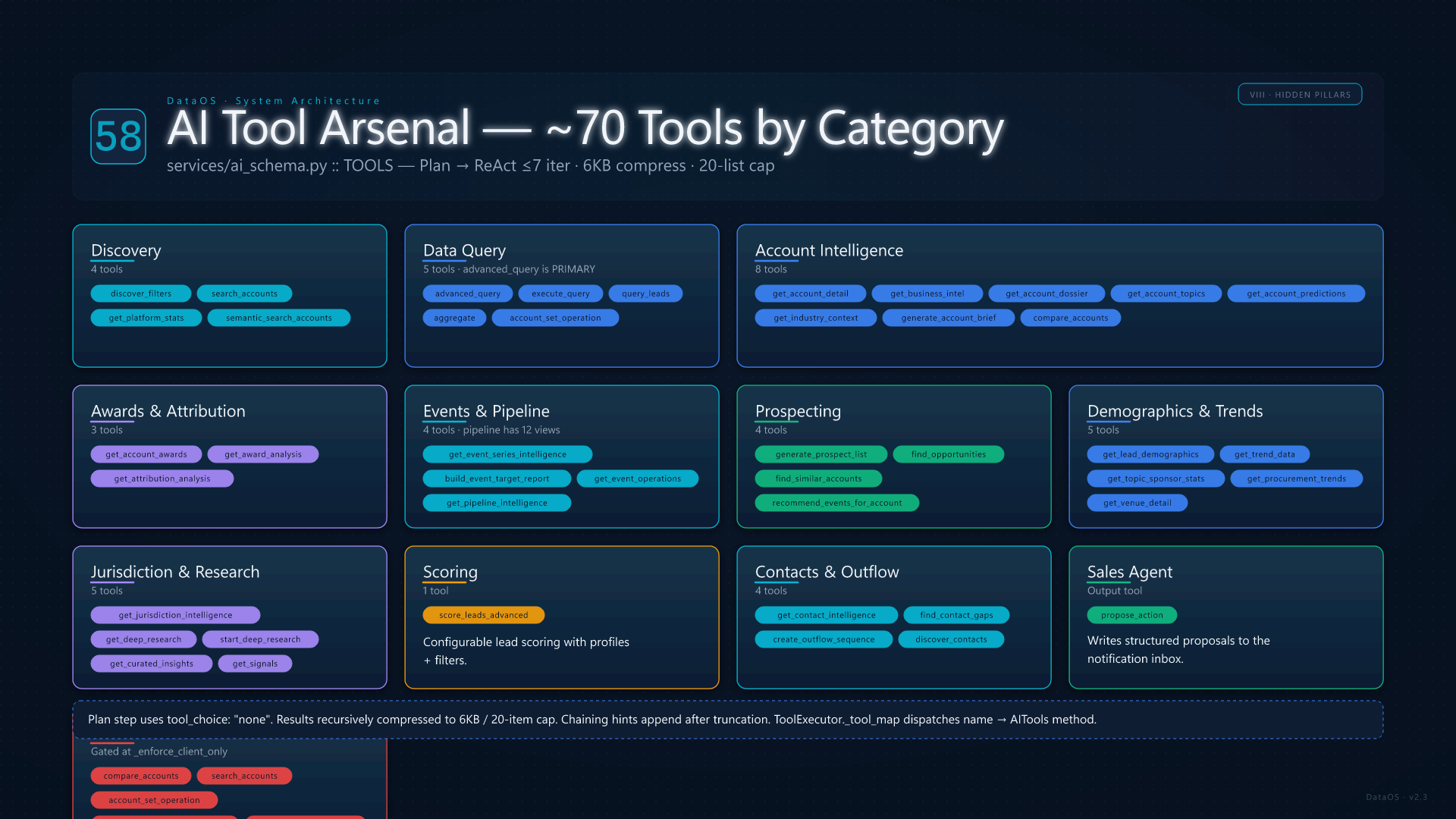
The TOOLS dict in services/ai_schema.py registers ~70 callable tools, each with a JSON schema, a description, and a return contract. Categories: Discoverydiscover_filters, search_accounts, get_platform_stats, semantic_search_accounts. Data Queryadvanced_query (the primary data-discovery tool, full boolean across 45 dimensions), execute_query, query_leads, aggregate, account_set_operation (intersect / subtract / union for gap analysis). Account Intelligenceget_account_detail, get_business_intel, get_account_dossier, get_account_topics, get_account_predictions, get_industry_context, generate_account_brief, compare_accounts. Awards & Attributionget_account_awards, get_award_analysis, get_attribution_analysis.

Events & Pipelineget_event_series_intelligence, build_event_target_report, get_event_operations, get_pipeline_intelligence (12 views: summary, teams, reps, accounts, stages, products, health, velocity, gaps, deals, opportunity, revenue). Prospectinggenerate_prospect_list, find_opportunities, find_similar_accounts, recommend_events_for_account. Demographics & Trendsget_lead_demographics, get_trend_data, get_topic_sponsor_stats, get_procurement_trends, get_venue_detail. Intelligenceget_jurisdiction_intelligence (5 views), get_deep_research, start_deep_research, get_curated_insights, get_signals. Scoringscore_leads_advanced. Contacts & Outflowget_contact_intelligence, find_contact_gaps, create_outflow_sequence, discover_contacts. Sales Agent actionpropose_action (the output tool that writes structured proposals to the notification inbox). Six tools are admin-only and blocked at _enforce_client_only: compare_accounts, search_accounts, account_set_operation, plus the four intelligence-engine tools.


AI Tool Arsenal
59

Account Dossier — 16-Domain Model

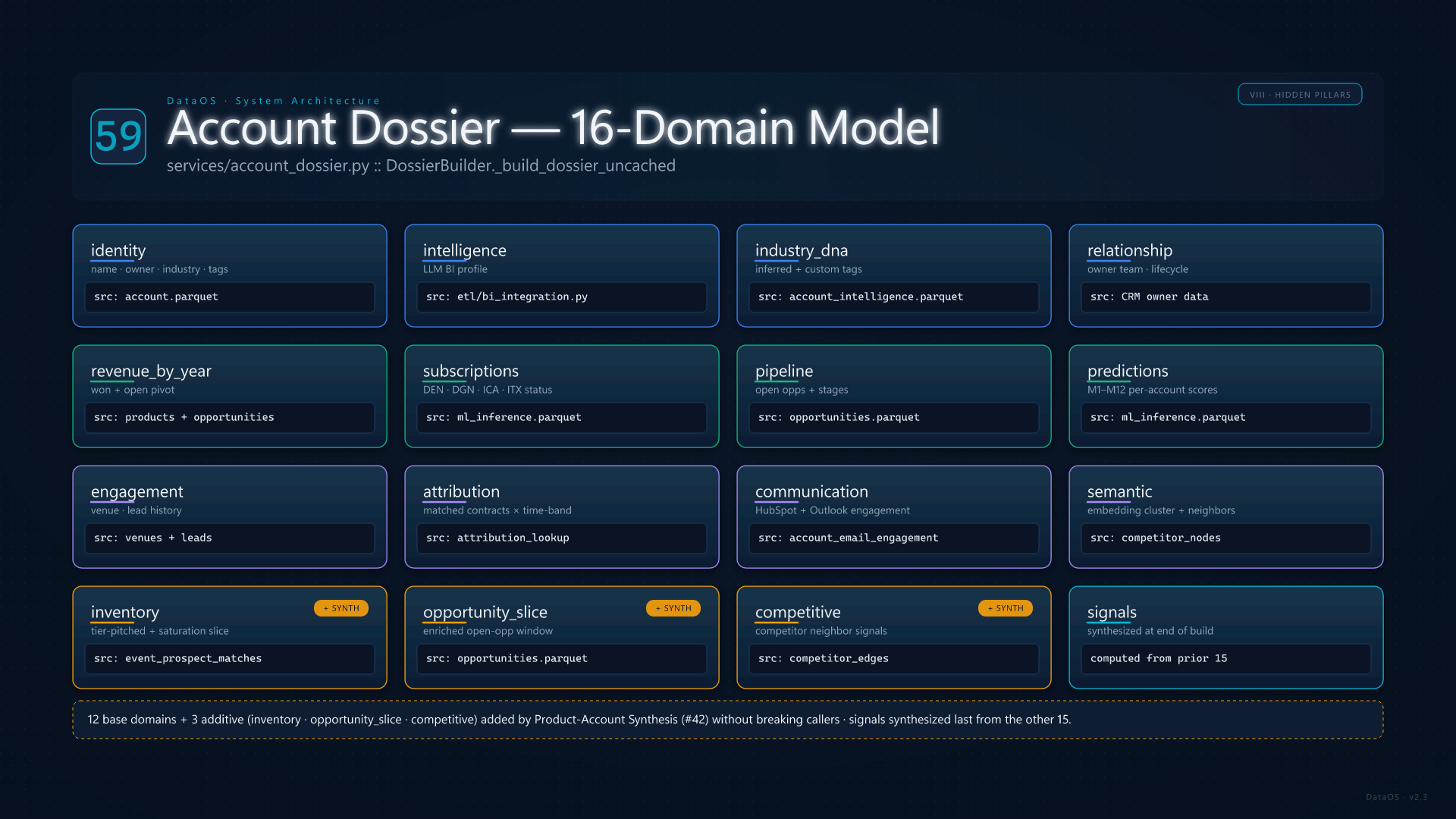
services/account_dossier.py::DossierBuilder is the single source of truth that every account-aware surface reads from — Account Brief, Tearsheet target reports, Books of Business, Sales Agent context, AI Chat get_account_dossier, and Product-Account Synthesis. Per account ID, _build_dossier_uncached assembles 16 domain blocks from precomputed indexes (no request-time joins): identity (name, owner, industry, tags), intelligence (BI profile from etl/bi_integration.py), industry_dna, relationship, revenue_by_year (won + open pivot), subscriptions (DEN/DGN/ICA/ITX status), pipeline (open opps), predictions (M1–M12 per-account scores), engagement (venue/lead history), attribution (matched contracts with time-band), communication (HubSpot + Outlook engagement summary), semantic, inventory (added by Product-Account Synthesis), opportunity_slice, competitive, and signals (synthesized at the end).
The 12 base domains keep their semantics under additive extension: Product-Account Synthesis (card 42) added inventory, opportunity_slice, and competitive without breaking the dossier contract for the Account Brief API or any of the older callers. A bounded LRU caches built dossiers in process; prewarm_dossiers + invalidate_dossier_cache + dossier_cache_stats form the operational seam visible in /ops/memory.

Account Dossier 16-Domain Model
60

Action Queue & Engineering Metrics

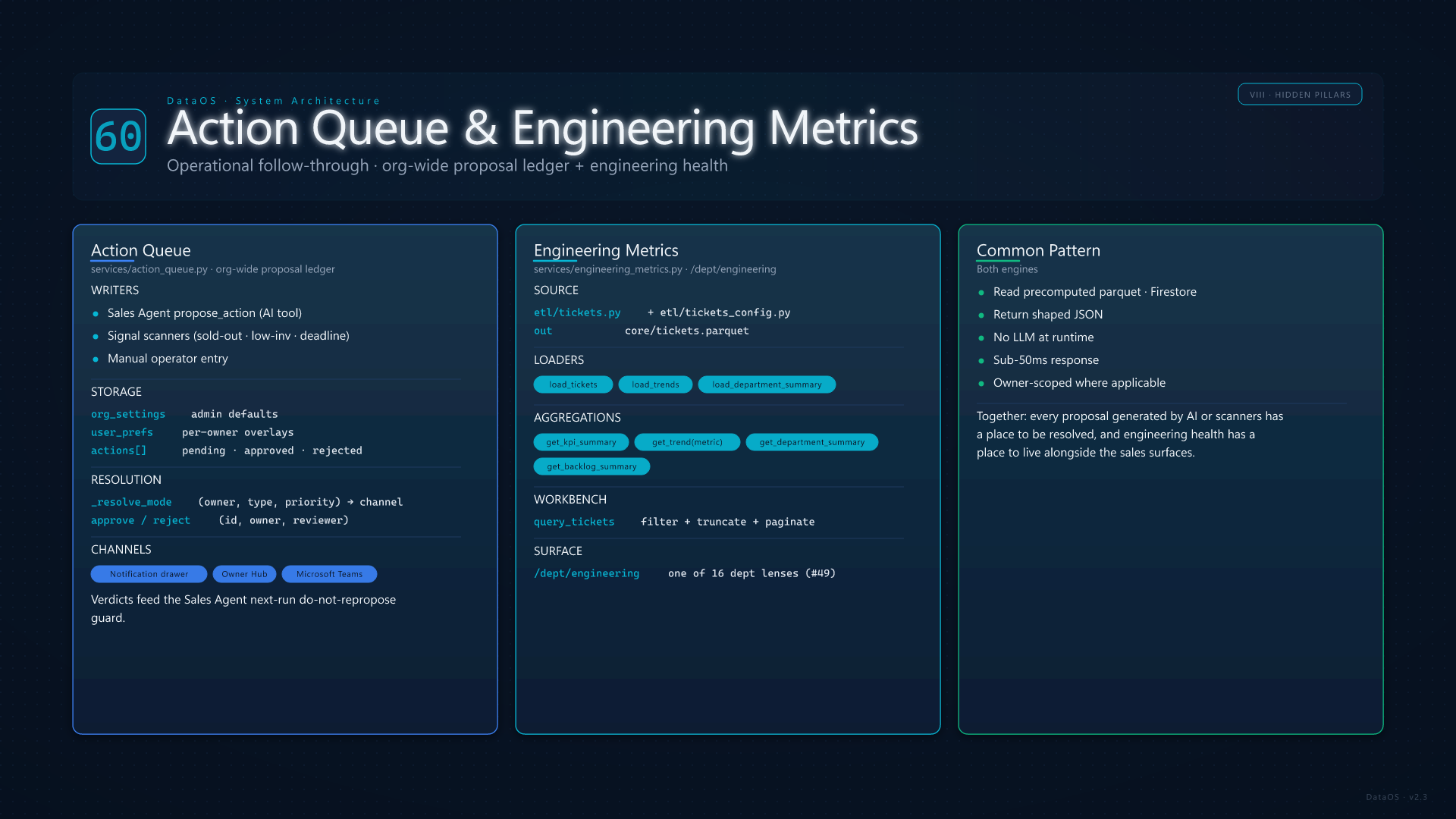
services/action_queue.py is the org-wide proposal ledger that backs the Sales Agent verdict workflow and any operator surface that needs an "approve / reject / iterate" cadence. propose_action is the writer (called by the Sales Agent's propose_action AI tool, by signal scanners, and by manual operator entry); list_pending + list_actions are the readers. Per-action settings live under org_settings (admin-controlled defaults: priority threshold, auto-route channels) and per-user user_prefs overlays. _resolve_mode chooses delivery channel (notification drawer, Owner Hub, Teams) based on action type, priority, and the owner's preferences. Approve/reject decisions are stored in metadata and feed the Sales Agent's next-run "do-not-repropose" guard rail (card 29).

services/engineering_metrics.py is the parallel store for the Engineering department lens (/dept/engineering): tickets, KPI summary, trend lines, backlog, department roll-ups. etl/tickets.py + etl/tickets_config.py ingest from a configured ticket source into core/tickets.parquet; load_tickets / load_trends / get_kpi_summary / query_tickets serve the dept dashboard. Together with the rest of the 16 /dept/<slug> lenses (card 49), Action Queue and Engineering Metrics close the loop on operational follow-through — every proposal generated by AI or scanners has a place to be resolved, and engineering health has a place to live alongside the sales surfaces.

Action Queue and Engineering Metrics
61

Owner Fingerprints & Communication Strategist

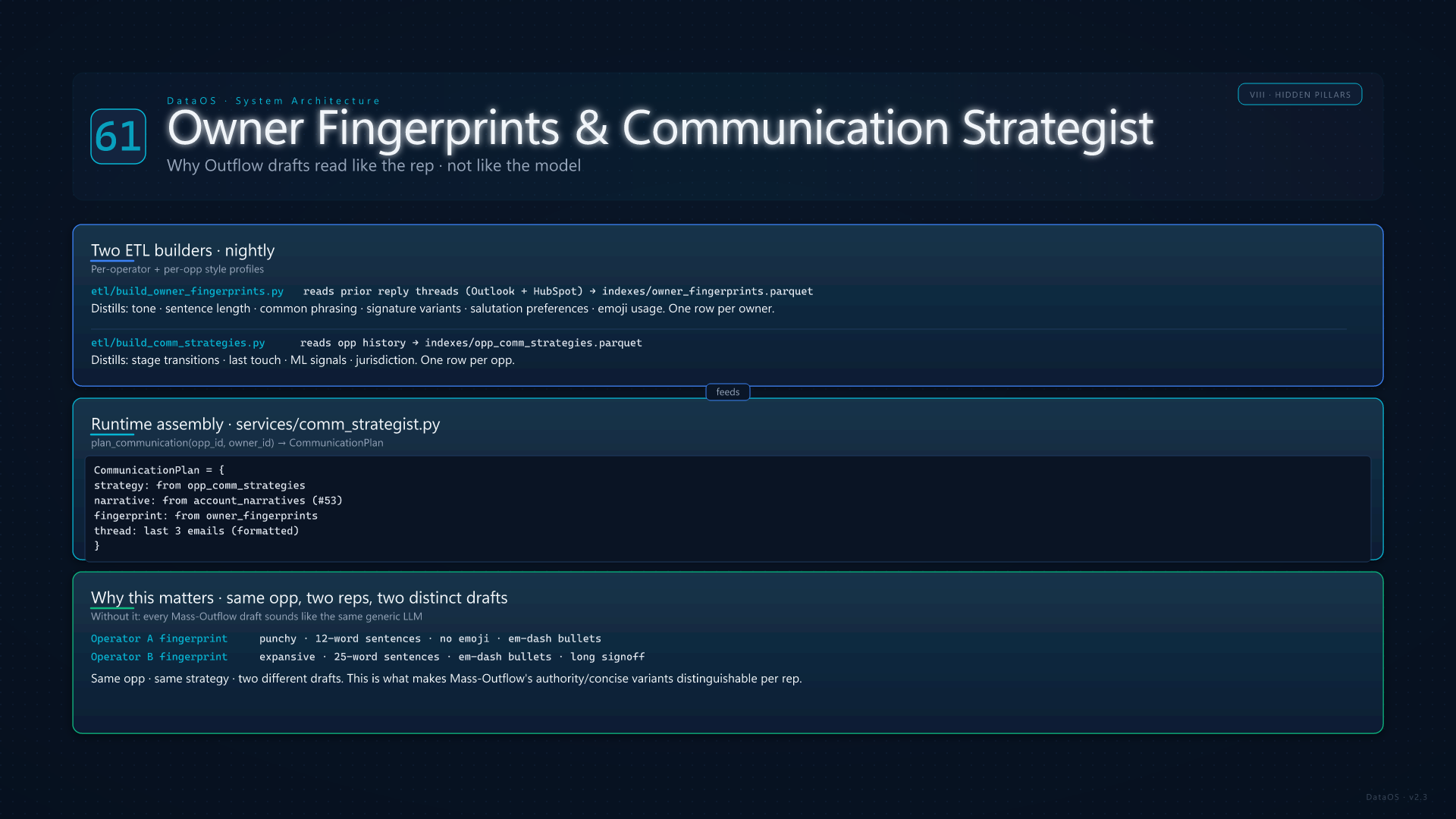
For Outflow drafts to read like the rep instead of like the model, two ETL builders manufacture per-operator and per-opp style profiles overnight. etl/build_owner_fingerprints.py reads each rep's prior reply threads (Outlook + HubSpot) and distills tone, sentence length, common phrasing, signature variants, salutation preferences, and emoji usage into a per-owner JSON profile. etl/build_comm_strategies.py reads each opp's history (stage transitions, last touch, ML signals, jurisdiction) and produces a strategy hint per opp.

At send time, services/comm_strategist.py::plan_communication assembles a CommunicationPlan from those two artifacts plus the account narrative (card 53), then generate_from_plan calls the LLM with _build_plan_system + _build_plan_user (rich-HTML aware). The fingerprint flows through the system prompt; the strategy flows through the user prompt; the result is grounded copy that matches the operator's voice. This is what makes Mass-Outflow's authority/concise variants distinguishable per rep — without it, every send would sound like the same generic model output.

Owner Fingerprints and Comm Strategist
62

Whitespace, Win-Loss & Portfolio Planner

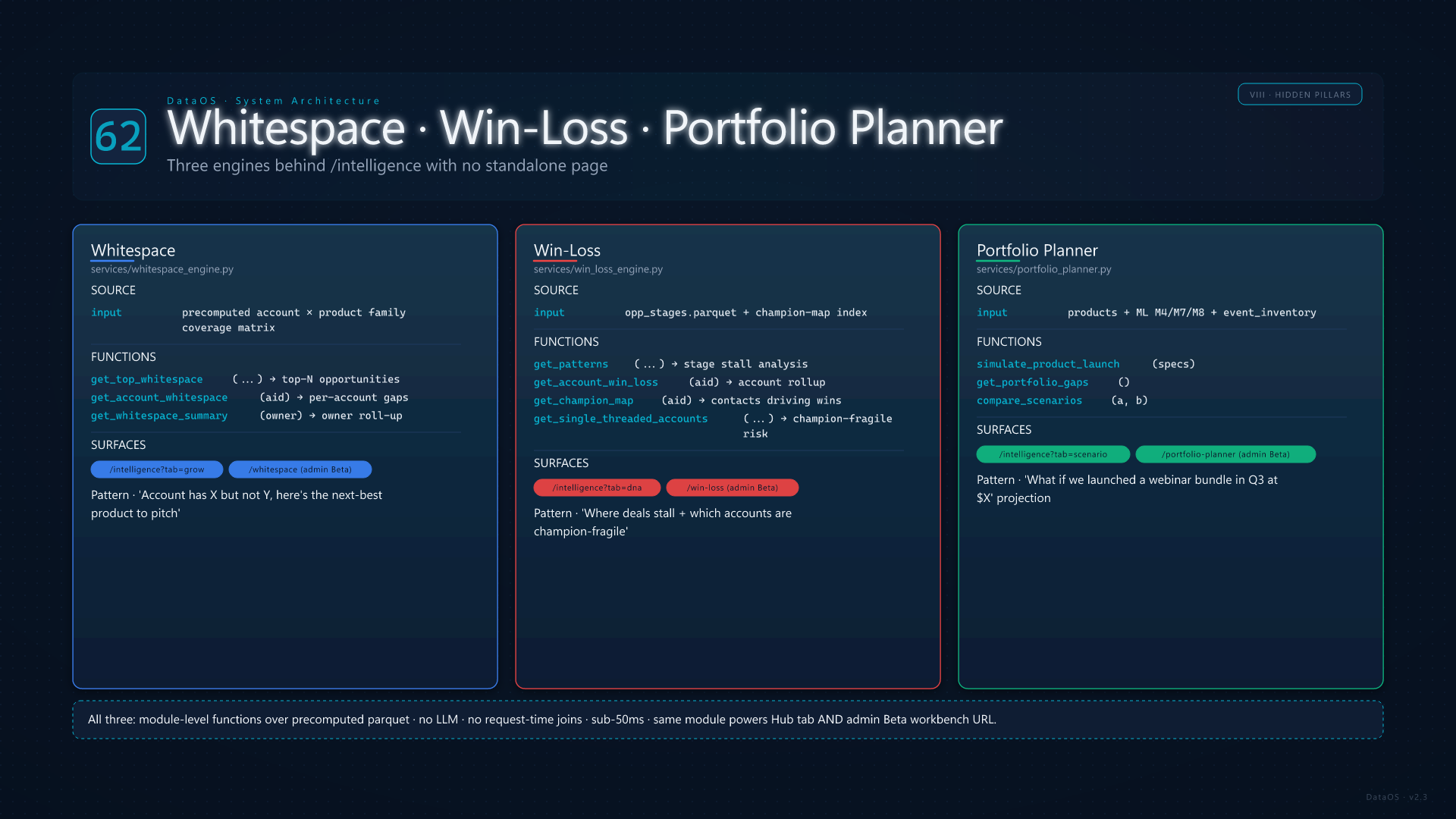
Three engines power the analytical depth of the Revenue Intelligence Hub (card 51) without surfacing as standalone pages. Whitespace (services/whitespace_engine.py) reads precomputed account × product family coverage to surface "this account has X but not Y, here's the next-best product to pitch" — top-N whitespace, per-account whitespace, owner-scoped summary. Win-Loss Intelligence (services/win_loss_engine.py) reads opp_stages.parquet and a champion-map index to extract patterns: which stages most deals stall in, single-threaded accounts (only one champion), close-rate by stage and by product, and account-level win/loss rollup. Portfolio Planner (services/portfolio_planner.py) is the scenario engine — simulate_product_launch, get_portfolio_gaps, compare_scenarios, supporting "what if we launched a webinar bundle in Q3 priced at $X" projections that combine ML M4/M7/M8 expansion signals with current event inventory pacing.

All three are module-level functions over precomputed parquets — no LLM calls, no request-time joins, sub-50ms responses. They expose the same shape that the Hub's Grow tab (Whitespace), DNA tab (Win-Loss patterns), and Scenario tab (Planner simulations) consume, plus admin Beta routes (/whitespace, /win-loss, /portfolio-planner) for direct workbench access. Together with Revenue DNA (card 14) and Retention Intelligence (card 15), they form the analytical engine room behind the consolidated /intelligence hub.

Whitespace Win-Loss and Portfolio Planner

Notifications

No notifications

Create Opportunity

DATA OS

Opportunity Created

DataOS
Install DataOS Add to home screen for quick access
All Features